
shrutichauhan
Participant
June 6, 2017
Question

ColdFusion could not delete the file for an unknown reason.

  • June 6, 2017
  • 1 reply
  • 1815 views

Hi,

ColdFusion could not delete the file C:\ColdFusion11\cfusion\wwwroot\LAW\Briefs\A2878\pwd1.txt for an unknown reason.

I am unable to delete any .txt or .msg file immediately after upload from their physical path and as well as from server too and the Coldfusion doesn’t return any particular reason for failure.

It doesn't allow me to delete the file from the physical path i.e. from the brief folder, it will show an error pop-up with a message 'The action can't be completed because the file is open in coldfusion.exe'(see attached screenshot). It seems that Coldfusion locks the file in the background and after sometimes it allows me to delete the file successfully.

For another extension like .docx, .pdf, I am immediately able to delete the file after upload.

Apart from this, when I restart ColdFusion service it will allow me to delete the file again as if the file is getting locked by ColdFusion.

I am using ColdFusion version '11,0,03,292866'.
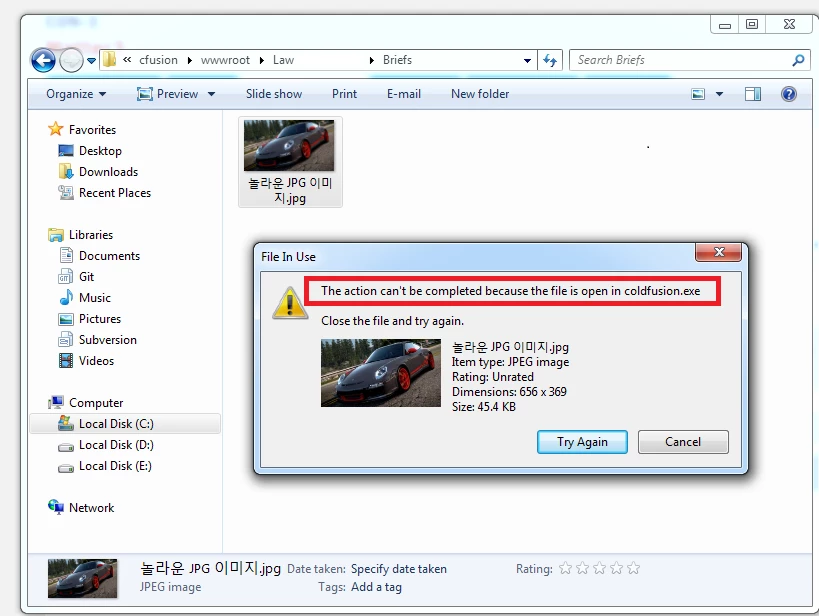
Does anyone have a solution to this problem?

    This topic has been closed for replies.

    1 reply

    Inspiring
    June 6, 2017

    This has been an issue in the earlier version of CF 11. You will need to update your Coldfusion 11 to the latest hot fix. Which is currently ColdFusion 11 Update 12 .

    When in doubt, always make sure its all up to date.

    I think this exact / similar issue was fixed in hotfix 8 incase you have issues with patching further then this due to fixes, enhancement and compatibility in the newer hotfixes.

    shrutichauhan
    Participant
    June 7, 2017

    Hi,

    Thanks for the reply. I have updated my ColdFusion 11 to 'ColdFusion 11 Update 12'(see attached screenshot). However, this issue is still occurring. Please, let me know what else I need to do in order to fix this issue.

    Inspiring
    November 17, 2017

    I have exactly the same issue using the exact same version of CF11.

    Did you find an answer to this problem? Thanks.

    I am tearing my hair out over this problem. It was working fine on Windows 7 but on Windows 10, it throws an error...