
Inspiring
August 9, 2018
Answered

COLDFUSION MAPPINGS

  • August 9, 2018
  • 1 reply
  • 1971 views

I have these mappings setup in my cfadmin for a PROD version of a website. They work fine
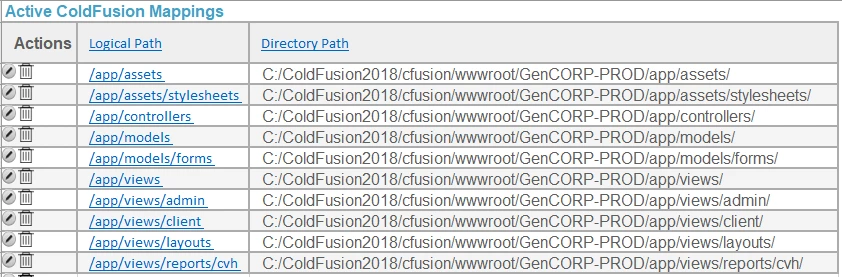
Now I am going to create another site on the same CF2018 server, an almost mirror copy of this PROD site, but it will be a TEST version, named, GenCORP-TEST

I understand I am going to need to do mappings like I did for my PROD site.

I understand I'll need to use this.mappings for both the PROD and TEST versions of the site.

And I will need to remove these existing mappings.

I understand that the code goes into the application.cfc

How would I code a few of these mapping rows from above in PROD and TEST?

and then would it start like this in the application.cfc

<cfcomponent>

  <cfscript>

    THIS.name = "myName";

    {etc.}

    THIS.mappings = StructNew();

    Then what??

  </cfscript>

This topic has been closed for replies.
Correct answer BKBK

this.mappings = structNew();

this.mappings["/app/assets"] = "C:\ColdFusion2018\cfusion\wwwroot\GenCORP-PROD\app\assets\";

this.mappings["/app/assets/stylesheets"] = "C:\ColdFusion2018\cfusion\wwwroot\GenCORP-PROD\app\assets\stylesheets\";

...

...

this.mappings["/app/views/reports/cvh"] = "C:\ColdFusion2018\cfusion\wwwroot\GenCORP-PROD\app\views\reports\cvh\";

1 reply

BKBK
Community Expert
BKBKCommunity ExpertCorrect answer
Community Expert
August 11, 2018

this.mappings = structNew();

this.mappings["/app/assets"] = "C:\ColdFusion2018\cfusion\wwwroot\GenCORP-PROD\app\assets\";

this.mappings["/app/assets/stylesheets"] = "C:\ColdFusion2018\cfusion\wwwroot\GenCORP-PROD\app\assets\stylesheets\";

...

...

this.mappings["/app/views/reports/cvh"] = "C:\ColdFusion2018\cfusion\wwwroot\GenCORP-PROD\app\views\reports\cvh\";

weezerboyAuthor
Inspiring
August 13, 2018

As always, Thank you