
Legend
November 15, 2024
Answered

ColdFusion Memory Issue: sdk-ScheduledExecutor

  • November 15, 2024
  • 1 reply
  • 1148 views

A quick post in case anyone else ever runs in to this memory issue. 


Our CF servers seemed to have a "memory leak", in that the memory being used  (Windows) by the CF service would gradually grow until it was maxing out the entire server.


Long-story-short, we found (with the folks over at xByte cloud hosting) in a thread dump that we had tens of thousands of hung (waiting) threads with the name: sdk-ScheduledExecutor


Turns out, that thread is created by the AWS SDK for Java, which we are not using.  Not surprisingly, though, ColdFusion does use a version of this SDK for their cloud services functionality.  We use that extensively when interacting with S3.  At first we thought there could be a bug in CF or in the SDK if it's spawning all these threads.  But, when pouring over Adobe's docs we found the following little tidbit on this page:
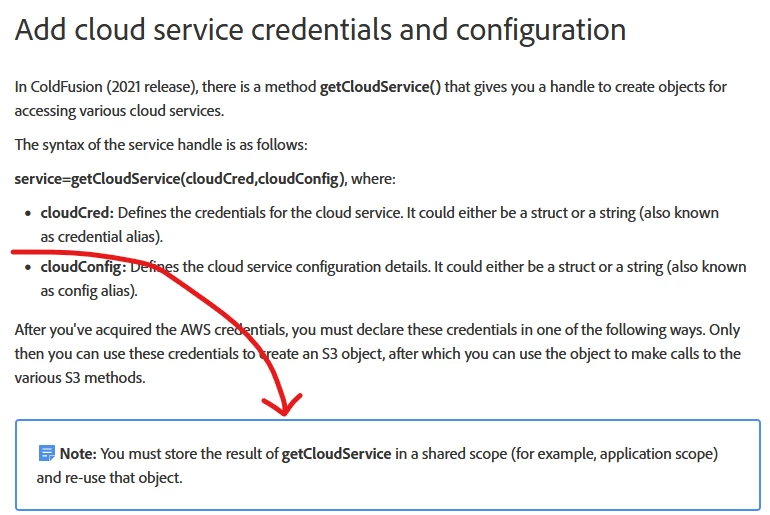
 

Oh!  The getCloudService() function must be in a shared scope? In true Adobe fashion, none of the examples they  give on that page actually show this requirement in practice!


Anyway, our devs had missed that, entirely.  All our functions that interacted with S3 were starting out by creating the service object with getCloudService().


Turns out, as far as we can tell, every time that function is called, CF fires up a 'sdk-ScheduledExecutor' thread.  The thread does the work you give it, then sits in a waiting state for another job that, in our case, would never come.  So, after a while, we'd accumulate 1000s!


Solution: make sure 'getCloudService()' is called in a shared scope and reuse that object!


Going forward...and maybe I've missed something.... it would be helpful to have a way to close, or kill, this serviceObject.  As it stands, once you fire it up, it runs forever?


Cheers!


    This topic has been closed for replies.
    Correct answer sdsinc_pmascari

    I hope you'll please update us on any subsequent findings or conclusions you come to, so that others finding this thread can make sense of all that was being shared. 


    Will do, Charlie.


    For all those who come here looking for help with a ColdFusion memory issue, the solution for us, in this case, was to be sure to only put getCloudService() objects into shared scopes.  Do not create that object 'as needed' in a local scope.

    1 reply

    BKBK
    Community Expert
    Community Expert
    November 15, 2024

    @sdsinc_pmascari , thanks for sharing your findings. Your advice is quite instructive.


    To answer your question, since the object that results from the getCloudService() call is stored in application-scope, it will not run forever. It will abide by the applicationTimeout value. That means, it will no longer be alive when the application times out.

    Legend
    November 15, 2024

    Interesting, regarding object timing out when in the application scope.  Yes, of course I would expect this to be true.


    But, perhaps I'm misunderstanding something, so allow me to postulate....


    What we had been doing was putting the object created by getCloudService() into the local variable scope.  Our thinking was that object would only be alive when called upon during the intial page load.  But, it spawned a thread that never died even though the original object no longer existed when the page processing completed.


    Which makes me wonder...  When the application times out, does CF actually go kill those threads, or does it fire up some new ones when the applicaiton re-initializes?  Thus, leaving the original threads continuing to run?


    This makes me wonder if loading this object to a server scope might make more sense to prevent to buildup of unused threads?  Or, is that thinking fraught with peril?

    Charlie Arehart
    Community Expert
    Community Expert
    November 15, 2024

    Interesting stuff, indeed. Thanks for sharing, Paul. 


    1) First, as for your asking about the considerations relative to application timeouts, we should note that they might rarely or even never happen: the default is 2 days, and even if one lowers that (for an app or all), the duration is of course not "since the app was created" but rather "since the app was last used". And as some apps get traffic all the time, even if only from bots or monitoring calls, those might never timeout. 


    But sure, the server scope would seem a fine choice (assuming there are no app-specific characteristics to the object instance saved there). 


    2) And it will surely be interesting to see if time may show there to be more (to all this you've found) than meets the eye.


    3) Also, did you confirm there was indeed a great reduction in how far memory now falls to, when you force a gc? That would confirm this was the cause of a seeming memory leak.


    I get that reducing the high thread count is alone compelling, of course.

    /Charlie (troubleshooter, carehart. org)