
Participant
September 13, 2016
Answered

ColdFusion Report Building Grouping Output By Date

  • September 13, 2016
  • 1 reply
  • 915 views

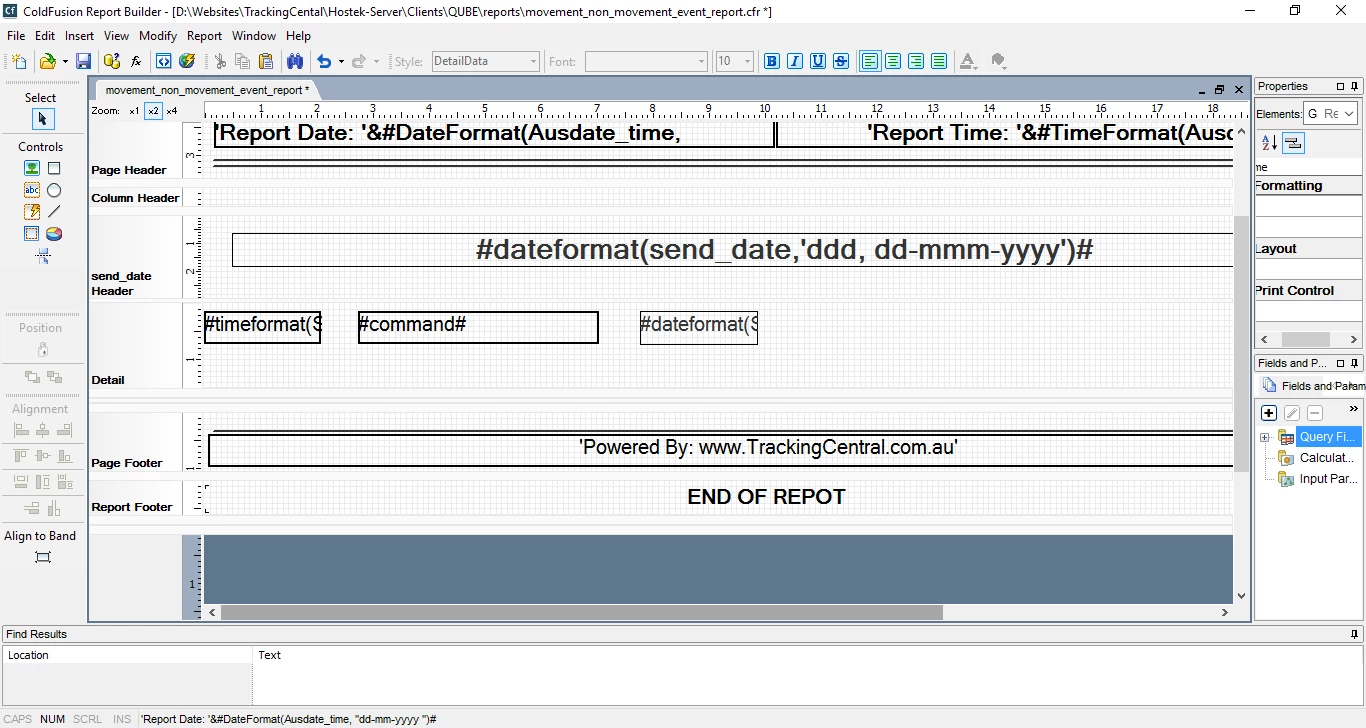
I am building a report in cf report builder where there records outputed are grouped and sorted by date in the cf query

I need to be able to display the date as the grouped heading on each page, if there is a change of date in results on the same page i am wanting the sub heading for the new grouped date to appear on the page as a sub heading.

the output i am needing is the same as the output that would be generated from the following code in a cfm output

<cfoutput query="queryname" group="TransactionDate">

#TransationDate#<br>

     <cfoutput>

#transationTime# , #transactiontype#, #transactionamount#

     </cfoutput>

</cfoutput>

When i try and generate similar output above in cf report builder i am not able to have the TransationDate appear as the subheading once the date changes

the report simply outputs the rows containing

#transationTime# , #transactiontype#, #transactionamount#

however at the change of date there is no sub heading appearing to separate the transaction from one date to the next via a sub heading3

Adise on how to solve this would be appreciated and or reference to any examples of a cfr file that does output its results in a grouped fashion within the one page as described above
This topic has been closed for replies.
Correct answer j_a_c_i_

sorry however your sample generates the same output structure as my original

note how the date changes from 2016-09-14 to 2016-09-13  yet there is no grouped heading to separate the 2 dates into their own group as you get in the

<cfoutput query="" group="'>

<b>#DDate#</b>

<cfoutput>

#dDate# #employee#

</cfoutput>

</cfoutput>

IT simply lists the heading of the data at top of page and then all the records in date order however not inserting a grouped heading for date when it detects the new date resulting in output to be

2016-9-16

2016-9-16

2016-9-15

2016-9-15

2016-9-14

When i am needing that at the detection of change of date the date header is inserted so it clearly identifies a change in date


the answer to this is that you need to add the fields names as field p[aramaters so they are referenced throughout the report as query.fieldname not simply fieldname and then the reports group with the sub headings as the grouped value changes

1 reply

EddieLotter
Inspiring
September 13, 2016

You appear to have created a group on "send_date" rather than "TransactionDate" in your report definition.

Cheers

Eddie

j_a_c_i_Author
Participant
September 13, 2016

Yes and it is send date thats correct the reference to transaction date  was simply used as example i will edit the post so it has send data i the text