Inspiring
August 22, 2013
Answered

ColdFusion Server question

  • August 22, 2013
  • 2 replies
  • 1001 views

I have a virtual web server at work.  I have several different sites on it, lets call them:

SiteA.MyWork.org

SiteB.MyWork.org  <-- this is a ColdFusion site

SiteC.MyWork.org

The sites are all installed in the H drive as is ColdFusion.

I am going to add one more site SiteD.MyWork.org - also on the H drive.

These are my server details:

System Information
Server Details
Server ProductColdFusion
Version9,0,0,251028 
EditionStandard 

Can I add the new site or do I need to install the enterprise version of ColdFusion?  If I need the enterprise version, is it as simple as changing the license or do I need to actually install it?

Thank you

    This topic has been closed for replies.
    Correct answer vishu_13

    Yes, you can add a new website (SiteD.MyWork.org) and place in the H drive (if H drive is not full).
    Now, no need to install ColdFusion if you want your new website ((SiteD.MyWork.org) as ColdFusion website. You just need to create a connector for the same website if you previously had not cretaed connector with All (at server level)

    Same Scenario : -

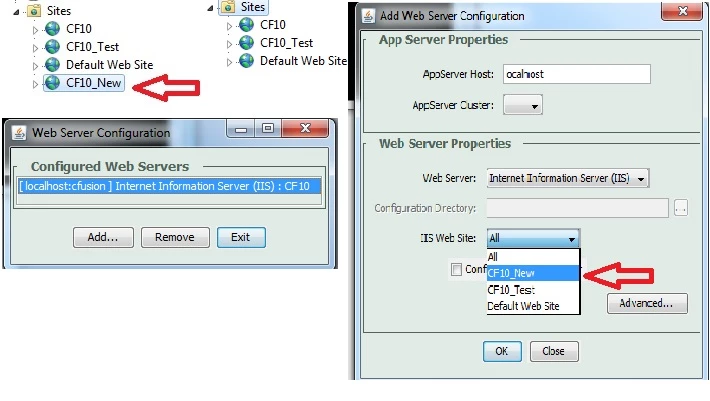
    3 wesbite and then added 1 new website (highlighted in red arrow)

    Then launch Web Server Configuration Tool and found that out of 3 websites, I had configured one website as ColdFusion website name CF 10

    If in the above screenshot, instead of CF 10, you see All, then do not create connector means do not follow the steps mentioned below

    Steps

    Now you need to  configure new website CF10_New and that's it, you are done

    Hope it helps

    Thanks

    VJ

    2 replies

    vishu_13
    vishu_13Correct answer
    Inspiring
    August 22, 2013

    Yes, you can add a new website (SiteD.MyWork.org) and place in the H drive (if H drive is not full).
    Now, no need to install ColdFusion if you want your new website ((SiteD.MyWork.org) as ColdFusion website. You just need to create a connector for the same website if you previously had not cretaed connector with All (at server level)

    Same Scenario : -

    3 wesbite and then added 1 new website (highlighted in red arrow)

    Then launch Web Server Configuration Tool and found that out of 3 websites, I had configured one website as ColdFusion website name CF 10

    If in the above screenshot, instead of CF 10, you see All, then do not create connector means do not follow the steps mentioned below

    Steps

    Now you need to  configure new website CF10_New and that's it, you are done

    Hope it helps

    Thanks

    VJ

    ctreevesAuthor
    Inspiring
    August 23, 2013

    Wow, thank you for the very fast replies.

    Two things.

    I am on CF 9

    I am not a server person / programmer.  How do I create a "connector"?  In CF Administrator, IIS7...?

    vishu_13
    Inspiring
    August 23, 2013

    Go to C:\ColdFusion9\runtime\bin (single server) / C:\Jrun4\ bin (multiserver), launch wsconfig.exe as Run as Admin and follow the screenshot

    Under IIS WebSite, either you can choose All or if there is only 1 website in IIS that is a ColdFusion website then you can choose the website name instead of All

    Thanks

    VJ

    Inspiring
    August 22, 2013

    You can create separate connector for this website if you have initially created connectors for each websites separately.

    If you have initially selected all websites for connector then that would work for this too.

    Regards,

    Kaif Akbar