

coldfusion+word 2007+rtf+non English characters
hi,
I am trying to update a word document by using rtf, word2007, and coldfusion 8 as such:
<!-------------------------------------------------------
Generate a unique ID for the file in the temporary server
directory and get the file that is to be merged.
--------------------------------------------------------->
<CFSETTING ENABLECFOUTPUTONLY="YES">
<CFSET OUTFILE=GetDirectoryFromPath(GetCurrentTemplatePath())&"files\xx.doc">
<CFSET SOURCEFILE=GetDirectoryFromPath(GetCurrentTemplatePath())&"rtf\xx.rtf" >
<!-------------------------------------------------------
If the file exists then delete the file from the server.
--------------------------------------------------------->
<CFIF FILEEXISTS(OUTFILE)>
<CFFILE ACTION="DELETE" FILE="#OutFile#">
</CFIF>
<!-------------------------------------------------------
Read the RTF file into memory so that it can be modified.
-------------------------------------------------------->
<CFFILE ACTION="read" FILE="#SourceFile#" VARIABLE="RTFDocument">
<!-------------------------------------------------------
Look for substition fields and substitute the proper data
into the document.
-------------------------------------------------------->
<cfswitch expression="#url.doc#">
<cfcase value="Invest">
<cfset add='#trim(clt5.svna4)# #trim(clt5.svna5)#'>
<CFSET RTFDOCUMENT=REPLACE(RTFDOCUMENT,"[name]",#clt5.gfcuna#,"ONE")>
<CFSET RTFDOCUMENT=REPLACE(RTFDOCUMENT,"[address]",#add#,"ONE")>
<cfmodule template="udf_TAGS\dateconvert.cfm"
eqDate='#clt5.start#' flag='EQ'
cfDate=cfDate>
<CFSET RTFDOCUMENT=REPLACE(RTFDOCUMENT,"[date]",#cfdate#,"ONE")>
</cfcase>
</cfswitch>
<!-----------------------------------------------------------
Write the changed file to disk for outputting to the workstation.
the rtf source file is in Arabic
------------------------------------------------------------>
<CFFILE ACTION="WRITE" FILE="#OutFile#" OUTPUT="#RTFDocument#" ADDNEWLINE="No">
Everything works fine except for this line
<CFSET RTFDOCUMENT=REPLACE(RTFDOCUMENT,"[name]",#clt5.gfcuna#,"ONE")>
which replaces [name] with an Arabic name
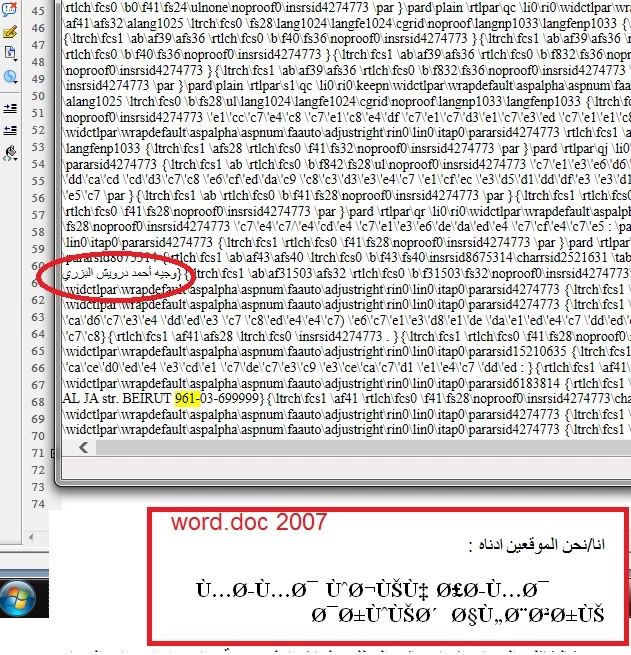
if you look at the snapshot for the RTFDOCUMENT (variable), you can see the Arabic font is displaying correctly
but if you open the word doc the replaced Arabic text is gibberish (refer snapshot below)
i tried using charset in cffile (utf-8 and windows-1252) but came up with same results
any ideas?


 AdChoices