guilhermeark
Participating Frequently
March 10, 2022
Answered

ColdFusion11 - can't start. Very few log details

  • March 10, 2022
  • 3 replies
  • 980 views

Hi All,


I have a CF 11 Server (sorry I know its pretty outdated - we are scheduling to update it)

Recently our server was restarted and CF couldnt start anymore.


The only CF log file being updated is the 

C:\ColdFusion11\cfusion\logs\coldfusion-error.log


Sorry for the images below but I can't copy and paste or even download the file as its outside my network. 

I have requested them to copy the error log, so as soon as I have it I will update here

But the only thing it states is 



In The windows events - I got this message

 

Following up some other discussions I have checked the jvm.config but it is pointing to the correct JAVA path.


Its my first post here so I'm sorry if I post in the wrong topic,


Thanks in advance
This topic has been closed for replies.
Correct answer Priyank Shrivastava.

Hi Priyank,


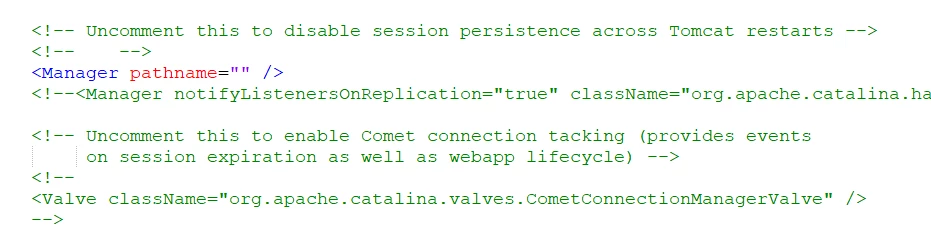
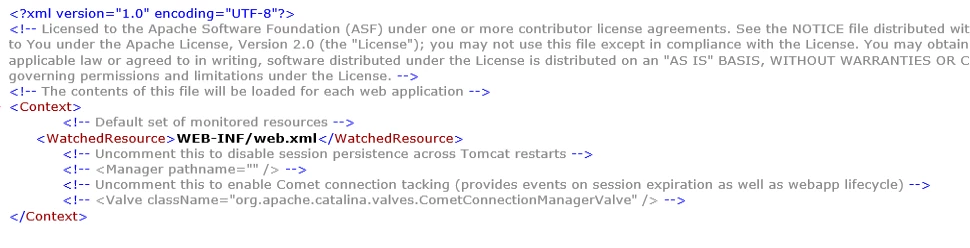
I have checked the context.xml (it hasnt been updated since 2015) and saw that manager pathname = "" was commented out.
When checking with other servers I saw that that line was uncommented so when I uncommented it it worked.


Do you have any idea why that happened or could you explain me what that manager pathname does?

Thank you very much by the way 😃


Hi,


One reason that Manager Pathname could be commented, if you have tried to create the cluster in CF. If you haven't then it will be really difficult to say why it happend. When we create the cluster, Tomcat comment the ManagerPathname and Add an entry for SessionPersistance.


You can uncomment this line and restart CF. It will work.


I hope this helps.


3 replies

Inspiring
March 15, 2022

@guilhermeark 

I remember having this problem in my environment often back when my team was using CF11. When we were having issues with ColdFusion starting up, it was because the ColdFusion services and W3SVC services were starting at inappropriate times, and it was causing conflicts.


I was able to get around the issue by ensuring the the ColdFusion services started before the W3SVC. Go into your Windows Services window and set W3SVC to Automatic (Delayed) and if you are seeing what I was seeing it should resolve it.


Additionally, if you ever have to restart the ColdFusion services, you must restart the ColdFusion and W3SVC services in appropriate order.


Get-Service -ComputerName $Server -DisplayName 'ColdFusion *' | Stop-Service -Force -Verbose
Get-Service -ComputerName $Server -Name W3SVC | Stop-Service -Force -Verbose
Get-Service -ComputerName $Server -DisplayName 'ColdFusion *' | Start-Service -Verbose
Get-Service -ComputerName $Server -Name W3SVC | Start-Service


Hope this helps...

guilhermeark
Participating Frequently
March 20, 2022

Hi Neo,


Thanks for your feedback, I did think that this could have been an issue so I did stop w3svc, but even after restarting both services in the right order there was no difference on the issue.


This was indeed caused by the j2ee session variables update.

BKBK
Community Expert
Community Expert
March 13, 2022

In The windows events - I got this message


Following up some other discussions I have checked the jvm.config but it is pointing to the correct JAVA path.


By @guilhermeark


Indeed, I think the likeliest cause of the problem is the Java path.


You wrote later in this thread,

"We have actually installed our JRE manually"

Yet the Java directory that you showed has the path C:\ColdFusion11\jre. This is, presumably, not the Java you manually installed, but the one that ships with ColdFusion 11. 


I shall now suggest some steps you can follow to see if they solve the problem. You say you have updated ColdFusion 11, so I shall assume it can run on Java 8. [Charlie Arehart's CF/Java compatibility table shows that any update of ColdFusion 11 newer than Update 3 may use Java 8].


  1.  Go to the ColdFusion Downloads page. Scroll all the way down to the section "Additional Third party Installers"Click on the link to select the Java version, and choose Java SE 8u311.
  2.  Download jdk-8u311-windows-x64.exe (Size 170 MB). Install it, using the default options (to the same server as CF11). This Java installation's home directory will then be, for example, C:\Program Files\Java\jdk1.8.0_311\.
  3.  Open in a text editor the file C:\ColdFusion11\cfusion\bin\jvm.config. Set ColdFusion to point to the new Java home:
     java.home="C:/Program Files/Java/jdk1.8.0_311/jre"


    Save the jvm.config file.


  4.  Open Windows Services and restart ColdFusion 11.

    Any luck? 

Charlie Arehart
Community Expert
Community Expert
March 13, 2022

Bkbk, perhaps you skipped over all the other comments, but it became clear after the OP's first reply to my first comment that this problem is not about the jvm.


More than that, the last few comments from Priyank and myself (and the OP, guilhermeark) help explain how the issue seems instead to be about session persistence, due to their uncommenting (in the past)  the manager config element in the context.xml.


We're waiting to hear confirmation from guilhermeark about suggestions and observations we'd made.


Still, what you share may well help someone, so thanks for offering it, and for the reference. 

/Charlie (troubleshooter, carehart. org)
BKBK
Community Expert
Community Expert
March 14, 2022

Charlie, you have wrongly presumed that I "skipped over all the other comments". I read them all. After that, I said what I think the cause is and how to fix the problem. 


Charlie Arehart
Community Expert
Community Expert
March 10, 2022

Go to the command line, to the cf11 cfusion/bin folder, and run cfstart. That should give the explanation. If not clear to you, share the results here.


You say the Java path is correct. But if someone had java offer to remove "old jvms", it may have tried to remove the one in THAT folder, but it would have been unable to remove ALL the files in that folder, such that now cf can't start because of that.  Point cf to a supported jvm for cf11 and your cf update level.


I have blog posts to help with more on all this, but I'm typing on mobile and am short on time.  So let's see first what you may find. 

/Charlie (troubleshooter, carehart. org)
guilhermeark
Participating Frequently
March 10, 2022

Hi Charlie,


Thank you for the super fast reply, I did indeed see one of your comments to run cf by CMD as admin, I had tried that before and unfortunately got the same answer( I should have said it before, sorry).  I dont think I'm actually getting an error message, is just INFO warnings (the same from the logs).

It has been stuck in this message for more than 10 minutes last time.

If I start it via services it tells me that the service didnt start in time.

We have actually installed our JRE manually - which has been working fine also in other servers, I have compared with other servers that I have already restarted and the file jvm.config has the same settings

This is the folder


Ps: I still havent receive the log file, 

Priyank Shrivastava.
Community Manager
Community Manager
March 10, 2022

Hi, 


Can you please share the content of "context.xml"

Go to \ColdFusion11\cfusion\runtime\conf folder. 


Thanks, Priyank Shrivastava