
April 21, 2016
Answered

Context validation error for tag cfset.

  • April 21, 2016
  • 5 replies
  • 2277 views

I have a ColdFusion 10, front end on a Windows 2008 R2 (VMWare) machine interfacing with an Oracle 11g database.  I recently had an issue (https://forums.adobe.com/thread/2121425http://)  ​that was solved by changing this.datasource to application.datasource.   Shortly after, I was tracking  down some other issues, specifically one where a CFMAIL tag was not loading output of a query.  I toyed with it, even trying to brute force the TO address in there, and just caused other problems.  Since I am working with a copy on my Test server, I decided to start over.  I copied the two files that I had been working on from the copy on my Development machine that has not been touched since it was promoted to Test, expecting to see the CFMAIL error again.   Instead I see:
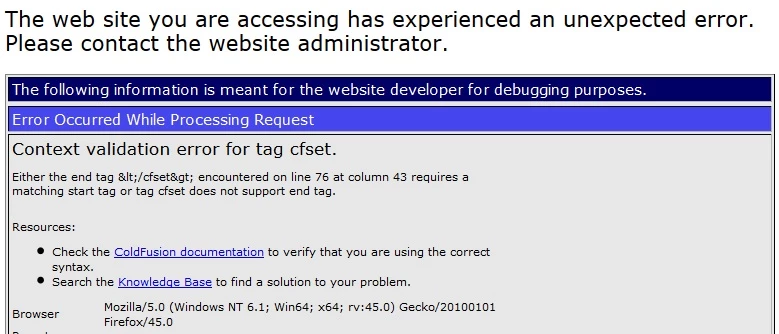
When I go to tline 76 in the module listed, that line is completely blank.   I am baffled as to what needs to be done to get back to the original error.

This topic has been closed for replies.
Correct answer BKBK

Hi LouieWarren,

It doesn't exactly have to be line 76 in your text editor. It might be the line before or after that. The error might even come from an included page.

Check every <cfset> from lines 70 to 80, say. The error message suggests at least one of them has an end tag. Perhaps something like this

<cfset someVar = "some value" />

5 replies

April 22, 2016

OK, I'm an idiot.  I posted the code fragment of the page that referring.cfm file.  When I checked the actual .cfm file causing the error, I found 12 <cfset  something=something> in that code but not a </cfset> in the bunch.  I added the /> to each of the 12 and now I am back to my original error:  I have not touched this file except the datasource issue I had earlier.  The Production version has the non-terminated <cfset> assignments and works just fine.

CurrentPage = MyAppt/App_New/secure/helpdesk/newchangerequest.cfm

Call from = https://App_New//secure/helpdesk/add_changerequest.cfm

MESSAGE = Attribute validation error for CFMAIL.

LOCATION = Code location is not available

TAGNAME = CFMAIL

ERROR = Error

WARNING = Info

DETAIL = The value of the TO attribute is invalid. The length of the string, 0 character(s), must be greater than or equal to 1 character(s).

ATTRIBUTE = TO

KNOWNCOLUMN = -1

KNOWNLINE = -1

COLUMN = -1

KNOWNTEXT = <unknown>

FEATURENAME = CFMAIL

LINE = -1

CATEGORY = Tag

SEVERITY = Error

REMEDY = Try The Following:

After looking at this, I am assuming it can't extract the e-mail address from the user database.  I have it in the database on development that I dumped and sent to the gov't DBA for import.   I will have him run the query to see if the value is valid and then report back.

In the event it isn't screwed data...  is there a possible way I can brute force it and hardwire the code to just make all the TO addresses my e-mail address?  I'm supposed to get all mail anyway.  Just curious.  This is taking time they don't want to let me have.

Thank you all so much for your help on all of this.   You have definitely helped this old man out.

BKBK
Community Expert
Community Expert
April 23, 2016

I am confused. Are you asking a new question? Is your original issue resolved? If it is, then please mark the answer that helped you or share your solution with us. Answers help.

If you wish to discuss a new issue, then please start a new thread. 

April 25, 2016

I apologize.   I get so caught up in troubleshooting, I forget protocol.  I did mention my initial error was a CFMAIL error, so I assumed this was fine.  I am currently ruling out whether or not the data is bad in the database before I submit another thread. 

The problem:

12 instances of <cfset someVar = "some value" > with no end tag.

The solution

Changed all 12 instances to <cfset someVar = "some value" />

Problem solved.  Thank you.

April 22, 2016

I'm using Expression Web 4 because my customer didn't want to spend the money for DreamWeaver.   I will do the matching of <cfset> tags and post whatever I find.

WolfShade
Legend
April 22, 2016

LouieWarren wrote:

I'm using Expression Web 4 because my customer didn't want to spend the money for DreamWeaver.

I'm not familiar with Expression Web, but not shelling out for DW is (IMHO) reasonable since DW really doesn't support CF tags, anymore.  With the advent of HTML5, Adobe wanted DW to be more of a front-end IDE than a back-end.

Does Expression Web have the ability to search for source code using regular expressions?

V/r,

^_^

April 22, 2016

Here's line 70 - 81 of the module identified:

70

71  if(document.form1.Priority.value=="")

72  {alert("Please select the Priority")

73  document.form1.Priority.focus()

74  document.form1.problem.select()

75  return false}

76       

77  if(document.form1.problemarea.value=="")

78  {alert("Please select a Problem Area")

79  document.form1.problemarea.focus()

80  document.form1.problem.select()

81  return false}

BKBK
Community Expert
BKBKCommunity ExpertCorrect answer
Community Expert
April 22, 2016

Hi LouieWarren,

It doesn't exactly have to be line 76 in your text editor. It might be the line before or after that. The error might even come from an included page.

Check every <cfset> from lines 70 to 80, say. The error message suggests at least one of them has an end tag. Perhaps something like this

<cfset someVar = "some value" />

WolfShade
Legend
April 22, 2016

Hi, BKBK​,

Isn't <cfset someVar = "some value" /> a valid format for the cfset tag?  I've been using the trailing slash for years, and never had a problem with it.

V/r,

^_^

BKBK
Community Expert
Community Expert
April 22, 2016

Hi WolfShade,

You're probably right. The offending code is more likely to be

<cfset someVar = "some value"></cfset>

WolfShade
Legend
April 21, 2016

If you're using Dreamweaver, use CTRL-F on that document and do a RegEx search for

<[\s\/]cfset>

HTH,

^_^