
Inspiring
July 29, 2015
Question

Correct Values within Multi Select Box for Edit Form

  • July 29, 2015
  • 1 reply
  • 258 views

Hi,

I have a Multi-Select Option Box that is correctly listing all values as well as the selected values within the multi select box.
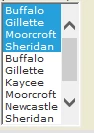
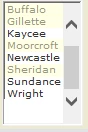
However, as you can see, the items are duplicated in the list, with both selected items and the available option values both showing. Instead, I'd like to show the full list of values, with the ones that are selected without any duplicates, like this instead:
<cfset lstFinds = Recordset1.OfficeServed> 

<cfoutput><SELECT NAME="OfficeServed" size="10" multiple class="VBlack10" ID="OfficeServed" >              

          <cfloop list="#lstFinds#" index="k" delimiters=",">

            <option value="#k#"

            <cfif listfindnocase(ValueList(RS_location.location), k)>

            selected="selected"

            </cfif>>#k#

            </option>

            </cfloop>

           <CFLOOP QUERY="RS_location">

            <OPTION VALUE="<cfoutput>#RS_location.location#</cfoutput>"><CFOUTPUT>#RS_location.location#</CFOUTPUT></OPTION>

          </CFLOOP>      

        </SELECT></cfoutput>

Thanks!

John

    This topic has been closed for replies.

    1 reply

    WolfShade
    Legend
    July 29, 2015

    You are looping through one query result to add SELECTED offices, then you are looping through a second query result to add ALL offices.  ????

    Loop through the second query, only.  IF the value of the current iteration matches any of the locations listed in the first query, THEN put selected="selected" in the option.

    HTH,

    ^_^

    Inspiring
    July 29, 2015

    Hi Wolf, So, the first query generates a list of the offices selected that are in a specific record, and the second query is the results of all of the offices from a different table. If I just use the second query, then the Select list will only show the selected items and not the selected items + the optional items.

    So, I need a way to merge list 1 with list 2, selecting just list 1 within list 2.

    Does that make sense?

    WolfShade
    Legend
    July 30, 2015

    As I understand it, your first query (recordset1.officeserved) is ONLY the selected offices.  Your second query is ALL offices.

    Please re-read what I replied with.  If you iterate ONLY the query that contains all locations, and check (on each iteration) to see if that office is listed in the first query (only served offices) and mark those with selected="selected", you'll get your desired results (no duplicates, only one instance of each office, only selected offices highlighted.)

    Unless I completely mis-understand what you are seeking.

    But the way you currently have it set, you are adding SELECTED offices as options for the select, first, then following that with adding ALL offices as options for the select.  This is going to get you duplicates.

    HTH,

    ^_^