

John_Allred
Inspiring
July 2, 2020
Answered

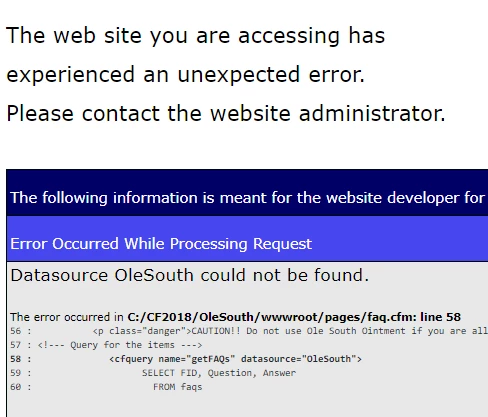
Datasource [name] could not be found

  • July 2, 2020
  • 5 replies
  • 2125 views

Not much hair left to pull out here...

I have two CF sites, each with a MySQL database, on an ISP's server. I'm managing them on a local instance of Coldfusion 18 (on 64-bit Win10) via localhost.


Sometime back, I got the first of these set up to access its datasource on the ISP with no problem. Using the same settings (I think), I can't get my second site to recognize its datasource. I placed the files on a subdomain and the datasource for my queries works fine there. It's just the access from localhost.


I set up both datasources through Coldfusion Admin the same way, using ODBC Socket. Both datasources test OK there. Neither site's application.cfc affects the datasources.


Is there some setting for the local sites that could produce a problem? Because I can't find anything amiss anywhere else.

Thanks!


This topic has been closed for replies.
Correct answer John_Allred

Priyank graciously spent a little time with me yesterday and again this morning to sus out the problem. He correctly diagnosed it as creating my datasource under the wrong Coldfusion server instance. I had created it under the top level 8500 instance, when I should have done so under the instance my application was running under.

THANKS, SO MUCH, PRIYANK!

5 replies

BKBK
Community Expert
Community Expert
July 8, 2020

Hi John_Allred ,

I am glad to hear you've solved the problem. You say,

"[Priyank] correctly diagnosed it as creating my datasource under the wrong Coldfusion server instance. I had created it under the top level 8500 instance, when I should have done so under the instance my application was running under."

But there were 2 possible driver options: MySQL ODBC and MySQL Connector/J Jar. Which one did he help you with?


Priyank Shrivastava.
Community Manager
Community Manager
July 8, 2020

Hi,

For testing I removed the ODBC connection and created a JDBC connection using the MySQL jdbc driver and having the same issue "datasource could not be found" then I noticed that it is pointing to different instance. I created the DB using JDBC on that particulat instance and it worked.

Before this call, John was able to verify the ODBC connection for the same DB however, it was not working because he added in the wrong instance. 

If he adds the ODBC connection now and use in his application that will also work.

Thanks, Priyank Shrivastava
BKBK
Community Expert
Community Expert
July 9, 2020

Thanks for sharing that, Priyank_Shrivastava_ .

BKBK
Community Expert
Community Expert
July 4, 2020

There's another suggestion that might or might not be relevant. But I shall just put it out there:

- Using a text editor, open - as Administrator - the file C:\Windows\System32\drivers\etc\hosts

- Edit it as suggested below, and save.

Charlie Arehart
Community Expert
Community Expert
July 4, 2020

More specific to the previous comments, I'll suggest you use an "other" driver type in the CF Admin DSN page, not mysql. CF no longer provides a MySQL driver. You have to get it yourself (it's free).


Sadly, none of the top 10 results of googling: coldfusion mysql tell you this. (Adobe, please create a modern resource and strive to get it to show up first!) About the 14th one currently does explain the process, and though it's from CF11 timeframe, the steps (if not the specific mysql version info) are right:
http://www.nodans.com/index.cfm/2015/5/18/ColdFusion-11--MySQL-no-Suitable-Driver


Let us know if you get going.

/Charlie (troubleshooter, carehart. org)
Priyank Shrivastava.
Community Manager
Community Manager
July 3, 2020

Hi,

Can you please try with MySQL JDBC jar which you can download from the MySQL site and use the JDBC connection string to connect it. 


Thanks, Priyank Shrivastava
John_Allred
John_AllredAuthorCorrect answer
Inspiring
July 8, 2020

Priyank graciously spent a little time with me yesterday and again this morning to sus out the problem. He correctly diagnosed it as creating my datasource under the wrong Coldfusion server instance. I had created it under the top level 8500 instance, when I should have done so under the instance my application was running under.

THANKS, SO MUCH, PRIYANK!

Community Expert
July 2, 2020

I'm not sure what the problem is, but I'd recommend using a JDBC driver instead of ODBC Socket. I'll bet that will also take care of this problem too, and things will generally work better.


Dave Watts, Eidolon LLC

Dave Watts, Eidolon LLC
John_Allred
Inspiring
July 2, 2020

Thanks, Dave.

Any idea where I would create a JDBC to make it available to me in CF Admin? Plus, remember, the original datasource is on a remote server.


Here are my choices through ODBC Administrator on my local PC


Community Expert
July 2, 2020

Since it's MySQL, you'd choose one of the MySQL drivers. I'm pretty sure they're both JDBC. One is commercial (DataDirect) and is probably better than the vendor-provided one (MySQL 5). When you set this up, you can point it to a remote server as part of the process.


Dave Watts, Eidolon LLC

Dave Watts, Eidolon LLC