arunag53503483
Participating Frequently
May 10, 2016
Answered

debugger fails to connect

  • May 10, 2016
  • 2 replies
  • 2401 views

Unable to debug coldfusion cfml.

I have done the following setting.

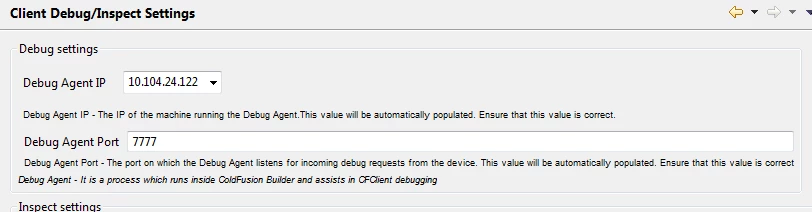
Debugger Port: 7777

-DDEBUGGER_SERVER_PORT=7777.

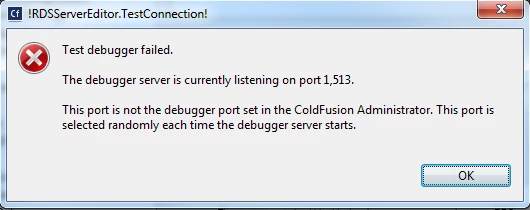
Test debugger fails.
This topic has been closed for replies.
Correct answer GonzoRock

I had the same problem last week. I found a solution here:  Adobe ColdFusion Builder * Using ColdFusion debugger

Solution was to open port 1513 on my desktop so that it could communicate with the debugger running on the ColdFusion server. I used the Windows Firewall to create a rule to open it. Next I had to pin that port so that next time CF starts the random debugging port it picks is NOT random anymore.

2 replies

arunag53503483
Participating Frequently
May 13, 2016

are you setting up as a java project? My firewall is off. I created the firewall rule. But still my java project cannot connect to debugger.

I have java calls from the coldfusion server, my project is java project.

GonzoRockCorrect answer
Inspiring
May 11, 2016

I had the same problem last week. I found a solution here:  Adobe ColdFusion Builder * Using ColdFusion debugger

Solution was to open port 1513 on my desktop so that it could communicate with the debugger running on the ColdFusion server. I used the Windows Firewall to create a rule to open it. Next I had to pin that port so that next time CF starts the random debugging port it picks is NOT random anymore.

arunag53503483
Participating Frequently
May 12, 2016

Thanks! I still have the problem.

Even though I have set -DDEBUGGER_SERVER_PORT = 7778, my WAS server logs show another port.  

[5/12/16 14:20:01:438 CDT] 000000b9 SystemOut     O May 12, 2016 14:20:01 PM Information [WebContainer : 0] - ColdFusion debugger is listening at port 31258.

Also I have set this in WAS JVM Debug arguments, but when i launch

-Xdebug -Xrunjdwp:transport=dt_socket,server=y,suspend=n,address=7777

I have setup a general java project and launch a debug remote java application and attach the 7777 socket. The debug not able to connect.

Failed to connect to remote VM. Connection timed out.

org.eclipse.jdi.TimeoutException

Inspiring
May 12, 2016

Your first image above stated that 1513 was the port that the debugger was listening on. That changes every time CF starts. That is the port that is not open. Turn your desktop firewall off and try it. Don't leave the firewall off obviously... but give it a try. If it works then you need to turn firewall on again and create a rule for the port to allow it.

Next you pin the port CF uses. This is NOT the port you see in the CF Admin.