Inspiring
April 7, 2026
Answered

Enable FIPS Mode in Tomcat by editing the Tomcat server.xml configuration file

  • April 7, 2026
  • 1 reply
  • 49 views

When I try to set the FIPS Mode in Configuration as below:

<Listener    className="org.apache.catalina.core.AprLifecycleListener"    SSLEngine="on"    FIPSMode="on"/> 

I’m getting error in the coldfusion-error.log: “Failed to enter FIPS mode” and unable to login to CF Admin page. 

How can I fix this error with enabling the FIPS mode?

Thanks!

    Correct answer BKBK

    Suggestion:

    1. Enable FIPS on Windows Server 2022. 
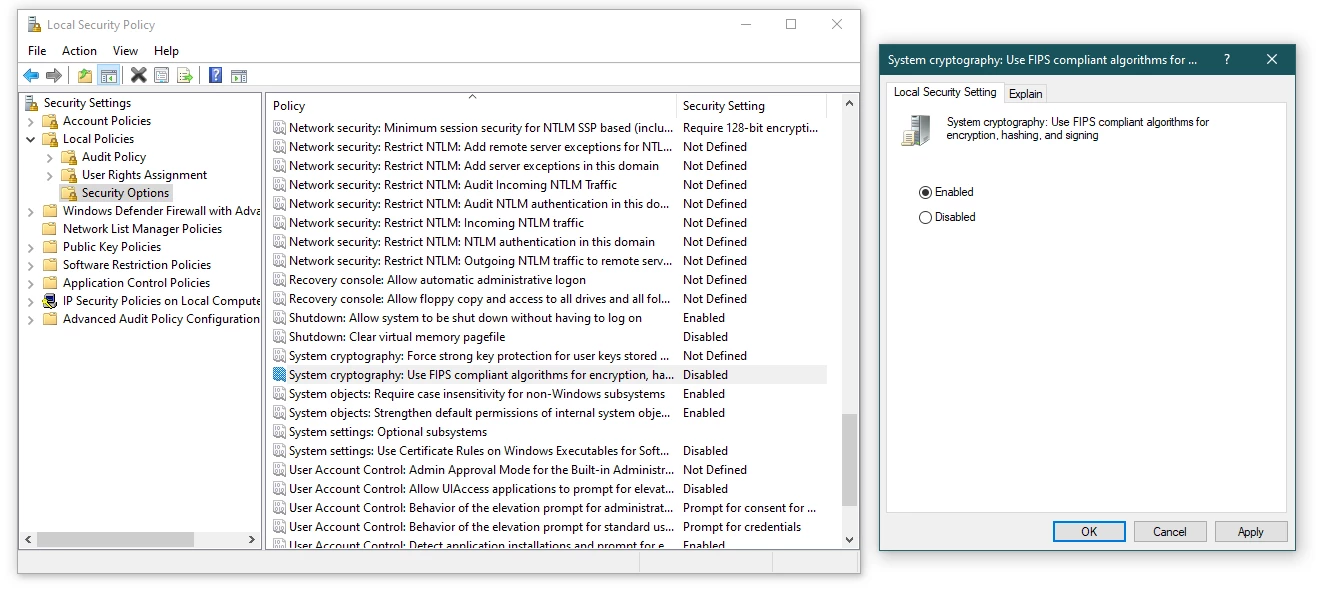
      You can do so as follows: On Windows Start menu, open Local Security Policy. Click on Local Policies. Double-click on Security Options. Scroll to the option “System cryptography: Use FIPS compliant algorithms for encryption, hashing and signing” and double-click on it. Choose the Enabled option.
    2. Install and run the ColdFusion 2023 Auto-Lockdown Tool for STIG alignment. When you do, it might help to consult the ColdFusion 2023 Lockdown Guide.

    1 reply

    BKBK
    Community Expert
    Community Expert
    April 8, 2026

    I don’t think you should tamper with that listener in order to enable FIPS mode. So, switch it back to its default state,

    <Listener SSLEngine="on" className="org.apache.catalina.core.AprLifecycleListener"/> 

    and let’s look for an alternative solution. 


    To start with, what is your Operating System and ColdFusion build number?

    Inspiring
    April 8, 2026

    We’re running CF 2023 and build number is: 2023,0,18,330879. The OS is Windows Server 2022. This is one of the CF STIG requirements. Thanks in advance for your help!

    BKBK
    Community Expert
    BKBKCommunity ExpertCorrect answer
    Community Expert
    April 9, 2026

    Suggestion:

    1. Enable FIPS on Windows Server 2022. 
      You can do so as follows: On Windows Start menu, open Local Security Policy. Click on Local Policies. Double-click on Security Options. Scroll to the option “System cryptography: Use FIPS compliant algorithms for encryption, hashing and signing” and double-click on it. Choose the Enabled option.
    2. Install and run the ColdFusion 2023 Auto-Lockdown Tool for STIG alignment. When you do, it might help to consult the ColdFusion 2023 Lockdown Guide.