
Inspiring
May 24, 2022
Answered

Enabling term highlighting in Solr on Coldfusion 2021

  • May 24, 2022
  • 1 reply
  • 371 views

How do we enable term highlighting in Coldfusion 2021 please?


This article https://helpx.adobe.com/coldfusion/cfml-reference/coldfusion-tags/tags-r-s/cfsearch.html says


"Enable Term Highlighting using Data & Services > ColdFusion Collections > Manage Collection."


However I don't see a Manage Collection option on that page in Coldfusion Adminstrator (2021)


Is term highlighting still supported?


Thanks very much.


I've tried making the the changes to solrconfig.xml and schema.xml as detailed here https://helpx.adobe.com/coldfusion/developing-applications/accessing-and-using-data/solr-search-support/term-highlighting.html but context = empty string in my cfsearch result.
    This topic has been closed for replies.
    Correct answer BKBK

    I think what you've discovered is a bug. Please report it. In your bug report, include a link to this forum page. That will provide some context to Adobe engineers.


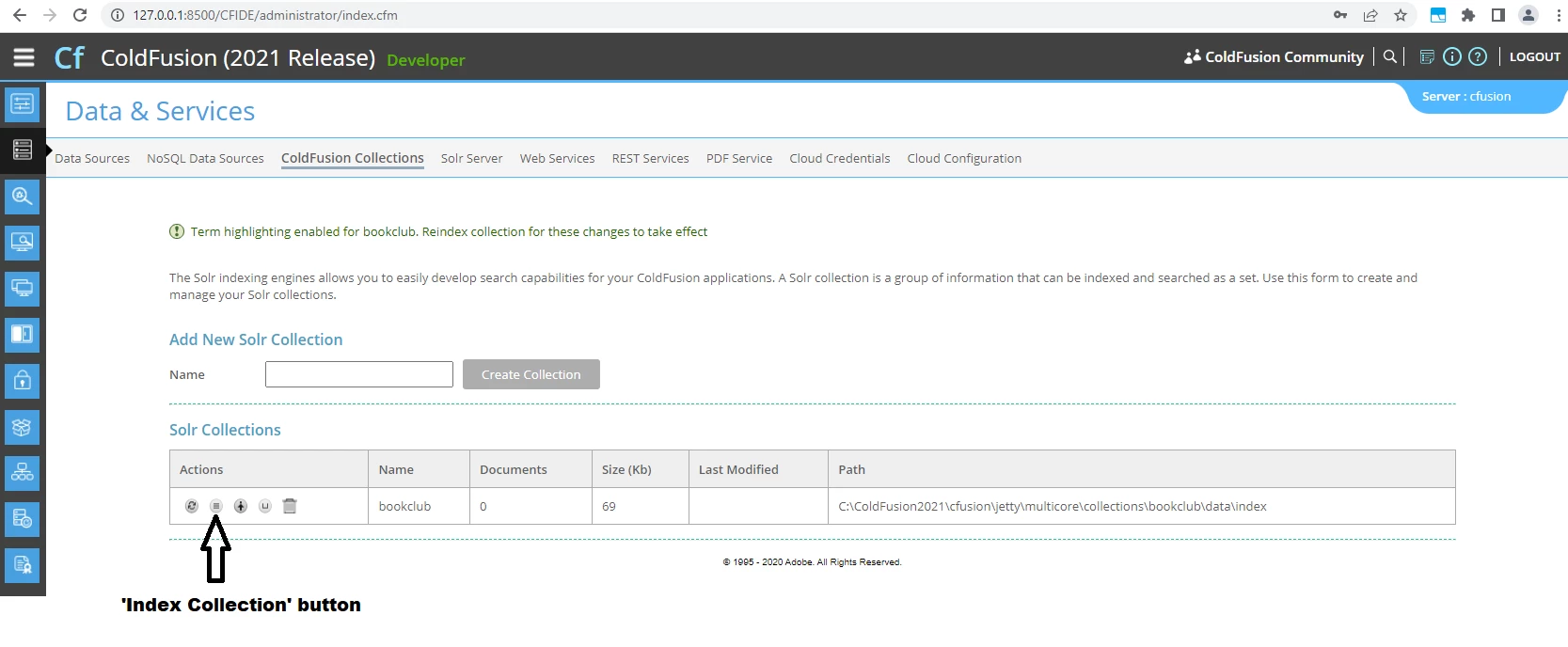
    That said, you can still access the functionality to enable Term Highlighting. Press the 'Index Collection' button. The resulting user interface will include a button to enable Term Highlighting.


    1 reply

    BKBK
    Community Expert
    BKBKCommunity ExpertCorrect answer
    Community Expert
    May 25, 2022

    I think what you've discovered is a bug. Please report it. In your bug report, include a link to this forum page. That will provide some context to Adobe engineers.


    That said, you can still access the functionality to enable Term Highlighting. Press the 'Index Collection' button. The resulting user interface will include a button to enable Term Highlighting.


    Nick WayAuthor
    Inspiring
    May 25, 2022

    Ah thank you Dan - always so helpful! 🙂


    I didn't realise the Index Collection button takes you to another page but now that I know my issue is sorted. Will file the bug - it's a documentation issue I think basically.


    Thanks Dan - hope all's well with you.

    BKBK
    Community Expert
    Community Expert
    May 25, 2022

    Hi @Nick Way , thanks for the kind words.

    I hope you're not confusing me with Dan Bracuk, erstwhile contributor and legend of these forums. 🙂


    BKBK