Participant
November 1, 2021
Answered

Event Gateway Not working

  • November 1, 2021
  • 3 replies
  • 386 views

Hi, 


So I've setup an event gateway in CF 2016.. Service is enabled, when I look at my instance, it does report events coming in and out, but my code does not execute. I put a simple file write as a test in there and it never creates file. Full code:


my.cfc file
<cfcomponent output="false">

<cffunction name="onIncomingMessage" >
  <cfargument name="CFEvent" type="struct" required="yes">

     <cfset filewrite( "c:\rave7\temp\smsdev\yo.txt", "oooooo")>

     <cfreturn true>

  </cffunction>

</cfcomponent>


Calling code:

<cfscript>
status = false;
props = structNew();
props.Message = "yo #now()#";
status = SendGatewayMessage("vorText SMS", props);
if (status IS True) WriteOutput('Event Message "#props.Message#" has been sent.');
</cfscript>


Any thoughts??


    This topic has been closed for replies.
    Correct answer BKBK

    @samuelr7 , I set up a CFML gateway and ran your exact code. You will be glad to hear that it works. 🙂


    The steps I followed are:


    1. Create the directories C:\rave7\temp\smsdev and \cfusion\wwwroot\gatewayTest.

    2. Create the following CFM and CFC files in the gatewayTest directory:

    <!--- gatewayCaller.cfm --->
    <cfscript>
    status = false;
    props = structNew();
    props.Message = "yo #now()#";
    status = SendGatewayMessage("vorText SMS", props);
    if (status IS True) WriteOutput('Event Message "#props.Message#" has been sent.');
    </cfscript>


    <!--- my.cfc --->
    <cfcomponent output="false">
      <cffunction name="onIncomingMessage">
      <cfargument name="CFEvent" type="struct" required="yes">
         <cfset filewrite( "c:\rave7\temp\smsdev\yo.txt", "oooooo")>
         <cfreturn true>
      </cffunction>
    </cfcomponent>

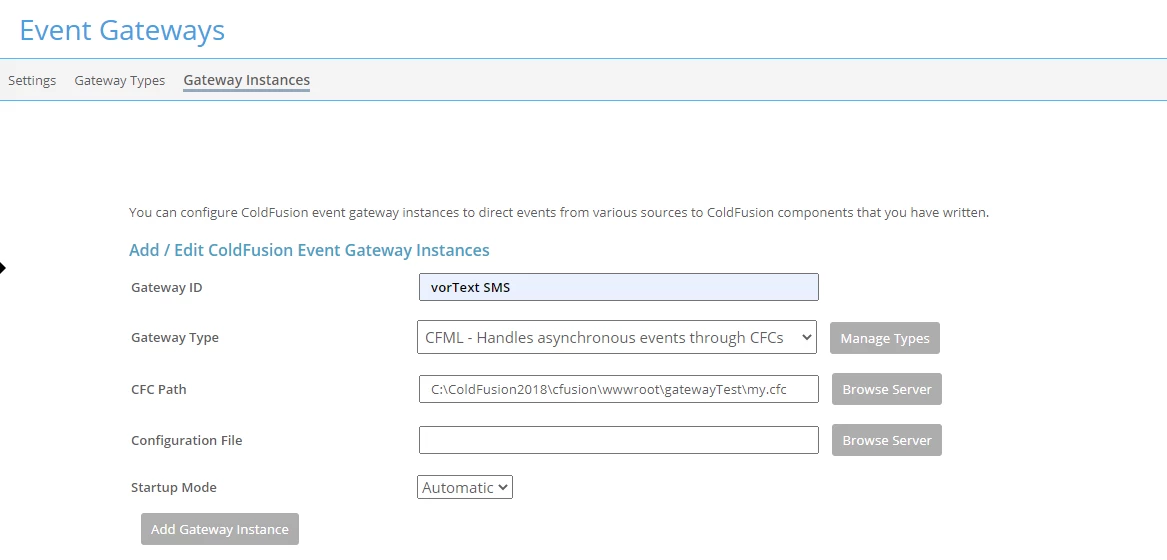
     3. Open the ColdFusion Administrator and go to the Gateway Instances page. If you see an existing gateway named "vorText SMS", delete it. The idea is that we now want to set up "vorText SMS" from fresh.


       Ensure that the form fields are filled as follows:

    Gateway ID: vorText SMS
    Gateway Type: CFML - Handles asynchronous events through CFCs
    CFC Path: C:\ColdFusion2016\cfusion\wwwroot\gatewayTest\my.cfc


    Press the button Add Gateway Instance. ColdFusion should then create a new gateway, named vorText SMS.


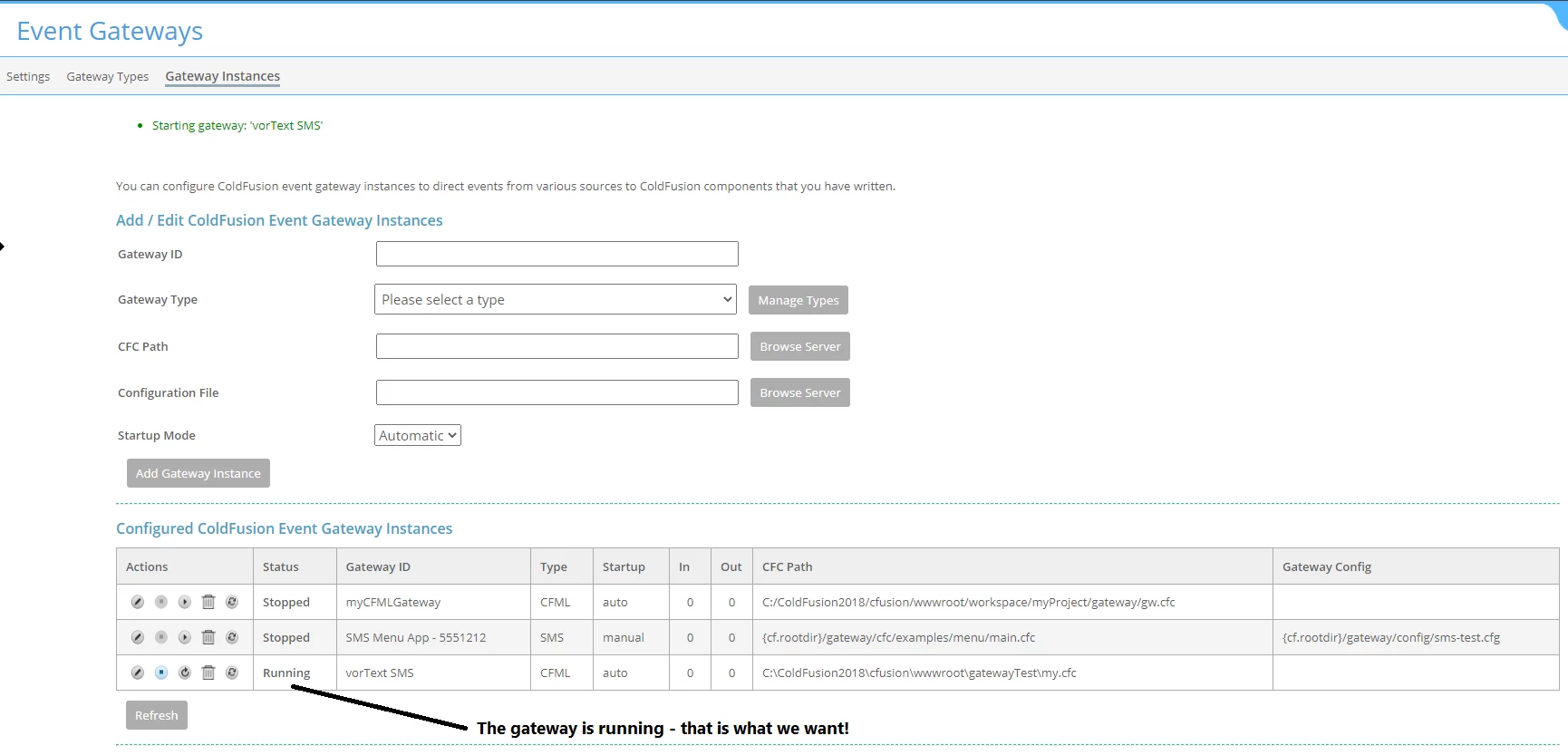
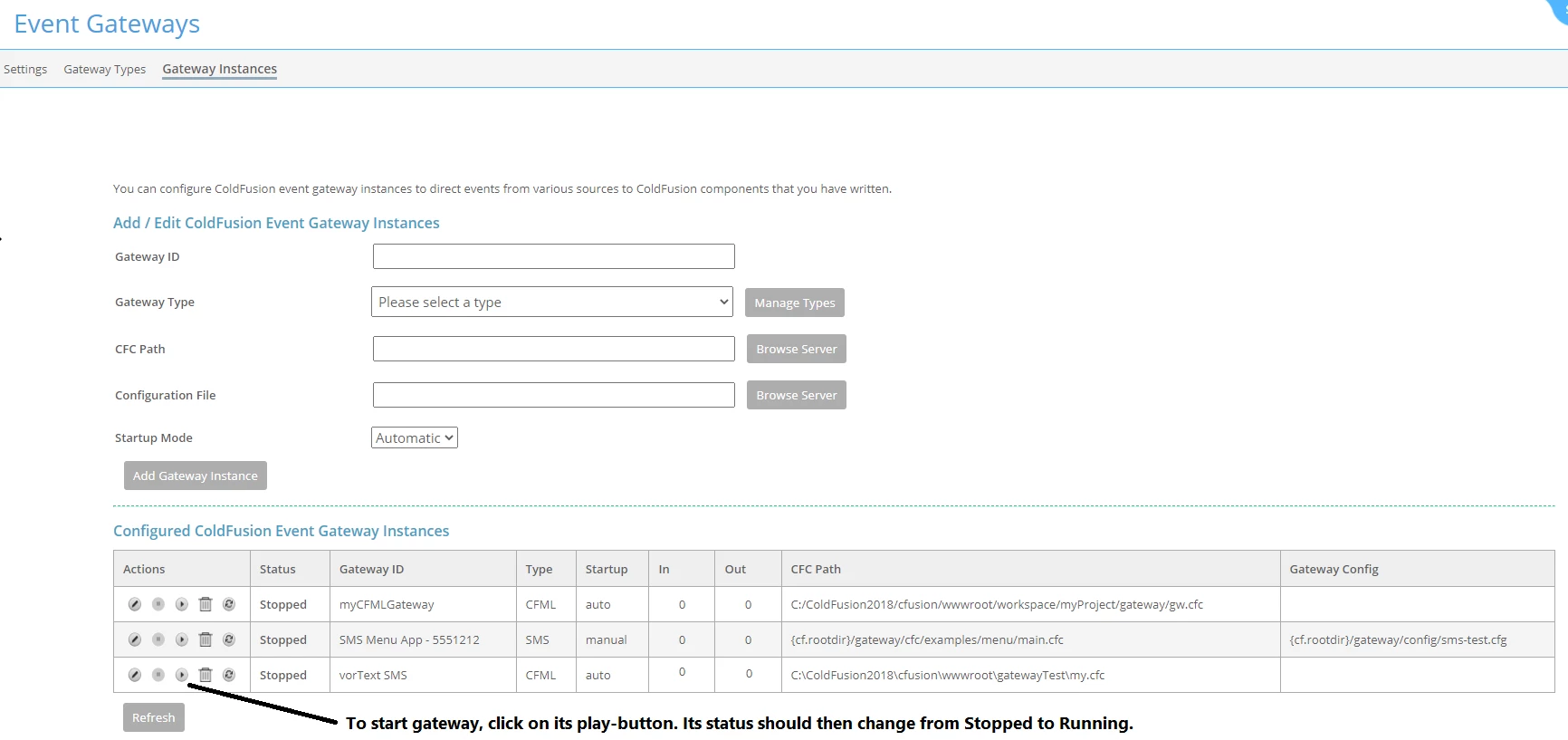
    4. If the status of this gateway is not Running, then you will have to start the gateway. To do so, click on its play-button. See attached images.


    5. Launch the gateway calling page in the browser: http://127.0.0.1:8500/gatewayTest/gatewayCaller.cfm 


    6. Finally, check whether the text file has been written to the directory C:\rave7\temp\smsdev 


    3 replies

    BKBK
    Community Expert
    Community Expert
    November 14, 2021

    @samuelr7 , did you follow the suggestions? Is your gateway working now?

    BKBK
    Community Expert
    BKBKCommunity ExpertCorrect answer
    Community Expert
    November 3, 2021

    @samuelr7 , I set up a CFML gateway and ran your exact code. You will be glad to hear that it works. 🙂


    The steps I followed are:


    1. Create the directories C:\rave7\temp\smsdev and \cfusion\wwwroot\gatewayTest.

    2. Create the following CFM and CFC files in the gatewayTest directory:

    <!--- gatewayCaller.cfm --->
    <cfscript>
    status = false;
    props = structNew();
    props.Message = "yo #now()#";
    status = SendGatewayMessage("vorText SMS", props);
    if (status IS True) WriteOutput('Event Message "#props.Message#" has been sent.');
    </cfscript>


    <!--- my.cfc --->
    <cfcomponent output="false">
      <cffunction name="onIncomingMessage">
      <cfargument name="CFEvent" type="struct" required="yes">
         <cfset filewrite( "c:\rave7\temp\smsdev\yo.txt", "oooooo")>
         <cfreturn true>
      </cffunction>
    </cfcomponent>

     3. Open the ColdFusion Administrator and go to the Gateway Instances page. If you see an existing gateway named "vorText SMS", delete it. The idea is that we now want to set up "vorText SMS" from fresh.


       Ensure that the form fields are filled as follows:

    Gateway ID: vorText SMS
    Gateway Type: CFML - Handles asynchronous events through CFCs
    CFC Path: C:\ColdFusion2016\cfusion\wwwroot\gatewayTest\my.cfc


    Press the button Add Gateway Instance. ColdFusion should then create a new gateway, named vorText SMS.


    4. If the status of this gateway is not Running, then you will have to start the gateway. To do so, click on its play-button. See attached images.


    5. Launch the gateway calling page in the browser: http://127.0.0.1:8500/gatewayTest/gatewayCaller.cfm 


    6. Finally, check whether the text file has been written to the directory C:\rave7\temp\smsdev 


    Charlie Arehart
    Community Expert
    Community Expert
    November 1, 2021

    Samuel, I have a few thoughts, if they may help.


    First, rather than test a file write (which could fail due to permissions), try instead a cflog. Does the log line then appear? And in your calling code, are you saying that your writeoutput does or does not appear? If not, try adding an else that outputs something else. Does THAT appear.


    To be clear, I am not affirming whether the other CFC is properly setup for an event gateway. (I've not used them for years.) I also have not tested your code. Indeed, you don't say anything about the event gateway setup, but we'll assume it's correct.


    And I see that it's the sms gateway that you are trying to use. To be clear, that g/w doesn't let one send an sms from CF...unless you have setup also an smpp provider. For more, see the docs, such as here.


    Finally, note that there is an eventgateway.log file that CF writes to with info about the g/w use. Have you looked at that for any more info it may share?


    Hope something above is helpful.

    /Charlie (troubleshooter, carehart. org)
    samuelr7Author
    Participant
    November 2, 2021

    The log has an error:


    Error invoking CFC for gateway vorText SMS: null {GATEWAYTYPE={CFMLGateway},DATA={{MESSAGE={Hello}}},GATEWAYID={vorText SMS},ORIGINATORID={CFMLGateway}}.


    And no it's not an actual SMS gateway, the name is misleading in that way. Rigth now I am just trying to gt it to work..