Inspiring
February 12, 2019
Answered

Extract Numbers from string

  • February 12, 2019
  • 1 reply
  • 3759 views

I have strings like this

PGH2019AprilPA73-01.docx

PGH2019AprilPA73-0.docx

PGH2019AprilREC73-0.docx

I need to extract the number 73 from the string.

The number could be 2 or 3 digits long, like 99 or 101
EG: PGH2019AprilPA99-01.docx or PGH2019AprilPA101-01.docx

The number is always right before the -0

PGH2019AprilPA73-01.docx

PGH2019AprilPA73-0.docx

PGH2019AprilREC73-0.docx

How would I extract this 2 or 3 digit number that precedes the -0?

    This topic has been closed for replies.
    Correct answer WolfShade

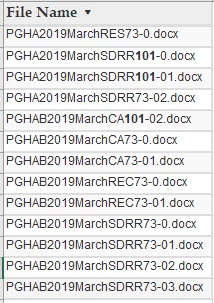
    Here is the file list

    All works well except when the number preceding the dash is 3 digits
    This is the current code I am using.

    <cfif LEFT(filename,5) EQ 'PGHAB'>

              <cfset thisNumber = REreplaceNoCase(trim(fileName),"(\w{4,5}\d{4}\w+)(\d{2,3})(-\d{1,2}?\.docx)",'\2','all') />

             </cfif>

            <cfif LEFT(filename,4) EQ 'PGHA'>

              <cfset thisNumber = REreplaceNoCase(trim(fileName),"(\w{3,4}\d{4}\w+)(\d{2,3})(-\d{1,2}?\.docx)",'\2','all')   />

            </cfif>


    FIXED IT. 

    In the first backreference, replace \w+ with [a-z]+ and VOILA!

    V/r,

    ^ _ ^

    UPDATE:  Here is the code I used for my "homework". 

    <cfscript>
        fileNames = [];
        arrayAppend(fileNames,"PGHA2019MarchRES73-0.docx");
        arrayAppend(fileNames,"PGHA2019MarchRES101-0.docx");
        arrayAppend(fileNames,"PGHAB2019MarchRES101-0.docx");
        arrayAppend(fileNames,"PGHAB2019MarchRES73-0.docx");
        arrayAppend(fileNames,"PGHAB2019MarchRES73-0.docx");
        arrayAppend(fileNames,"PGHA2019MarchRES101-0.docx");
        arrayAppend(fileNames,"PGHA2019MarchRES73-0.docx");
        arrayAppend(fileNames,"PGHAB2019MarchRES111-0.docx");
        arrayAppend(fileNames,"PGHAB2019MarchRES73-0.docx");
        arrayAppend(fileNames,"PGHAB2019MarchRES73-0.docx");
        arrayAppend(fileNames,"PGHA2019MarchRES101-0.docx");
        arrayAppend(fileNames,"PGHA2019MarchRES73-0.docx");
    </cfscript>
    <cfoutput>
        <cfloop index="idx" from="1" to="#arrayLen(fileNames)#">
            <cfset thisNumber = REreplaceNoCase(trim(fileNames[idx]),"^(\w{4,5}\d{4}[a-z]+)(\d{2,3})(-\d{1,2}\.docx)$","\2","all") />
            #idx# - #thisNumber#<br /><br />
        </cfloop>
    </cfoutput>

    1 reply

    WolfShade
    Legend
    February 12, 2019

    Again, RegEx to the rescue. 

    Assuming that the names will always be in the same format:

    <cfset filename = "PGH2019AprilPA73-01.docx" />

    <cfset thisNumber = REreplaceNoCase("(\w{3}\d{4}\w+)(\d{2,3})(-01?\.docx)",fileName,'\2','all') />

    <cfoutput>#thisNumber#</cfoutput>

    Not tested.

    HTH,

    ^ _ ^

    WolfShade
    Legend
    February 12, 2019

    EXPLAINED:

    (\w{3}\d{4}\w+) 

    Parenthesis indicate first backreference.  \w{3} is three letters, \d{4} is four numbers, \w+ is one or more letters.

    (\d{2,3})

    Parenthesis indicate second backreference.  \d{2,3} is two or three digits.

    (-01?\.docx)

    Parenthesis indicate third backreference.  -0 is as expected, -0, 1? means zero or one instance of "1", \.docx is an escaped period (period, alone, in RegEx is wildcard for everything) followed by docx.

    RegEx replace using this mask to remove first and third backreferences, leaving only the second backreference.

    HTH,

    ^ _ ^