
Participant
November 14, 2011
Question

Float not working properly in IE7

  • November 14, 2011
  • 1 reply
  • 790 views

Hi,

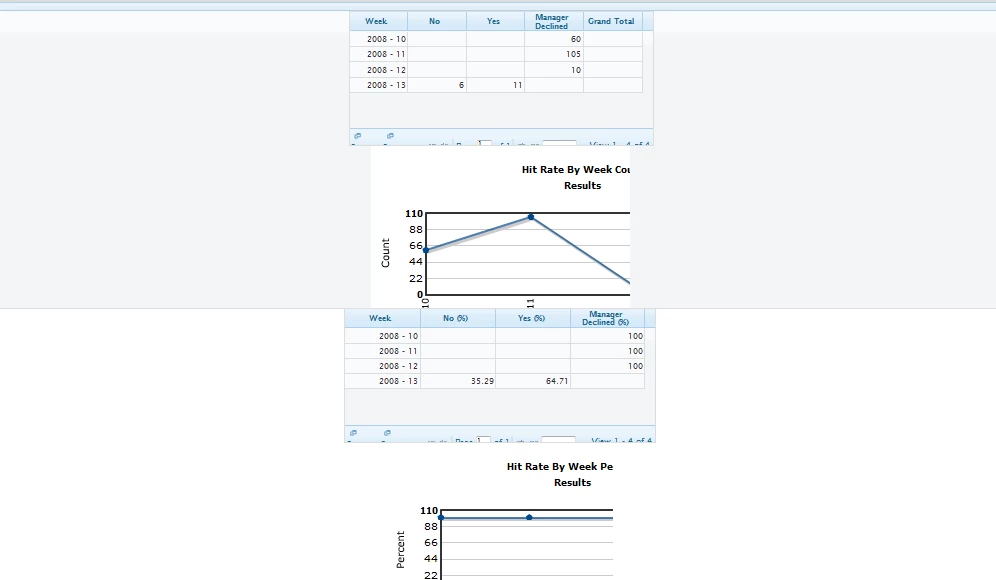
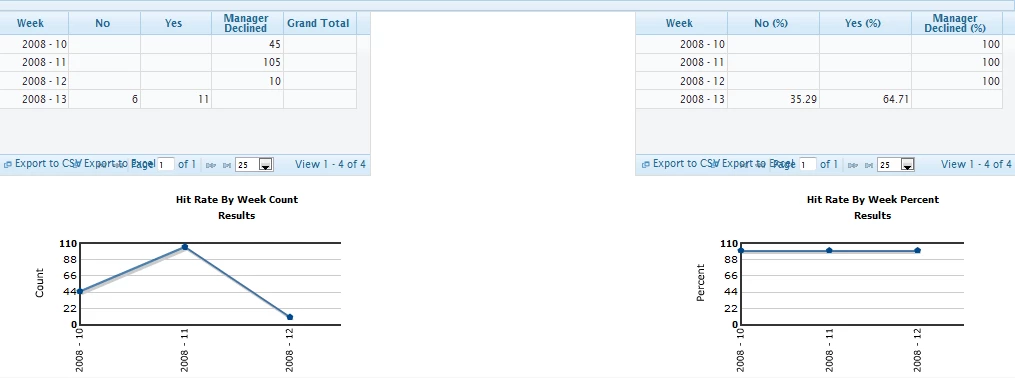
I'm a beginner to coldfusion and am having a problem with a site. It looks fine in Internet Explorer 8 and Firefox, but in Internet Explorer 7, the float is not working. The element that's supposed to appear to the right is showing up under the element with the left float.

Here is the screenshot of  IE7.
Here is the screenshot of IE8.
Any help would be appreciated!

Thanks,

vpl7

    This topic has been closed for replies.

    1 reply

    Inspiring
    November 14, 2011

    G'day

    These are the "before you post" guidelines, linked from the right-hand-side of the CF forums main page.  It might be an idea if you read them:

    http://forums.adobe.com/thread/607238

    They're based on this:

    http://catb.org/~esr/faqs/smart-questions.html

    Both give good advice.

    Please post - stand alone - code that demonstrates your problem.  Pictures of the output don't help us guess what might be going on to cause this...

    --

    Adam

    vpl7Author
    Participant
    November 14, 2011

    Hi Adam,

    I am using Coldfusion 3.2.

    Server OS:Windows 7

    <!--Left hand div -->

    <div style="height:100%; width:470px; float:left;">

         <ui:datagrid id="reportGrid" loadOnce="false" displayPaging="true" width="470">

             <ui:datagridcolumn column="YEAR_WEEK" label="Week" sortable="false" sorttype="int" align="right">

             <ui:datagridcolumn column="ACTION_COUNT_N" label="No" sortable="false" sorttype="int" align="right">

             <ui:datagridcolumn column="ACTION_COUNT_Y" label="Yes" sortable="false" sorttype="int" align="right">

             <ui:datagridcolumn column="ACTION_COUNT_MGRDECL" label="Manager Declined" sortable="false"           sorttype="int" align="right">

             <ui:datagridcolumn column="GRAND_TOTAL" label="Grand Total" sortable="false" sorttype="int"           align="right">

         </ui:datagrid>

         <chart:storeOpsHitRateByWeek locationGroupId="#locationGroupId#" alertType="#alertType#"      startDate="#startDate#" endDate="#endDate#">

    </div>

    <!--Right hand div -->

    <div style="100%; width:470px;float:right;">

         <ui:datagrid id="reportGridPercentage"  loadOnce="false" displayPaging="true" width="480">

             <ui:datagridcolumn column="YEAR_WEEK" label="Week" sortable="false" sorttype="int" align="right">

             <ui:datagridcolumn column="ACTION_N_PERCENT" label="No (%)" sortable="false" sorttype="int" align="right">

             <ui:datagridcolumn column="ACTION_Y_PERCENT" label="Yes (%)" sortable="false" sorttype="int" align="right">

             <ui:datagridcolumn column="ACTION_MGRDECL_PERCENT" label="Manager Declined (%)" sortable="false" sorttype="int" align="right">

         </ui:datagrid>

         <chart:storeOpsHitRateByWeekPercent locationGroupId="#locationGroupId#" alertType="#alertType#" startDate="#startDate#" endDate="#endDate#">

    </div>

    The right hand div is showing on next line after the first div not on the same line.

    Sean Coyne
    Participating Frequently
    November 14, 2011

    The containing div must be less than 940px which causes the right div to wrap.

    Also, I highly doubt you are using ColdFusion 3.2