Inspiring
December 7, 2017
Answered

Help using a Grouped Table inside cfmail?

  • December 7, 2017
  • 2 replies
  • 1312 views

I have the following code which generates a table of data and sends out to an email, but I need it to group by the Status "new_Data" field.

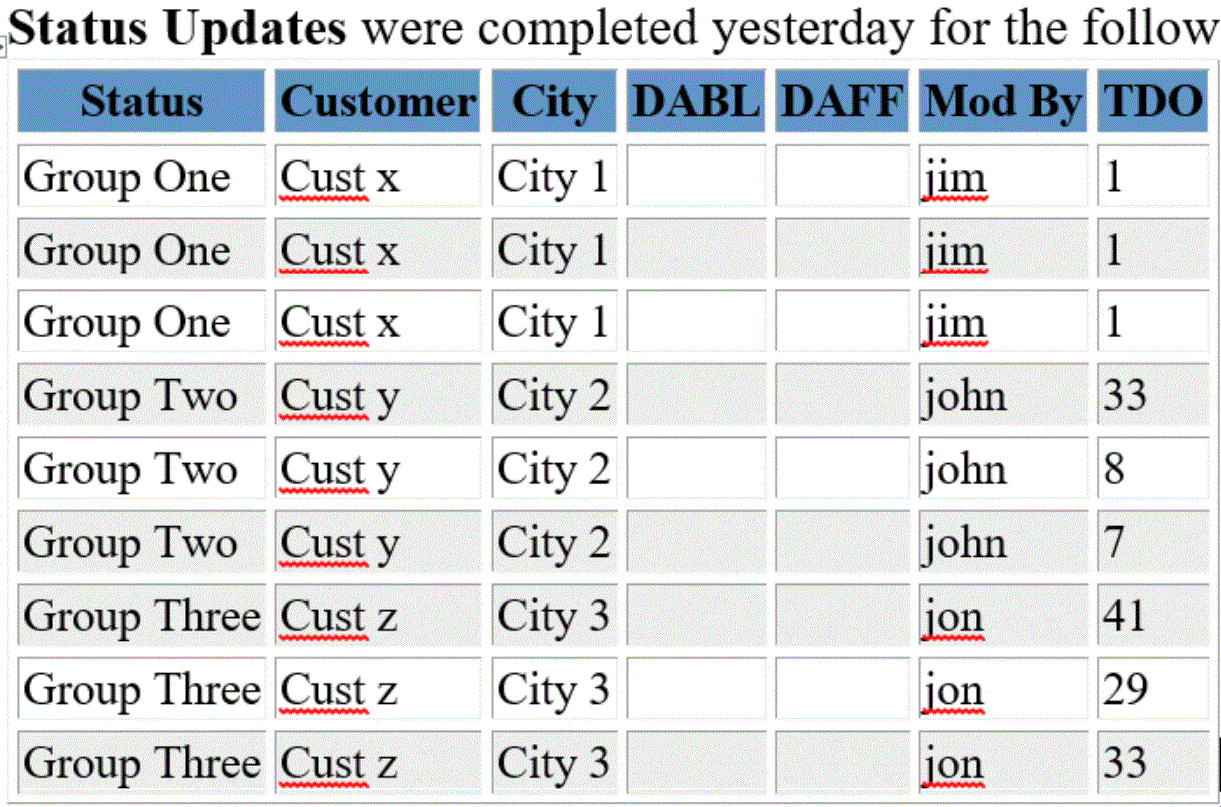
  • Here is what it currently produces:
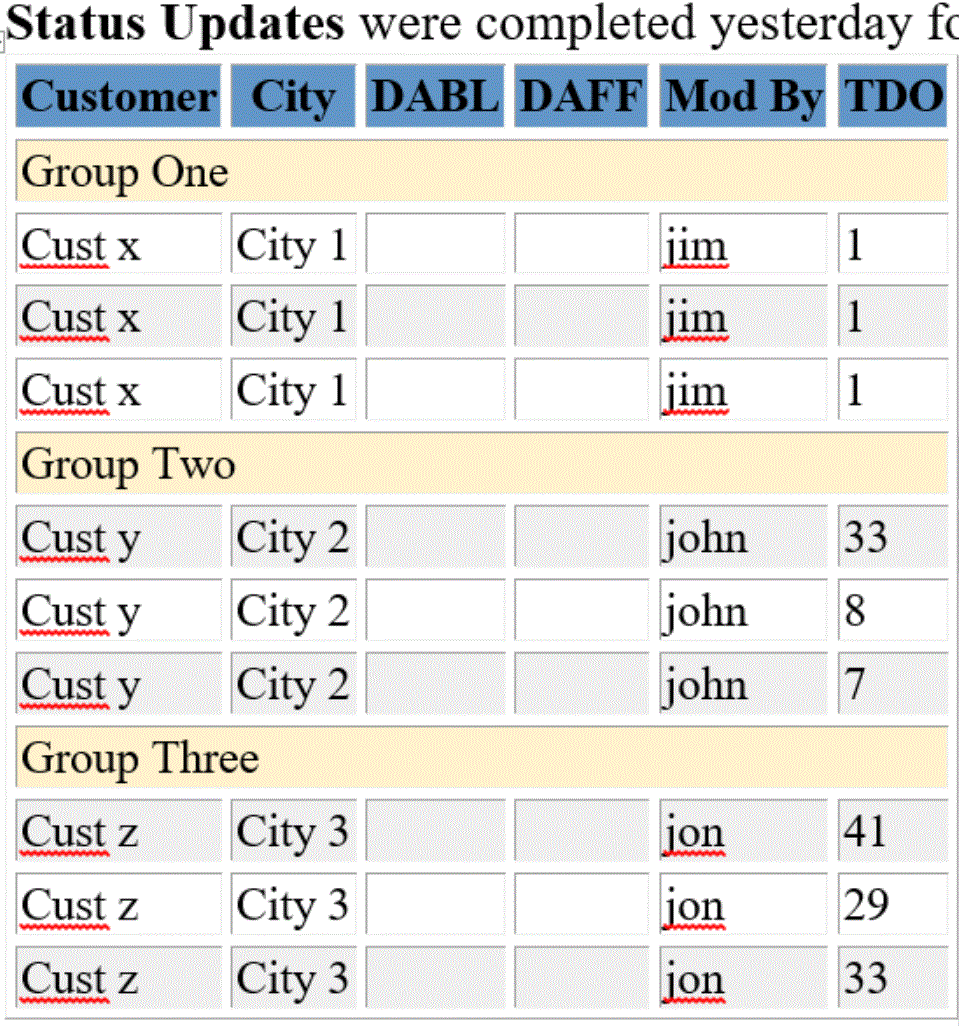
  • Here is what it should produce:

I'm not sure how to change the grouping in my table code to get the Status (in yellow) to break properly?

Here is my current code:

<!--- Only send the email Mon-Fri --->

<cfset weekday = DayOfWeek(Now())>

<cfif (weekday eq 1) or (weekday eq 7)>

  <cfabort>

</cfif>

<!--- Query for the Status Audit records that were Changed yesterday --->

<cfquery name="rsAudit_Status" datasource="cwo">

SELECT tblcom.omID, DATE_FORMAT(tblcom.omEstCompDate,'%a %m-%d-%Y') AS ecd, omOwner, tblcom.omContractDate, tblcom.omStatusID, tblStatus.stSort, tblcom.omType, IF(tblcom.omDelayed='N', 'Priority Builds', 'Delayed') AS delay_name, tblcom.omCustName, tblcom.omCustAddress, tblcom.omCity

, omWorkUnits

, omBuildClass

, IFNULL(Datediff(NOW(),omDate),0) AS DOS

, DATE_FORMAT(tblaudit.modified,'%m-%d-%Y') AS alm

, atID

, tblaudit.new_Data

, tblaudit.modifiedby

, DATE_FORMAT(tblaudit.modified,'%a %m-%d-%Y') AS report_label_date

, "" AS DAFF_sum

, "" AS DABL_sum

FROM      tblaudit LEFT OUTER JOIN tblcom ON tblaudit.comID = tblcom.omID LEFT OUTER JOIN tblstatus ON tblstatus.stDesc = tblaudit.new_data

WHERE     DATE(tblaudit.modified) = DATE(NOW() - INTERVAL 1 DAY)

ORDER BY  tblStatus.stSort

</cfquery>

<!---// create the HTML email //--->

<cfmail

to="mgr@domain.com"

bcc=""

from="xxx@domain.com"

subject="Daily Summary report.."

group="new_Data">

<html>

<head>

    <title>HTML E-mail</title>

</head>

<body>

<!--- If query returns no records --->

<cfif rsAudit_Status.RecordCount EQ 0>

<cfmailpart type="text">

..

</cfmailpart>

<cfmailpart type="html">

No customer Statuses were updated yesterday..

</cfmailpart>

<!--- Otherwise send email with records --->

<cfelse>

  <cfmailpart type="text">

    ..

  </cfmailpart>

  <cfmailpart type="html">

    <!--- Style Tag in the Body, not Head, for Email --->

    <style type="text/css">

               body { font-size: 14px; }

           </style>

    <strong>Status Updates</strong> were completed yesterday for the following data customer(s)..

    <cfoutput>

    <table border="1">

      <tr bgcolor="##6296C8" class="body">

        <th>Status</th>

        <th>Customer</th>

        <th>City</th>

        <th>DABL</th>

        <th>DAFF</th>

        <th>Mod By</th>

        <th>TDO</th>

      </tr>

      <cfloop query="rsAudit_Status">

      <tr bgcolor="###iif(currentrow MOD 2,DE('ffffff'),DE('efefef'))#">

        <td>#rsAudit_Status.new_Data#</td>

        <td>#rsAudit_Status.omCustName#</td>

        <td>#rsAudit_Status.omCity#</td>

        <td>#rsAudit_Status.DABL_sum#</td>

        <td>#rsAudit_Status.DAFF_sum#</td>

        <td>#rsAudit_Status.modifiedby#</td>

        <td>#rsAudit_Status.DOS#</td>

      </tr>

      </cfloop>

    </table>

    </cfoutput>

    <p>


      <em>(Note: This report is also available from the CRM in PDF) </em><br>


    <p>Thanks,<br>

    Project Team</p>

  </cfmailpart>

</cfif>

</body>

</html>

</cfmail>

</cfmail>

This topic has been closed for replies.
Correct answer WolfShade

My CF version is 9.0 so it doesn't support the CFLOOP grouping..

I also tried using cfsavecontent, which delivers the email fine, but the body just shows up in raw <table> <tr> html.. no real data?

<cfsavecontent variable="mailContent">

    <strong>Status Updates</strong> were completed yesterday for the following data customer(s)..

    <cfoutput query="rsAudit_Status" group="new_Data"> 

<table border="1">

      <tr>

        <th>Customer</th>

        <th>City</th>

        <th>DABL</th>

        <th>DAFF</th>

        <th>Mod By</th>

        <th>TDO</th>

      </tr>


     <tr bgcolor="##FBF2D7"><td colspan="6" bgcolor="##FBF2D7"><strong>#rsAudit_Status.new_Data#</strong></td></tr> 

       <cfoutput> 

      <tr bgcolor="###iif(currentrow MOD 2,DE('ffffff'),DE('efefef'))#"> 

        <td>#rsAudit_Status.omCustName#</td> 

        <td>#rsAudit_Status.omCity#</td> 

        <td>#rsAudit_Status.DABL_sum#</td> 

        <td>#rsAudit_Status.DAFF_sum#</td> 

        <td>#rsAudit_Status.modifiedby#</td> 

        <td>#rsAudit_Status.DOS#</td> 

      </tr> 

      </cfoutput> 

      </cfoutput> 

    </table>


    <p>


      <em>(Note: This report is also available from the CRM in PDF) </em><br>

    <p>Thanks,<br>

    Clearwave Project Team</p>

</cfsavecontent>

<cfmail to="user@domain.com" from="sys@domain.com" subject="Daily Summary report..">

    #mailContent#

</cfmail>

</body>

</html>


You need to add type="html" to your CFMAIL tag.

HTH,

^ _ ^

2 replies

WolfShade
Legend
December 7, 2017

Use the group="column" attribute in nested CFOUTPUT tags (the innermost CFOUTPUT cannot have this attribute set; it must be left out.)  I do not think CFLOOP has this attribute available, so switch to CFOUTPUT.

      <cfoutput query="rsAudit_Status" group="new_Data">

     <tr bgcolor="##???"><td colspan="6">#rsAudit_Status.new_Data#</td></tr>

       <cfoutput>
      <tr bgcolor="###iif(currentrow MOD 2,DE('ffffff'),DE('efefef'))#">
        <td>#rsAudit_Status.omCustName#</td>
        <td>#rsAudit_Status.omCity#</td>
        <td>#rsAudit_Status.DABL_sum#</td>
        <td>#rsAudit_Status.DAFF_sum#</td>
        <td>#rsAudit_Status.modifiedby#</td>
        <td>#rsAudit_Status.DOS#</td>
      </tr>
      </cfoutput>
      </cfoutput>

HTH,

^ _ ^

jligAuthor
Inspiring
December 7, 2017

HTH, thanks for the reply!

I tried your suggestion but get the following error:

Error Occurred While Processing Request

Invalid tag nesting configuration.

A query driven cfoutput tag is nested inside a cfoutput tag that also has a query attribute. This is not allowed. Nesting these tags implies that you want to use grouped processing. However, only the top-level tag can specify the query that drives the processing.
The error occurred in C:\inetpub\wwwroot\xxx\xxx\reports\Email_Reports_Status_Change_Summary.cfm: line 64
62 :     <table border="1"> 63 : 64 :       <cfoutput query="rsAudit_Status" group="new_Data">   65 :      <tr bgcolor="##6296C8"><td colspan="6">#rsAudit_Status.new_Data#</td></tr> 66 :        <cfoutput>  

Here is my updated code:

<body>

<!--- If query returns no records --->

<cfif rsAudit_Status.RecordCount EQ 0>

<cfmailpart type="text">

..

</cfmailpart>

<cfmailpart type="html">

No customer Statuses were updated yesterday..

</cfmailpart>

<!--- Otherwise send email with records --->

<cfelse>

  <cfmailpart type="text">

    ..

  </cfmailpart>

  <cfmailpart type="html">

    <!--- Style Tag in the Body, not Head, for Email --->

    <style type="text/css">

               body { font-size: 14px; }

           </style>

    <strong>Status Updates</strong> were completed yesterday for the following data customer(s)..


    <table border="1">


      <cfoutput query="rsAudit_Status" group="new_Data"> 

     <tr bgcolor="##6296C8"><td colspan="6">#rsAudit_Status.new_Data#</td></tr> 

       <cfoutput> 

      <tr bgcolor="###iif(currentrow MOD 2,DE('ffffff'),DE('efefef'))#"> 

        <td>#rsAudit_Status.omCustName#</td> 

        <td>#rsAudit_Status.omCity#</td> 

        <td>#rsAudit_Status.DABL_sum#</td> 

        <td>#rsAudit_Status.DAFF_sum#</td> 

        <td>#rsAudit_Status.modifiedby#</td> 

        <td>#rsAudit_Status.DOS#</td> 

      </tr> 

      </cfoutput> 

      </cfoutput> 

    </table>


    <p>


      <em>(Note: This report is also available from the CRM in PDF) </em><br>


    <p>Thanks,<br>

    Clearwave Project Team</p>

  </cfmailpart>

</cfif>

</body>

</html>

</cfmail>

WolfShade
Legend
December 7, 2017

That's very strange, seeing as how the error message clearly shows the code, and the nested CFOUTPUT does not have the query attribute set.  What version of CF are you using?  Does it have all of the latest updates?

(BTW.. if you use the advanced editor, there is a button that looks like two 'greater than' symbols (>>) that will allow you to encapsulate code to make it more readable.  Just highlight your code, click the button, choose "Syntax Highlighting" and then XML, Java, SQL, Plain, etc.)

<cfoutput>#cgi.server_name#</cfoutput>

(BTW2.. HTH = Hope This Helps, my signature is ^ _ ^, an attempt to look like the head of a wolf, my alias being WolfShade.  )

V/r,

^ _ ^

jligAuthor
Inspiring
December 7, 2017

Looks like my code did not post? Here it is again:

<!--- Only send the email Mon-Fri --->

<cfset weekday = DayOfWeek(Now())>

<cfif (weekday eq 1) or (weekday eq 7)>

  <cfabort>

</cfif>

<!--- Query for the Status Audit records that were Changed yesterday --->

<cfquery name="rsAudit_Status" datasource="cwo">

SELECT tblcom.omID, DATE_FORMAT(tblcom.omEstCompDate,'%a %m-%d-%Y') AS ecd, omOwner, tblcom.omContractDate, tblcom.omStatusID, tblStatus.stSort, tblcom.omType, IF(tblcom.omDelayed='N', 'Priority Builds', 'Delayed') AS delay_name, tblcom.omCustName, tblcom.omCustAddress, tblcom.omCity

, omWorkUnits

, omBuildClass

, IFNULL(Datediff(NOW(),omDate),0) AS DOS

, DATE_FORMAT(tblaudit.modified,'%m-%d-%Y') AS alm

, atID

, tblaudit.new_Data

, tblaudit.modifiedby

, DATE_FORMAT(tblaudit.modified,'%a %m-%d-%Y') AS report_label_date

, "" AS DAFF_sum

, "" AS DABL_sum

FROM      tblaudit LEFT OUTER JOIN tblcom ON tblaudit.comID = tblcom.omID LEFT OUTER JOIN tblstatus ON tblstatus.stDesc = tblaudit.new_data

WHERE     DATE(tblaudit.modified) = DATE(NOW() - INTERVAL 1 DAY)

ORDER BY  tblStatus.stSort

</cfquery>

<!---// create the HTML email //--->

<cfmail

to="mgr@domain.com"

bcc=""

from="xxx@domain.com"

subject="Daily Summary report.."

group="new_Data">

<html>

<head>

    <title>HTML E-mail</title>

</head>

<body>

<!--- If query returns no records --->

<cfif rsAudit_Status.RecordCount EQ 0>

<cfmailpart type="text">

..

</cfmailpart>

<cfmailpart type="html">

No customer Statuses were updated yesterday..

</cfmailpart>

<!--- Otherwise send email with records --->

<cfelse>

  <cfmailpart type="text">

    ..

  </cfmailpart>

  <cfmailpart type="html">

    <!--- Style Tag in the Body, not Head, for Email --->

    <style type="text/css">

               body { font-size: 14px; }

           </style>

    <strong>Status Updates</strong> were completed yesterday for the following data customer(s)..

    <cfoutput>

    <table border="1">

      <tr bgcolor="##6296C8" class="body">

        <th>Status</th>

        <th>Customer</th>

        <th>City</th>

        <th>DABL</th>

        <th>DAFF</th>

        <th>Mod By</th>

        <th>TDO</th>

      </tr>

      <cfloop query="rsAudit_Status">

      <tr bgcolor="###iif(currentrow MOD 2,DE('ffffff'),DE('efefef'))#">

        <td>#rsAudit_Status.new_Data#</td>

        <td>#rsAudit_Status.omCustName#</td>

        <td>#rsAudit_Status.omCity#</td>

        <td>#rsAudit_Status.DABL_sum#</td>

        <td>#rsAudit_Status.DAFF_sum#</td>

        <td>#rsAudit_Status.modifiedby#</td>

        <td>#rsAudit_Status.DOS#</td>

      </tr>

      </cfloop>

    </table>

    </cfoutput>

    <p>


      <em>(Note: This report is also available from the CRM in PDF) </em><br>


    <p>Thanks,<br>

    Project Team</p>

  </cfmailpart>

</cfif>

</body>

</html>

</cfmail>