
Known Participant
June 4, 2009
Question

Help with Structure in array

  • June 4, 2009
  • 3 replies
  • 1497 views

I need to process a tab delimited list and I'm able to put the data into an array. See the image of the array below:
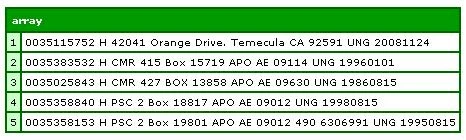
Now that the list is separated into 5 array elements, each element is a list by itself.

How can I create a structure for the list within each array element so I will have an Array with 5 element and each element contain a structure with keys and values???

To create the above array I simply use :

<cffile action="READ" file="#FeedPath##FileName#" variable="MyFile">

<cfset MyArray = listtoarray(MyFile,"#chr(13)##chr(10)#")>

Please help!

This topic has been closed for replies.

3 replies

BKBK
Community Expert
Community Expert
June 6, 2009

<cfset myArray = listtoarray(MyFile,"#chr(13)##chr(10)#")>

<cfset myStruct = structNew()>

<cfloop from="1" to="#arrayLen(myArray)#" index="idx">
    <cfset currentRow = 'row' & idx>
    <cfset position = 1>
    <cfloop list = "#myArray[idx]#" delimiters=" " index="listElement">
        <cfset myStruct[currentRow][position] = listElement>
        <cfset position = position+1>
    </cfloop>
</cfloop>

<cfdump var="#myStruct#">

Inspiring
June 4, 2009

I find nested lists easier to deal with than 2D arrays.  To make it even easier, if you could give column headings to your text file, you can use cfhttp to create a query.

ilssac
Inspiring
June 4, 2009

Well the basis for doing what you want is to loop over each record that builds the array and create a structure out of it.

How you do that is going to very somewhat depending on if you want to do this directly from the file so that in one larger fill reading step, you end up with and array of structures.  Or if you want to do it after you have read the file and created the array like you have already done, this would.

The latter is a bit simplier to show, but takes a tiny bit longer to process since you are effectivily looping over all the data twice.

<cfset myArray2 = arrayNew(1).

<cfloop array="#myArray#" index="i">

  <cfset arrayAppend(myArray2, structNew())>

  <cfset myArray2["key1"] = somePartOf(myArray)>

  <cfset myArray2["key2"] = somePartOf(myArray)>

  <cfset myArray2["key3"] = somePartOf(myArray)>

</cfloop>

aleckenAuthor
Known Participant
June 4, 2009

Ian,

one of my problem is how can I set the keys and values set from the list within each array element?

This is not a fixed length so how can I determined which key for which value?

for example with the list within the first element is 0035115752 H 42041 Orange Drive. Temecula CA 92591 UNG 20081124

how can I put the value of 0035115752 as id, H as addressType, 42041 Orange Drive. Temecula as StreetName, etc?

For fixed length it is easier since I know exactly the position of each item but this is a tab delimited.

So I guess in you example, I don't quite undertand what should I do with the

somePartOf(MyArray

ilssac
Inspiring
June 4, 2009

alecken wrote:


So I guess in you example, I don't quite undertand what should I do with the

somePartOf(MyArray

Well "somePartOf(myArray)" was vague, because I had no idea how you wanted to parse up your data into a structure.  The previous post gives some idea how you want to parse it up, but there are still chalanges you will have to work out because it is your data.  You could easily treat the value as a space delimited list, but you do not seem to have a one to one relationship between space separated values and your desired structure keys.  You will have to work out the business rules that turns that data into the structure you desire.  There is no magic "Make My Random Data into a Structure" function.

These would apply to the first two keys you described, but I have no idea how the rest of the data parses out.

<cfset myArray2["id"] = listFirst(myArray," ")>

<cfset myArray2["addressType"] = listGetAt(2,myArray," ")>