
Participant
July 9, 2014
Question

How do I get error to be send to my email from application.cfc?

  • July 9, 2014
  • 3 replies
  • 3195 views

From the ddocumentation

http://help.adobe.com/en_US/ColdFusion/9.0/Developing/WSc3ff6d0ea77859461172e0811cbec22c24-7d39.html#WSc3ff6d0ea77859461172e0811cbec22c24-7cce

I been following the steps inserting the code into application.cfc

<cfcomponent output="false" hint="Prevent security attacks where an unauthorized party attempts to access coldfusion files under /CFIDE/scripts/ajax/FCKeditor/editor/filemanager folder">

  <cfset this.name = "fckeditor_filemanager">

  <cffunction name="onRequestStart">

  <cfargument name="targetpage" required=true type="string" />

  <cfset verifyClient()>

  <cfreturn true>

  </cffunction>

<cfcomponent>

<cfset This.name = "BugTestApplication">

<cffunction name="onError">

    <!--- The onError method gets two arguments:

            An exception structure, which is identical to a cfcatch variable.

            The name of the Application.cfc method, if any, in which the error

            happened.

    <cfargument name="Except" required=true/>

    <cfargument type="String" name = "EventName" required=true/>

    <!--- Log all errors in an application-specific log file. --->

    <cflog file="#This.Name#" type="error" text="Event Name: #Eventname#" >

    <cflog file="#This.Name#" type="error" text="Message: #except.message#">

    <!--- Throw validation errors to ColdFusion for handling. --->

    <cfif Find("coldfusion.filter.FormValidationException",

                     Arguments.Except.StackTrace)>

        <cfthrow object="#except#">

    <cfelse>

        <!--- You can replace this cfoutput tag with application-specific 

                error-handling code. --->

        <cfoutput>

            <p>Error Event: #EventName#</p>

            <p>Error details:<br>

            <cfdump var=#except#></p>

        </cfoutput>

    </cfif>

</cffunction>

</cfcomponent>

But when I test it doesnt seem to be doing anything.obviously it still gives me a error , which it should,.

I have use the test example code they gave in the bottom but that just gives me a

regular error.
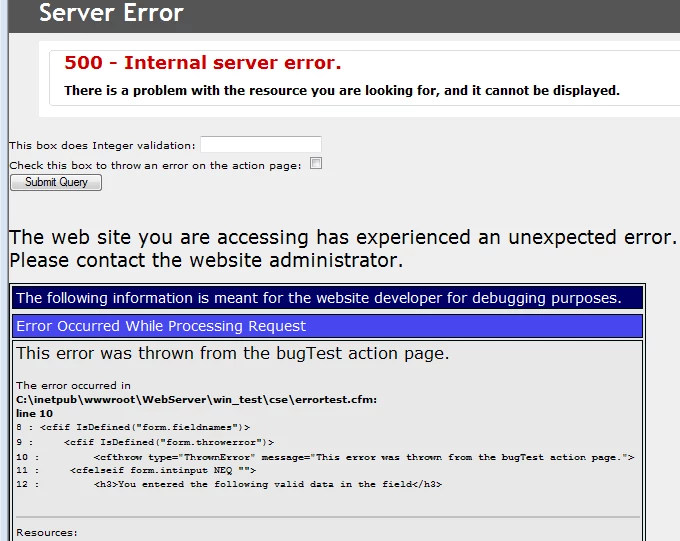
<cfform>

    This box does Integer validation: 

    <cfinput name="intinput" type="Text" validate="integer" validateat="onServer"><br>

    Check this box to throw an error on the action page:

    <cfinput type="Checkbox" name="throwerror"><br>

    <cfinput type="submit" name="submitit">

    </cfform>

<cfif IsDefined("form.fieldnames")>

    <cfif IsDefined("form.throwerror")>

        <cfthrow type="ThrownError" message="This error was thrown from the bugTest action page.">

    <cfelseif form.intinput NEQ "">

        <h3>You entered the following valid data in the field</h3>

        <cfoutput>#form.intinput#</cfoutput>

    </cfif>

</cfif>

Eventually i would like to make it send a email to me, how would i be able to accomplish this?

    This topic has been closed for replies.

    3 replies

    Participant
    July 11, 2014

    is there like option i have to enable to make it work on admin?

    i have

    Server Product  ColdFusion

    Version  9,0,1,274733 

    Edition  Standard 

    Operating System  Windows Server 2008 

    OS Version  6.0 

    Adobe Driver Version  4.0 (Build 0005)

    BKBK I did what you wrote on the (2) option, really i dont want anything complicated , just something simple that sends me when a error happens same as i would go

    in admin -> debugging & logging ->log files ->application.log, it has all the error i have created.

    thanks

    Edit: Removed the serial number.. Anit Kumar

    BKBK
    Community Expert
    Community Expert
    July 10, 2014

    You appear to have a component within a component, which is confusing. If all you wish to do is send error messages by e-mail, then the code could be much simpler.

    You can do it with or without the need for onError in Application.cfc. In either case, you will first have to configure the mail settings in the Coldfusion Administrator to enable your application to send e-mail.

    1) Send mail exception messages without the need for onError in Application.cfc


    Application.cfc


    <cfcomponent displayname="BugTestApp" hint="BugTestApp application file">

        <cfscript>

            this.name = "BugTestApp";

            this.applicationTimeout = "#createTimespan(1,0,0,0)#";

            this.sessionManagement = "true";

            this.sessionTimeout = "#createTimeSpan(0,0,20,0)#"; 

        </cfscript>

        <cffunction name="onApplicationStart" returntype="boolean">

                <cfreturn true>

         </cffunction>

        <cffunction name="onRequestStart">

             <cfargument name = "targetPage" type="String" required="true">

            <!--- In the page err.cfm, Coldfusion will use the mailTo address to send e-mail --->

             <cferror type = "exception" template = "err.cfm" mailTo = "bkbk@myDomain.com">

        </cffunction>

        <cffunction name="onRequestEnd">

               <cfargument type="String" name = "targetTemplate" required=true/>

        </cffunction>

    </cfcomponent>

    err.cfm


    An error has occurred. The website has sent an e-mail to notify the Administrator about it. Please accept our apologies for the inconvenience.

    <cfmail from="admin@myDomain.com" to="#error.mailTo#" subject="Error on site myDomain.com (page: #error.template#)">

    Error.diagnostics: #error.diagnostics#<br>

    Error.mailTo: #error.mailTo#<br>

    Error.dateTime: #error.dateTime#<br>

    User browser: #error.browser#<br>

    User IP: #error.remoteAddress#<br>

    Referrer: #error.HTTPReferer#<br>

    Error.template: #error.template#<br>

    Error.generatedContent: #error.generatedContent#<br>

    Error.queryString: #error.queryString#<br>

    Error.message: #error.message#<br>

    Error.type: #error.type#

    </cfmail>

    2) Send mail exception messages using onError


    Application.cfc


    <cfcomponent displayname="BugTestApp" hint="BugTestApp application file">

        <cfscript>

            this.name = "BugTestApp";

            this.applicationTimeout = "#createTimespan(1,0,0,0)#";

            this.sessionManagement = "true";

            this.sessionTimeout = "#createTimeSpan(0,0,20,0)#"; 

        </cfscript>

        <cffunction name="onApplicationStart" returntype="boolean">

                <cfreturn true>

         </cffunction>

        <cffunction name="onRequestStart">

             <cfargument name = "targetPage" type="String" required="true">

        </cffunction>

        <cffunction name="onRequestEnd">

               <cfargument type="String" name = "targetTemplate" required=true/>

        </cffunction>

    <cffunction name="onError">

    <cfargument name="Exception" required="true">

    <cfargument name="EventName" type="String" required="true">

    An error has occurred. The website has sent an e-mail to notify the Administrator about it. Please accept our apologies for the inconvenience.

    <cfmail from="admin@myDomain.com" to="bkbk@myDomain.com" subject="Error on site myDomain.com (page: #arguments.exception.tagContext[1].template#)">

    <p>Exception.Type: #arguments.exception.type#<br>

    <p>Exception.Message: #arguments.exception.message#<br>

    <p>Stacktrace: #arguments.exception.stacktrace#<br>

    <p>Template: #arguments.exception.tagContext[1].template#<br>

    <p>Line number: #arguments.exception.tagContext[1].line#<br>

    </cfmail>

    </cffunction>

    </cfcomponent>

    Participant
    July 10, 2014

    BKBK,  The reason for going with the approach of using the onError method of the Application.cfc is to catch as many errors as possible from the application.  There are actually two files that are being used in the solution. The first section is the code that you should put in your application.cfc.  the second set of code is a CFC that is responsible for taking care of parsing the cfcatch object and displaying environment variables and then emailing it out. For that one, you take all of the code and you create a CFC standalone file and add it to the rest of your CFCs. This helps in code maintainability and re-usability.  which makes it so that you can send out other dumps (for example from any other try/catches that you care to monitor).   

    BKBK
    Community Expert
    Community Expert
    July 10, 2014

    OK. Maintainability and reusabilty are worth aiming for, naturally. My remark was only about the confusion arising from one component start-tag being followed by two end-tags.

    As far as the main e-mail question is concerned, we are on the same page. My suggestion is in keeping with your idea of a site-wide error handler.

    Participant
    July 9, 2014