
stephens17708265
Participant
April 14, 2017
Answered

How do I use RestEasy in CF

  • April 14, 2017
  • 1 reply
  • 569 views

We are attempting to deploy a java client in CF to make talking to webservices (specifically, parsing the response) a lot simpler. The problem we appear to be running into is that the server is using the Jersey Jackson provider and Client Builder instead of the RestEasy jars provided with the distribution. Does anyone know how to force CF to use the RestEasy jars? We have deployed the client jar and all required dependency jars (including RestEasy) under their own path. We have confirmed that CF is seeing the client jar by instantiating the java client  and calling certain functions. We can get up to the point where it attempts to call out to the server. Unfortunately, the error information we are receiving in CF is not particularly helpful. I believe the last one just simply told us that there was an error but nothing us any use.

** Note: I am the Java side of this implementation and do not know CF very well. I built the client jar used the maven assembly plugin to provide a zip file containing all of the required dependency jars. I then confirmed that I had all the required required dependencies by writing a java se app which simply made a call through the client. Unfortunately, using Jersey is not an option. It simply does not support the calls in the correct way. We need to be able to use RestEasy. Any assistance will be greatly appreciated.
This topic has been closed for replies.
Correct answer BKBK

System:

ColdFusion 2016 Developer Edition on Windows 7 Ultimate

I did a test to integrate RestEasy in ColdFusion 2016 as follows:

1) Download the file resteasy-jaxrs-3.1.2.Final-all.zip

2) Unzip it and copy the folder resteasy-jaxrs-3.1.2.Final to the C: drive

3) Stop ColdFusion.

4) Open the file C:\ColdFusion2016\cfusion\bin\jvm.config in a text editor. (First create a backup of the file). Add RestEasy's lib directories to ColdFusion's classpath, by changing the line

java.args=-server  -Xms256m -Xmx1024m -Xdebug -Xrunjdwp:transport=dt_socket,server=y,suspend=n,address=5005 -XX:MaxMetaspaceSize=192m -XX:+UseParallelGC -Xbatch -Dcoldfusion.home={application.home} -Duser.language=en -Dcoldfusion.rootDir={application.home} -Dcoldfusion.libPath={application.home}/lib -Dorg.apache.coyote.USE_CUSTOM_STATUS_MSG_IN_HEADER=true -Dcoldfusion.jsafe.defaultalgo=FIPS186Random -Dorg.eclipse.jetty.util.log.class=org.eclipse.jetty.util.log.JavaUtilLog -Djava.util.logging.config.file={application.home}/lib/logging.properties -Duser.language=en -Duser.country=US -Dcoldfusion.classPath={application.home}/lib/updates,{application.home}/lib,{application.home}/lib/axis2,{application.home}/gateway/lib/,{application.home}/wwwroot/WEB-INF/flex/jars,{application.home}/wwwroot/WEB-INF/cfform/jars

to

java.args=-server  -Xms256m -Xmx1024m -Xdebug -Xrunjdwp:transport=dt_socket,server=y,suspend=n,address=5005 -XX:MaxMetaspaceSize=192m -XX:+UseParallelGC -Xbatch -Dcoldfusion.home={application.home} -Duser.language=en -Dcoldfusion.rootDir={application.home} -Dcoldfusion.libPath={application.home}/lib -Dorg.apache.coyote.USE_CUSTOM_STATUS_MSG_IN_HEADER=true -Dcoldfusion.jsafe.defaultalgo=FIPS186Random -Dorg.eclipse.jetty.util.log.class=org.eclipse.jetty.util.log.JavaUtilLog -Djava.util.logging.config.file={application.home}/lib/logging.properties -Duser.language=en -Duser.country=US -Dcoldfusion.classPath={application.home}/lib/updates,{application.home}/lib,{application.home}/lib/axis2,{application.home}/gateway/lib/,{application.home}/wwwroot/WEB-INF/flex/jars,{application.home}/wwwroot/WEB-INF/cfform/jars,C:/resteasy-jaxrs-3.1.2.Final/lib,C:/resteasy-jaxrs-3.1.2.Final/embedded-lib

5) Save the file jvm.config and restart ColdFusion.

6) Run the following test code in a CFM page:

<cfset testObject = createobject("java","javax.ws.rs.Path")>

<cfdump var="#testObject#">

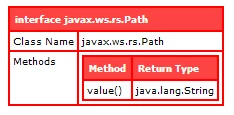
7) The successful result:

1 reply

BKBK
Community Expert
Community Expert
April 16, 2017

stephens17708265  wrote

We are attempting to deploy a java client in CF to make talking to webservices (specifically, parsing the response) a lot simpler. The problem we appear to be running into is that the server is using the Jersey Jackson provider and Client Builder instead of the RestEasy jars provided with the distribution.

By "the server", do you mean ColdFusion? If so, how did you integrate the Jersey Jackson provider and Client Builder in ColdFusion?

Does anyone know how to force CF to use the RestEasy jars?

Did you try the usual method? That is, stopping ColdFusion, copying the jars to ColdFusion's lib directory (after temporarily removing any related custom JARs from this directory), and then restarting ColdFusion.

stephens17708265
Participant
April 17, 2017

You are correct, when I said "server" I meant ColdFusion.

We did deploy by stopping CF, copying the jars over and restarting. We didn't deploy the java jars and dependencies in the Cold Fusion lib directory, we put them in a custom path via the Application.cfc this.javaSettings.

We did not integrate the Jersey Jackson provider or the Client Builder. We do find the following jersey jars in the cf lib directory:

:/opt/coldfusion11/cfusion/bin/opt/coldfusion11/cfusion/lib/jersey-core.jar: :/opt/coldfusion11/cfusion/bin/opt/coldfusion11/cfusion/lib/jersey-server.jar: :/opt/coldfusion11/cfusion/bin/opt/coldfusion11/cfusion/lib/jersey-servlet.jar:

BKBK
Community Expert
BKBKCommunity ExpertCorrect answer
Community Expert
April 22, 2017

System:

ColdFusion 2016 Developer Edition on Windows 7 Ultimate

I did a test to integrate RestEasy in ColdFusion 2016 as follows:

1) Download the file resteasy-jaxrs-3.1.2.Final-all.zip

2) Unzip it and copy the folder resteasy-jaxrs-3.1.2.Final to the C: drive

3) Stop ColdFusion.

4) Open the file C:\ColdFusion2016\cfusion\bin\jvm.config in a text editor. (First create a backup of the file). Add RestEasy's lib directories to ColdFusion's classpath, by changing the line

java.args=-server  -Xms256m -Xmx1024m -Xdebug -Xrunjdwp:transport=dt_socket,server=y,suspend=n,address=5005 -XX:MaxMetaspaceSize=192m -XX:+UseParallelGC -Xbatch -Dcoldfusion.home={application.home} -Duser.language=en -Dcoldfusion.rootDir={application.home} -Dcoldfusion.libPath={application.home}/lib -Dorg.apache.coyote.USE_CUSTOM_STATUS_MSG_IN_HEADER=true -Dcoldfusion.jsafe.defaultalgo=FIPS186Random -Dorg.eclipse.jetty.util.log.class=org.eclipse.jetty.util.log.JavaUtilLog -Djava.util.logging.config.file={application.home}/lib/logging.properties -Duser.language=en -Duser.country=US -Dcoldfusion.classPath={application.home}/lib/updates,{application.home}/lib,{application.home}/lib/axis2,{application.home}/gateway/lib/,{application.home}/wwwroot/WEB-INF/flex/jars,{application.home}/wwwroot/WEB-INF/cfform/jars

to

java.args=-server  -Xms256m -Xmx1024m -Xdebug -Xrunjdwp:transport=dt_socket,server=y,suspend=n,address=5005 -XX:MaxMetaspaceSize=192m -XX:+UseParallelGC -Xbatch -Dcoldfusion.home={application.home} -Duser.language=en -Dcoldfusion.rootDir={application.home} -Dcoldfusion.libPath={application.home}/lib -Dorg.apache.coyote.USE_CUSTOM_STATUS_MSG_IN_HEADER=true -Dcoldfusion.jsafe.defaultalgo=FIPS186Random -Dorg.eclipse.jetty.util.log.class=org.eclipse.jetty.util.log.JavaUtilLog -Djava.util.logging.config.file={application.home}/lib/logging.properties -Duser.language=en -Duser.country=US -Dcoldfusion.classPath={application.home}/lib/updates,{application.home}/lib,{application.home}/lib/axis2,{application.home}/gateway/lib/,{application.home}/wwwroot/WEB-INF/flex/jars,{application.home}/wwwroot/WEB-INF/cfform/jars,C:/resteasy-jaxrs-3.1.2.Final/lib,C:/resteasy-jaxrs-3.1.2.Final/embedded-lib

5) Save the file jvm.config and restart ColdFusion.

6) Run the following test code in a CFM page:

<cfset testObject = createobject("java","javax.ws.rs.Path")>

<cfdump var="#testObject#">

7) The successful result: