
Deepak Kumar Padhy
Inspiring
June 25, 2014
Answered

How remote instances work on Coldfusion Clustering?

  • June 25, 2014
  • 1 reply
  • 1837 views

I have just decided to set up my site using ColdFusion clustering in the staging environment. I need to find out what code adjustments are required when we move to a cluster environment. I have two machines where Coldfusion server is installed. Till now Steps I followed:

  1. On CFServer_1 I have created a instance.(cfinstance_1)
  2. On CFServer_2 I have created another instance. (cfinstance_2)
  3. On CFServer_1 I have created a Cluster using these two instances.
  4. Now on CFServer_1 I have created a IIS site(testsite.com) pointing to my codebase.
  5. Now On CFServer_1, Using the Web Configuration Tool I have associated testsite.com with the cluster.

Now my question is Do I also need to set up the code base on the second server(CFServer_2), Create a site in IIS with same name(testsite.com) and associate the site with the cfinstance_2?
This topic has been closed for replies.
Correct answer Deepak Kumar Padhy

Check this thread : https://forums.adobe.com/message/5616340#5616340

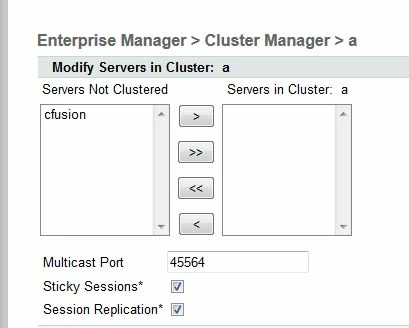
Also, make sure when you add the instances in the cluster then you must check the "Session Replication" option

HTH

Thanks

VJ


The Key point is

ColdFusion 10 servers must be Enterprise Edition for Session Replication To Work.

As in Developer Edition you will never see a option(Check box) for enabling session replication. Its so strange that some forums explains that "Deselecting the Sticky Session" option leads to session replication, which I tried a lot on my local dev edition but did not worked. I do not understand why Adobe does not explain these things properly on the documentation.

Thanks a lot for the info.

Thanks

Deepak Kumar

1 reply

vishu_13
Inspiring
June 25, 2014

Hi Deepak,

Everything is correct

Do not worry, you need not to create a site/folder in the server where you have cfinstance_2. Just place the .cfm in the webroot only and I believe IIS is configured in the machine where you have cfinstance_1.

HTH

Thanks
VJ

Deepak Kumar Padhy
Inspiring
June 25, 2014

Yes IIS is configured on cfinstance_1. So basically all my project files and folders must be on both the machines.Am I correct?

vishu_13
Inspiring
June 25, 2014

Place the cfm in 2 different folders

1. in the webroot (say C:\inetpub\wwwroot)

2. in the cfinstance_2 webroot which is the other server (server 2) where you have this instance. The path will be C:\ColdFusion11\cfinstance_2\wwwroot

Thanks
VJ