
Inspiring
May 12, 2010
Question

How to access method in java object from CF?

  • May 12, 2010
  • 1 reply
  • 3675 views

Hi, I used cfobject to create java object as follow:

<cfobject

type="Java" class="com.as.web.Search" name="myObj" action="create">

<cfdump

var="#myObj#">

Here is the output:
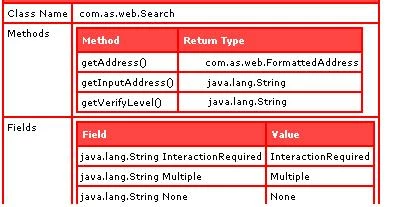
I'm having a hard time accessing these method from coldfusion. If I do:

<cfset x = myObj.getAddress()>

<cfdump var="#x#"> I got this error:

Object Instantiation Exception.

An exception occurred while instantiating a Java object. The class must not be an interface or an abstract class. If the class has a constructor that accepts an argument, you must call the constructor explicitly using the init(args) method. Error : com.as.web.Search

If I do:

<cfset y = "1st street skillman NJ 08558">

<cfset x = myObj.getAddress( #y#)>

<cfdump var="#x#"> I got an error :

The getAddress method was not found.

Either there are no methods with the specified method name and argument types, or the getAddress method is overloaded with argument types that ColdFusion cannot decipher reliably. ColdFusion found 0 methods that matched the provided arguments. If this is a Java object and you verified that the method exists, you may need to use the javacast function to reduce ambiguity.

I have no experience working with java object and don't understand what this mean and what should I do, please help?

This topic has been closed for replies.

1 reply

Inspiring
May 12, 2010

We need to know a little more about the class. Is there a public API or can you post a screen shot of the API for this class?

Inspiring
May 13, 2010

Hi! here is the java class I used;

/* ----------------------------------------------------------------------------
* Common Classes > Search.java
* The an element of the bulk verification search results
* ----------------------------------------------------------------------------
*/
package com.AS.web;

import com.AS.web.soap.*;

/** Wrapper class to encapsulate a single entry returned by a bulk verification search, with fields for
* the original input address, the verification level and possibly a FormattedAddress
*/
public class Search {
    // ------------------------------------------------------------------------
    // public constants
    // ------------------------------------------------------------------------
    /** Verify level indicating that there was no verification upon the search. */
    public static final String None = VerifyLevelType._None;
    /** Verify level indicating that the search has verified correct. */
    public static final String Verified = VerifyLevelType._Verified;
    /** Verify level indicating that the search produced a single deliverable match, but user confirmation is advised */
    public static final String InteractionRequired = VerifyLevelType._InteractionRequired;
    /** Verify level indicating that the address was matched to a partial address at the premise level.
     * This implies that there is also a picklist associated with the partial address. */
    public static final String PremisesPartial = VerifyLevelType._PremisesPartial;
    /** Verify level indicating that the address was matched to a partial address at the street level.
     * This implies that there is also a picklist associated with the partial address. */
    public static final String StreetPartial = VerifyLevelType._StreetPartial;
    /** Verify level indicating that the search was ambiguous and matched multiple separate addresses. */
    public static final String Multiple = VerifyLevelType._Multiple;
    /** Verify level indicating that the address was matched at the Place Level (Address Dr Specific Matching) */
    public static final String VerifiedPlace = VerifyLevelType._VerifiedPlace;
    /** Verify level indicating that the address was matched at the Street Level (Address Dr Specific Matching) */
    public static final String VerifiedStreet = VerifyLevelType._VerifiedStreet;
   
    // ------------------------------------------------------------------------
    // private data
    // ------------------------------------------------------------------------
    private FormattedAddress m_Address;
    private String m_VerifyLevel = null;
    private String m_sInputAddress;
   
    /** Construct an instance from a SOAP layer object */
    public Search(QASearchType t) {
        QAAddressType address = t.getQAAddress();
        if (address != null) {
            m_Address = new FormattedAddress(address);
        } else {
            m_Address = null;
        }
        VerifyLevelType level = t.getVerifyLevel();
        if (level != null) {
            m_VerifyLevel = level.toString();
        }
        m_sInputAddress = t.getInputAddress();
    }
   
    /** (Verification only) Returns the address, which may be null as this will only ever be returned by the
     * verification engine for certain types of results.
     */
    public FormattedAddress getAddress() {
        return m_Address;
    }
   
    /** (Verification only) Returns the input address
     */
    public String getInputAddress() {
        return m_sInputAddress;
    }
   
    /** (Verification only) Returns the verify level, which specifies how well the search has
     * been matched, and the appropriate action that can be taken upon the result.  */
    public String getVerifyLevel() {
        return m_VerifyLevel;
    }
}

Inspiring
May 13, 2010

Creating java objects is similar to creating an instance of a cfcomponent. Some components require arguments. For example a component that queries a database, might require a datasource name

<cfset MyObject = createObject("component", "MyDatabaseComponent").init(someDatasourceName)>

<cfcomponent>
    <cffunction name="init" ....>
         <cfargument name="dsn" ...>

         <!---- store the datasource for use in queries --->
         <cfset variables.dsn = arguments.dsn>
         <cfreturn this />
     </cfffunction>
</cfcomponent>

    public Search(QASearchType   t) {

          .....
    } 

Your Search class seems to require an argument: QASearchType.  So you will have to create a QASearchType object first. Then use it to create your Search object.   You will have to look at the QASearchType class/API to see what  arguments (if any) it requires.  (Note, I personally prefer the shorter createObject(..) syntax over cfobject)

<cfset QASearchType  = creatObject("java", "path.to.class.QASearchType").init( ....??.. )>

<cfset mySearchObject = creatObject("java", "com.AS.web.Search").init( yourQASearchTypeObject)>

Message was edited by: -==cfSearching==-