As it stands, the page for folder 060 (where the thumbnails are listed) was developed for a different purpose. Namely, to enable you to view each picture individually. You may of course decide to change this functionality. In that case, you will have to develop a new application from scratch.
Alternatively, I have a suggestion which entails leaving the current functionality intact. The idea is as follows.
I noticed that the image URLs are identified by a folder-number, followed by an index. This makes it starightforward to write code to generate the URLs of all the images in a folder. You could then use a suitable Javascript tool, such as LightBox, to navigate from picture to picture. The steps follow.
Step 1:
Download the LightBox Zip from GitHub. Unpack it, and copy the directory lightbox2-2.11.3 (and its contents) to your ColdFusion webroot directory.
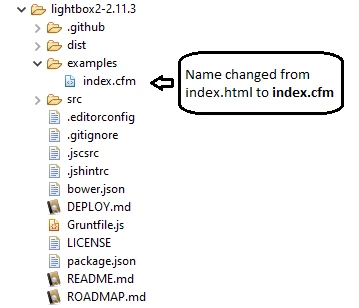
Step 2:
Change the name of the file /examples/index.html to /examples/index.cfm
Step 3:
Replace the entire contents of index.cfm with the following code
<!DOCTYPE html>
<html lang="en-us">
<head>
  <meta charset="utf-8">
  <title>Lightbox Example</title>
  <link rel="stylesheet" href="../dist/css/lightbox.min.css">
</head>
<body>

<cfoutput>

<cfset folderNumber="060">

<section>

<h3>Images from Folder #060#</h3>

<div>

<!--- Get URL of all the images in the folder. They are number 0001 to 0072 --->
<cfloop index="indx" from="1" to="72">
	<cfset dataTitle="">

	<!--- Extract right-most 4 digits --->
	<cfset imageNumber=right("000" & indx, 4)>
	<cfset imageName=folderNumber & "_" & imageNumber & ".jpg">
	<cfset imageURL="https://apps.rplmn.org/ochs/Fireindex/images/#imageName#">

	<!--- Hints on how to navigate when viewing the images --->
	<cfif indx eq 1>
		<cfset dataTitle="Click the right half of the image to move forward.">
	</cfif>
	<cfif indx eq 72>
		<cfset dataTitle="Click anywhere outside the image or the X to the right to close.">
	</cfif>

	<!--- Check if each image exists before proceeding with it.--->
	<cfif fileExists(imageURL)>
		<p>
		<!--- image links --->
		<a class="example-image-link" href="#imageURL#" data-lightbox="example-set" data-title="#dataTitle#">
		<!---display image thumbnails--->
		<img class="example-image" src="#imageURL#" alt="#imageName#" height="30" width="50" action="writeToBrowser"/></a>
		</p>
	</cfif>

</cfloop>

</div>

</section>

</cfoutput>

<script src="../dist/js/lightbox-plus-jquery.min.js"></script>

</body>
</html>
Thank you so much for the suggestion!



 AdChoices