
Inspiring
June 28, 2018
Answered

How to display/use a Stored Procedure on my cfm page?

  • June 28, 2018
  • 1 reply
  • 571 views

I created the following stored procedure to summarize counts by week:

CREATE DEFINER=`user`@`%` PROCEDURE `TT_by_Week`()

BEGIN

SET SESSION group_concat_max_len = 1000000;

DROP TABLE IF EXISTS tmp_results;

CREATE TEMPORARY TABLE tmp_results AS

SELECT td_type, FROM_DAYS(TO_DAYS(ttDate) -MOD(TO_DAYS(ttDate) -2, 7)) AS ttDate, ttCategory, ttNum, Count(ttNum) tickets

FROM v_closed_tickets

WHERE extract(year from ttDate) = '2018' AND ttCategory IN ('TT')

GROUP BY td_type, ttDate

ORDER BY td_type, ttDate ASC;

SELECT CONCAT('

SELECT td_type, ',tickets_by_dates,'

FROM tmp_results

GROUP BY td_type WITH ROLLUP

'

)

INTO @query

FROM

(

SELECT GROUP_CONCAT(CONCAT('IFNULL(COUNT(CASE WHEN ttDate=''',actual_date,''' THEN tickets END), ''-'') AS "',col_name,'"')) tickets_by_dates

FROM (

SELECT actual_date, DATE_FORMAT(actual_date,'%m/%d') AS col_name

FROM (SELECT DISTINCT ttDate AS actual_date FROM tmp_results) AS dates

) dates_with_col_names

) result;

PREPARE statement FROM @query;

EXECUTE statement;

DEALLOCATE PREPARE statement;

END

When I call that Stored Procedure using cfdump on my cfm page, I get this:
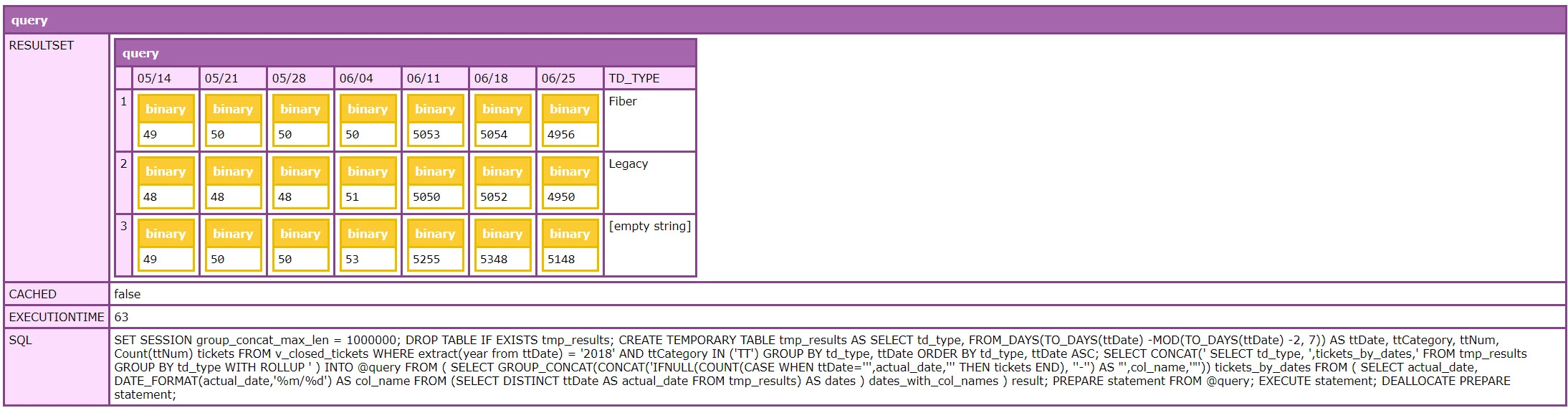
Questions:

  1. In general, how do you use a "stored procedure" in ColdFusion? (or reference the data?)
  2. Why are the values showing "Binary" and not my actual quantities?
  3. How do I use the correct values to create a regular html table or cfreport?

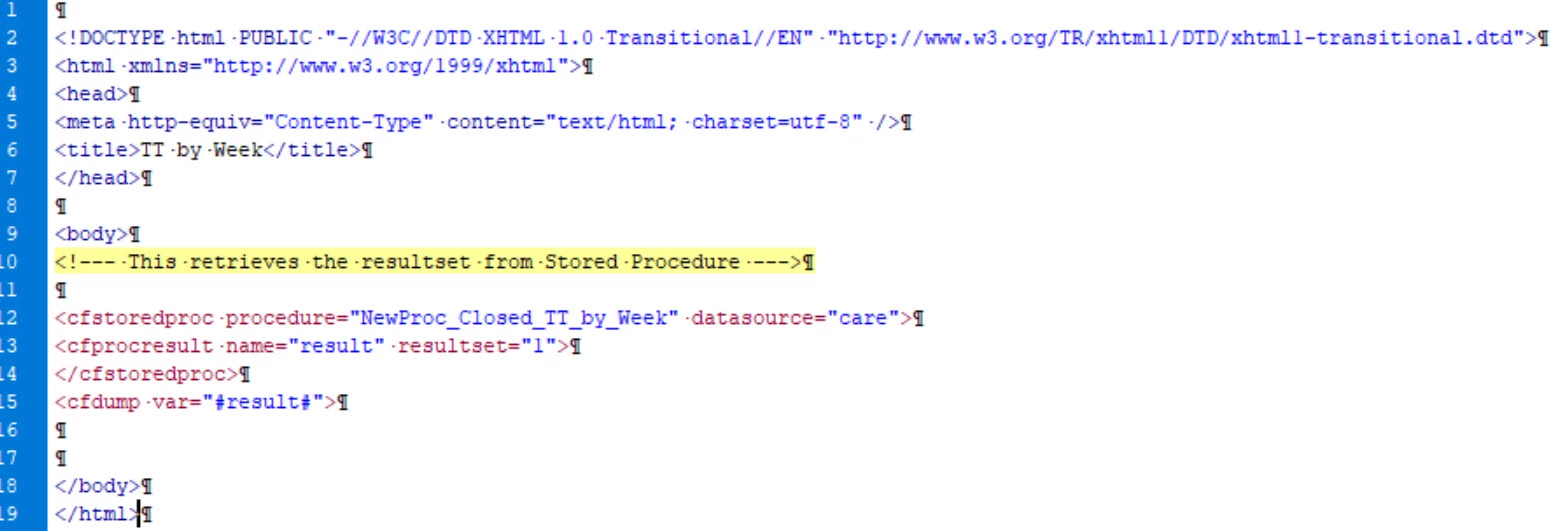
Here is my cfm page so far:
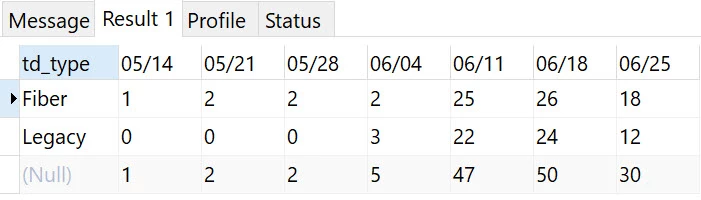
I need my cfm page to display results in a table like this:
This topic has been closed for replies.
Correct answer jlig

I was able to figure this out! Here is the final working cfm page:

<!--- This retrieves the resultset from Stored Procedure "NewProc_Closed_TT_by_Week" --->

<cfstoredproc procedure="NewProc_Closed_TT_by_Week" datasource="care">

<cfprocresult name="rsNewProc_Closed_TT_by_Week" resultset="1">

</cfstoredproc>

<!--- This displays the resultset in a table--->

<cfif IsDefined("rsNewProc_Closed_TT_by_Week.ColumnList")>

<table width="100%" border="1">

<tr style="background: rgba(255,153,51,0.2);">

        <cfloop list="#rsNewProc_Closed_TT_by_Week.ColumnList#" index="col" delimiters=",">

<th align="center" nowrap><cfoutput>#toString(col)#</cfoutput></th>

</cfloop>

        </tr>

<cfoutput query="rsNewProc_Closed_TT_by_Week">

<tr>

        <cfloop list="#rsNewProc_Closed_TT_by_Week.ColumnList#" index="col">

<td align="center" nowrap>#toString(rsNewProc_Closed_TT_by_Week[col][CurrentRow])#</td>

</cfloop>

</tr>

</cfoutput>

</table>

</cfif>

1 reply

jligAuthorCorrect answer
Inspiring
June 29, 2018

I was able to figure this out! Here is the final working cfm page:

<!--- This retrieves the resultset from Stored Procedure "NewProc_Closed_TT_by_Week" --->

<cfstoredproc procedure="NewProc_Closed_TT_by_Week" datasource="care">

<cfprocresult name="rsNewProc_Closed_TT_by_Week" resultset="1">

</cfstoredproc>

<!--- This displays the resultset in a table--->

<cfif IsDefined("rsNewProc_Closed_TT_by_Week.ColumnList")>

<table width="100%" border="1">

<tr style="background: rgba(255,153,51,0.2);">

        <cfloop list="#rsNewProc_Closed_TT_by_Week.ColumnList#" index="col" delimiters=",">

<th align="center" nowrap><cfoutput>#toString(col)#</cfoutput></th>

</cfloop>

        </tr>

<cfoutput query="rsNewProc_Closed_TT_by_Week">

<tr>

        <cfloop list="#rsNewProc_Closed_TT_by_Week.ColumnList#" index="col">

<td align="center" nowrap>#toString(rsNewProc_Closed_TT_by_Week[col][CurrentRow])#</td>

</cfloop>

</tr>

</cfoutput>

</table>

</cfif>