

John_Allred
Inspiring
August 5, 2020
Answered

How to set server time zone value

  • August 5, 2020
  • 2 replies
  • 2222 views

I came back to a previously working local server that accesses a remote datasource. I have no clue what changed in the interim, but when I try to run my local scripts that contain calls to the datasource, or when I try to create a new CF datasource to access the server db, I get this  error text. I don't know where to go to change time zone values.  I did see a page on stackoverflow that described how to access the CF server's JVM arguments to insert "-Duser.timezone=" and then your timezone ID. This did not work.

Thanks!
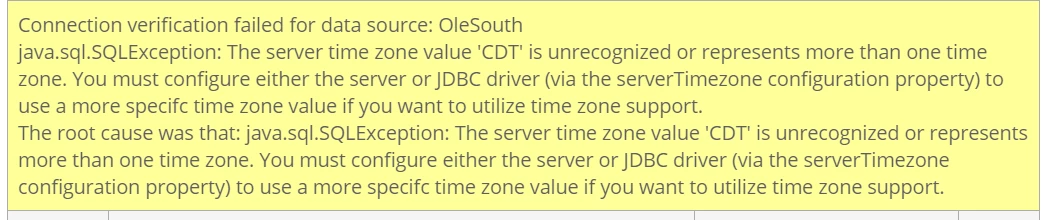
 

I should note that the template that makes calls to this db on the live server works just fine.

    This topic has been closed for replies.
    Correct answer BKBK

    I wouldn't set the time-zone as a global JVM property. If you did, it would be taken up by software components that didn't need the time-zone.


    You should set the time-zone as a property of the specific datasource. To do so, proceed as follows:

    1) Open the ColdFusion Administrator and go to the Data Sources page.

    2) Click on the button to edit the datasource in question (OleSouth), then on the button Show Advanced Settings.

    3) Enter your time-zone in the Connection String field as:


    serverTimezone=time_zone_of_your_database_server


    Obtain the value time_zone_of_your_database_server from the column "TZ database name" in https://en.wikipedia.org/wiki/List_of_tz_database_time_zones


    Mine, for example, is Europe/Amsterdam. Hence:

     4) Press the button to Submit the change.


    2 replies

    BKBK
    Community Expert
    BKBKCommunity ExpertCorrect answer
    Community Expert
    August 6, 2020

    I wouldn't set the time-zone as a global JVM property. If you did, it would be taken up by software components that didn't need the time-zone.


    You should set the time-zone as a property of the specific datasource. To do so, proceed as follows:

    1) Open the ColdFusion Administrator and go to the Data Sources page.

    2) Click on the button to edit the datasource in question (OleSouth), then on the button Show Advanced Settings.

    3) Enter your time-zone in the Connection String field as:


    serverTimezone=time_zone_of_your_database_server


    Obtain the value time_zone_of_your_database_server from the column "TZ database name" in https://en.wikipedia.org/wiki/List_of_tz_database_time_zones


    Mine, for example, is Europe/Amsterdam. Hence:

     4) Press the button to Submit the change.


    Participating Frequently
    August 5, 2020

    CDT is not a valid timezone, its just a name for an American zone when in DST. Timezones are usually defined as something like America/Chicago, which gives you CST and follows DST. If you don't need to follow DST then use Etc/GMT+6 for CST. There is a database of Timezones with details in places like https://en.wikipedia.org/wiki/List_of_tz_database_time_zones