NOTE : All the Servers(Machines) should be under same Network (same subnet)
Below is the example of two IP Addresses in the same Subnet
10.40.166.xx (say 34)
10.40.166.xx (say 121)
Below are the files (Application.cfc and index.cfm) to test session replication.
Steps to perform:
Enable the J2EE session variables for both the ColdFusion servers under Memory Variables in ColdFusion Administrator
Create a local instance (say test1) and create a remote instance (say test 2) on the remote machine.
Go ahead and Register the remote instance (test2) in the ColdFusion Administrator . Create a cluster and add both the instances (test1 and test2) with Sticky session option checked if you want session replication.
Now add the cluster tag information in the server.xml (between </host> and </engine>) of the remote instance using the help document of ColdFusion 10 mentioned below
http://help.adobe.com/en_US/ColdFusion/10.0/Admin/WSc3ff6d0ea77859461172e0811cbf363c31-7ffa.html
NOTE : Make sure you change the multicast port in the server.xml of the remote instance with the Multicast port number when you create cluster in ColdFusion Admin console.
Open the context.xml of the remote instance (test2) and make sure that the “Manager pathname” is comment out.
Also, make sure that in the context.xml of local machine instance (test1), “Manager pathname” is comment out.
Stop and Start remote instance first (test2) using command prompt and then stop and start instance (test1) using command prompt.
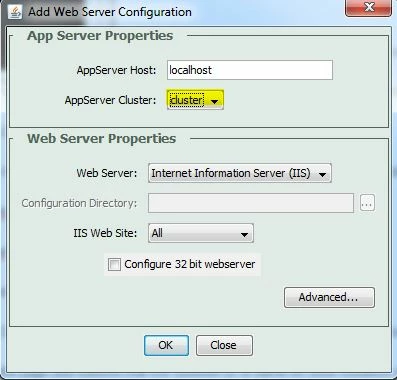
Place the files in the wwwroot of both the instances (test1 and test2) and in the website root. Create a cluster using the Web Server Configuration tool using the cluster as shown in the screenshot below
Access the index.cfm from your webserver (say IIS) like http://localhost:80/index.cfm.
Then note down the session ID and instance name, refresh the page and observe that the Session ID is same for other instance or not. You can stop any one instance and refresh the same page then check the same instance is getting the same session ID or not.
Application.cfc
<cfcomponent>
<cfset this.name = "SessionApp" />
<cfset this.sessionmanagement = "true" />
<cfset this.sessiontimeout = createTimeSpan(0,5,0,0) />
</cfcomponent>
index.cfm
<cfset Session.svar="Adobe">
<cfdump var="#Session#" />
<cfscript>
hostaddress = createObject("java", "java.net.InetAddress").localhost.getHostAddress();
instancename = createobject("component","CFIDE.adminapi.runtime").getinstancename();
</cfscript>
IP Address: <cfdump var="#hostaddress#"><br />
Instane Name : <cfdump var="#instancename#">
HTH 
VJ 




 AdChoices