Are you sure that all of the returned form values are able to generate a valid date?
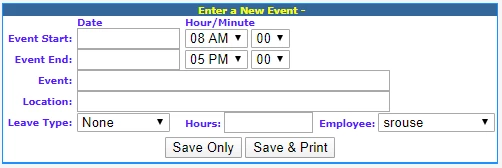
Regarding date consruction, this is simplier code... but you'd need to ensure that form.STARTDATE is a valid date to begin with:
<cfset fullStartDate = CreateDateTime(Year(form.STARTDATE), Month(form.STARTDATE), Day(form.STARTDATE'), VAL(Form.STARTHOUR), val(Form.STARTMINUTE), 0)>
or you could try something like this.
<cfparam name="form.STARTDATE" default="">
<cfparam name="form.STARTHOUR" default="00" type="numeric">
<cfparam name="form.STARTMINUTE" default="00" type="numeric">
<cfset fullStartDate = "">
<cfif isDate(form.STARTDATE)>
	<cftry>
		<cfset fullStartDate = ParseDateTime("#form.STARTDATE# #NumberFormat(VAL(Form.STARTHOUR),'00')#:#NumberFormat(VAL(Form.STARTMINUTE),'00')#:00")>
		<cfcatch>
			<cfthrow message="Invalid date/time: #form.STARTDATE# #NumberFormat(VAL(Form.STARTHOUR),'00')#:#NumberFormat(VAL(Form.STARTMINUTE),'00')#:00">
		</cfcatch>
	</cftry>
</cfif>
Regarding your user interface, have you considered using a javascript-based date, time or daterange widget? We've been using Date Range Picker and it has simplified data entry like this, but I only recommend it if you require start & end date/time values. If your date and/or time entry fields are optional, you may want to use something like Pikaday or TimePicker. (There are other client-side libraries available; these are just what we're currently using in production.)
Regarding number ranges, use CFLOOP to go from="00" to="23" for the hour and from="00" to="59" for the minute.



 AdChoices