June 13, 2013
Question

Installation error

  • June 13, 2013
  • 4 replies
  • 4882 views

Hello all!

I'm tryin to reinstall coldfusion 10 x64 on windows 2008 R2 64 after uninstall.

The installer show me this warning and error.
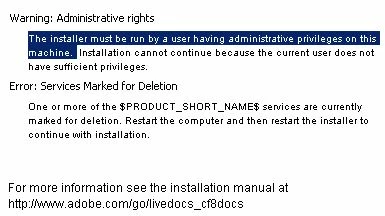
I manualy delete installation folder and all registry entries.

Colud you help me?

This topic has been closed for replies.

4 replies

Participant
October 6, 2018

I'm having the exact same issue, although on a new install of Windows 2016. Running the installer as the Administrator user.

Running the installer on a console also appears to have no affect.

Participant
October 6, 2018

I figured out my issue, I belive. The Sophos AV was detecting the installer as PUA https://community.sophos.com/kb/en-us/127332

Shpak Aliaksandr
Participant
June 13, 2017

ошибка связанная с именем пользователя не на латинке

user name only english !

должно быть только так "C:\Users\Sasha"

но не "C:\Users\Саша"

June 13, 2013

The 32bit version starts install well

Anit_Kumar
Community Manager
Community Manager
June 13, 2013

Hello Artemza,

Are you saying that you are able to install ColdFusion in 32-bit mode and the 64-bit is not working. Please confirm. Also, did you check the installer logs for more information?

Regards,

Anit Kumar

June 13, 2013

I try install 32bit from ColdFusion_10_WWEJ_win32.exe. It's work.
But when I try to install 64bit from ColdFusion_10_WWEJ_win64.exe they show me error.

This is last log file

__________________________________________________________________________

Thu Jun 13 22:44:33 ALMT 2013

Free Memory: 11895 kB

Total Memory: 57600 kB

java.class.path:

    C:\Users\Администратор\AppData\Local\Temp\2\I1371141832\InstallerData\IAClasses.zip

    C:\Users\Администратор\AppData\Local\Temp\2\I1371141832\InstallerData\Execute.zip

    C:\Users\Администратор\AppData\Local\Temp\2\I1371141832\Windows\InstallerData\Execute.zip

    C:\Users\Администратор\AppData\Local\Temp\2\I1371141832\InstallerData\Resource1.zip

    C:\Users\Администратор\AppData\Local\Temp\2\I1371141832\Windows\InstallerData\Resource1.zip

    C:\Users\Администратор\AppData\Local\Temp\2\I1371141832\InstallerData

    C:\Users\Администратор\AppData\Local\Temp\2\I1371141832\Windows\InstallerData

ZGUtil.CLASS_PATH:

    C:\Users\Администратор\AppData\Local\Temp\2\I1371141832\InstallerData\IAClasses.zip

    C:\Users\Администратор\AppData\Local\Temp\2\I1371141832\InstallerData\Execute.zip

    C:\Users\Администратор\AppData\Local\Temp\2\I1371141832\InstallerData

sun.boot.class.path:

    C:\Users\Администратор\AppData\Local\Temp\2\I1371141832\Windows\resource\jre\lib\resources.jar

    C:\Users\Администратор\AppData\Local\Temp\2\I1371141832\Windows\resource\jre\lib\rt.jar

    C:\Users\Администратор\AppData\Local\Temp\2\I1371141832\Windows\resource\jre\lib\sunrsasign.jar

    C:\Users\Администратор\AppData\Local\Temp\2\I1371141832\Windows\resource\jre\lib\jsse.jar

    C:\Users\Администратор\AppData\Local\Temp\2\I1371141832\Windows\resource\jre\lib\jce.jar

    C:\Users\Администратор\AppData\Local\Temp\2\I1371141832\Windows\resource\jre\lib\charsets.jar

    C:\Users\Администратор\AppData\Local\Temp\2\I1371141832\Windows\resource\jre\lib\modules\jdk.boot.jar

    C:\Users\Администратор\AppData\Local\Temp\2\I1371141832\Windows\resource\jre\classes

java.ext.dirs:

    C:\Users\Администратор\AppData\Local\Temp\2\I1371141832\Windows\resource\jre\lib\ext

    C:\Windows\Sun\Java\lib\ext

java.version                  == 1.6.0_29 (Java 1)

java.vm.name                  == Java HotSpot(TM) 64-Bit Server VM

java.vm.vendor                == Sun Microsystems Inc.

java.vm.version               == 20.4-b02

java.vm.specification.name    == Java Virtual Machine Specification

java.vm.specification.vendor  == Sun Microsystems Inc.

java.vm.specification.version == 1.0

java.specification.name       == Java Platform API Specification

java.specification.vendor     == Sun Microsystems Inc.

java.specification.version    == 1.6

java.vendor                   == Sun Microsystems Inc.

java.vendor.url               == http://java.sun.com/

java.class.version            == 50.0

java.compiler                 == null

java.home                     == C:\Users\Администратор\AppData\Local\Temp\2\I1371141832\Windows\resource\jre

java.io.tmpdir                == C:\Users\836D~1\AppData\Local\Temp\2\

os.name                       == Windows Server 2008 R2

os.arch                       == amd64

os.version                    == 6.1

path.separator                == ;

file.separator                == \

file.encoding                 == UTF-8

user.name                     == Администратор

user.home                     == C:\Users\Администратор

user.dir                      == C:\Users\Администратор\AppData\Local\Temp\2\I1371141832\Windows

user.language                 == ru

user.region                   == null

__________________________________________________________________________

Installed Feature(s) ColdFusion, J2EE of Adobe ColdFusion 10

Install Begin: JUNE 13, 2013 10:44:21 PM ALMT

Install End: JUNE 13, 2013 10:44:28 PM ALMT

Installed by InstallAnywhere 12.0 Enterprise Build 4118

INSTALLATION WAS CANCELLED BY USER DURING PRE-INSTALLATION

User Interactions

-----------------

Summary

-------

Installation:  Cancelled during pre-install.

44 Successes

2 Warnings

0 NonFatalErrors

0 FatalErrors

Action Notes:

Pre-Installation Check: The installer must be run by a user having administrative privileges on this machine.  Installation cannot continue because the current user does not have sufficient privileges.

Pre-Installation Check: One or more of the ColdFusion 10 services are currently marked for deletion. Restart the computer and then restart the installer to continue with installation.

Install Log Detail:

Check Disk Space:         \

                          Status: SUCCESSFUL

                          Additional Notes: NOTE - Required Disk Space: 443 831 720; Free Disk Space: 83 562 414 080

Get Registry Entry:       Key: HKEY_LOCAL_MACHINE\SOFTWARE\Adobe\Install Data\Adobe ColdFusion 8

                          Value Name: CFMXRoot

                          Status: SUCCESSFUL

Get Registry Entry:       Key: HKEY_LOCAL_MACHINE\SOFTWARE\Adobe\Install Data\Adobe ColdFusion 8

                          Value Name: CFMXRoot

                          Status: SUCCESSFUL

Get Registry Entry:       Key: HKEY_LOCAL_MACHINE\SOFTWARE\Adobe\Install Data\Adobe ColdFusion 8

                          Value Name: CFMXRoot

                          Status: SUCCESSFUL

Get Registry Entry:       Key: HKEY_LOCAL_MACHINE\SOFTWARE\Adobe\Install Data\Adobe ColdFusion 9

                          Value Name: CFMXRoot

                          Status: SUCCESSFUL

Get Registry Entry:       Key: HKEY_LOCAL_MACHINE\SOFTWARE\Adobe\Install Data\Adobe ColdFusion 9

                          Value Name: CFMXRoot

                          Status: SUCCESSFUL

Get Registry Entry:       Key: HKEY_LOCAL_MACHINE\SOFTWARE\Adobe\Install Data\Adobe ColdFusion 9

                          Value Name: CFMXRoot

                          Status: SUCCESSFUL

Get Registry Entry:       Key: HKEY_LOCAL_MACHINE\SOFTWARE\Adobe\Install Data\Adobe ColdFusion 10

                          Value Name: CFMXRoot

                          Status: SUCCESSFUL

Get Registry Entry:       Key: HKEY_LOCAL_MACHINE\SOFTWARE\Adobe\Install Data\Adobe ColdFusion 10

                          Value Name: CFMXRoot

                          Status: SUCCESSFUL

Get Registry Entry:       Key: HKEY_LOCAL_MACHINE\SOFTWARE\Adobe\Install Data\Adobe ColdFusion 10 .NET Integration Services

                          Value Name: DotNetIntegrationRoot

                          Status: SUCCESSFUL

Get Registry Entry:       Key: HKEY_LOCAL_MACHINE\SOFTWARE\Adobe\Install Data\Adobe ColdFusion 10 .NET Integration Services

                          Value Name: DotNetIntegrationRoot

                          Status: SUCCESSFUL

Get Registry Entry:       Key: HKEY_LOCAL_MACHINE\SYSTEM\CurrentControlSet\Services\ColdFusion10JettyService

                          Value Name: ImagePath

                          Status: SUCCESSFUL

Get Registry Entry:       Key: HKEY_LOCAL_MACHINE\SYSTEM\CurrentControlSet\Services\ColdFusion10JettyService

                          Value Name: ImagePath

                          Status: SUCCESSFUL

Get Registry Entry:       Key: HKEY_LOCAL_MACHINE\SYSTEM\CurrentControlSet\Services\ColdFusion10JettyService

                          Value Name: ImagePath

                          Status: SUCCESSFUL

Custom Action:            com.macromedia.ia.action.PreInstallCheckAction

                          Status: SUCCESSFUL

Custom Action:            com.macromedia.ia.action.LocalhostAddress

                          Status: SUCCESSFUL


Pre-Installation Check

                          Status: WARNING

                          Additional Notes: WARNING - Administrative rights

Pre-Installation Check

                          Status: WARNING

                          Additional Notes: WARNING - Services Marked for Deletion

INSTALLATION WAS CANCELLED BY USER DURING PRE-INSTALLATION

June 13, 2013

I just reinstall Windows 2008 R2. Intsall IIS7 and MS SQL 2008.

Next I try to install Coldfusion 10, but they show me same error.

Anybody know what's wrong?