
tobym6130
Inspiring
September 30, 2020
Answered

Installed CF Builder 2018 but getting 127.0.0.1 refused to connect error

  • September 30, 2020
  • 2 replies
  • 1363 views

Recently installed CF Builder 2018 but cannot get to http://127.0.0.1:8600/CFIDE/administrator/index.cfm - getting this:

This site can’t be reached

127.0.0.1 refused to connect.

I successfully pinged both 127.0.0.1 and localhost. Also tried disabling firewall to no avail. I'm logged in as Administrator. When I go to 127.0.0.1 or localhost I do get the IIS spalash screen. Any help appreciated!
    This topic has been closed for replies.
    Correct answer tobym6130

    Hi tobym6130 

    I'm glad to hear you've solved the initial problem. Could you please share the solution with the forum?


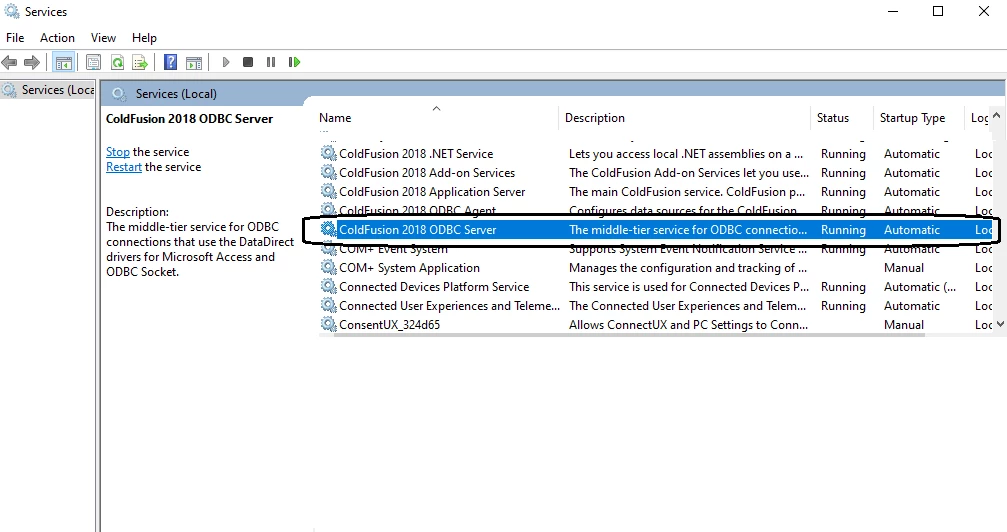
    About the ODBC Server? Is it running?


    My solution was as follows - necessary after reboot - on CF Builder 2018 start screen, select Window > Show View > CF Servers and then wight-click on defaultLocal and select Start Server.


    On the ODBC service, I don't even show the CF 2018 ODBC Service as listed. Not installed? 

    2 replies

    Charlie Arehart
    Community Expert
    Community Expert
    October 5, 2020

    Toby, when you installed cfbuilder, do you recall if you let it choose to install cf WITHIN cf builder? If you did, THAT is what listens on 8600.


    If you did, then you need to START that cf instance from with CF builder, using its Servers view. Use Windows>Show View to see how to make that view appear.


    If you did NOT install it within cfb's installer, then if you install cf separately THAT would listen on port 8500. 

    /Charlie (troubleshooter, carehart. org)
    tobym6130
    tobym6130Author
    Inspiring
    October 7, 2020

    Thanks! I have th running now, but when trying to set up an ODBC datasource (MS Access) I get the following: The "ColdFusion ODBC Server service is not running or has not been installed. You may also use the "MS Access with Unicode" driver to connect to MS Access datasources." Is there a fix for this? Thank you.

    BKBK
    Community Expert
    Community Expert
    October 7, 2020

    Hi tobym6130 

    I'm glad to hear you've solved the initial problem. Could you please share the solution with the forum?


    About the ODBC Server? Is it running?


    BKBK
    Community Expert
    Community Expert
    October 1, 2020

    For the port, try 8500 in place of 8600. Hence,  http://127.0.0.1:8500/CFIDE/administrator/index.cfm -

    tobym6130
    tobym6130Author
    Inspiring
    October 4, 2020

    Unforunately that doesn't work either - same result. But thanks for the suggestion. Any others? 

    BKBK
    Community Expert
    Community Expert
    October 5, 2020

    Another idea.Since you mention IIS, did you configure ColdFusion to use IIS as web server? For example, did you run the Web Server Configuration Tool? (This is the tool C:\ColdFusion2018\cfusion\runtime\bin\wsconfig.exe)


    If so, open IIS. In the lefthand panel, click on the site. In the righthand panel, click on Bindings. You should then see the port number. The default URL is usually  http://127.0.0.1 or  http://127.0.0.1:80