


m4tim23877130
Participant
Nov 28, 2016 9:36 AM UTC
Answered

Installing ColdFusion 2016 on RedHat Enterprise Linux 7.2 ppc64

Dear All,

I have some issue on installing ColdFusion 2016 on RedHat Enterprise Linux 7.2 ppc64. when i try to run the installer it's always saying "JRE libraries are missing or not compatible".
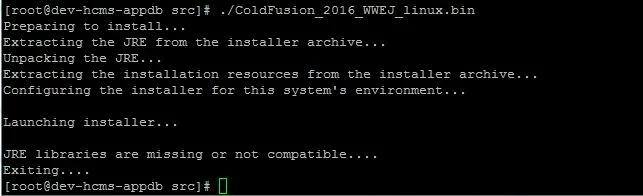
anyone can help me on this case? what am i missing here?

FYI, i already try to do the installation using 32 bit and 64 bit and the result is always the same.

Really appreciated for this big help.

    This topic is closed to new replies. Start a new post to keep the conversation going.
    Priyank Shrivastava.
    Priyank Shrivastava.Correct answer
    Inspiring
    Nov 28, 2016 1:10 PM UTC

    Hi,

    Please try this command while running the installer.

    ./ColdFusion_2016_WWEJ_linux64.bin LAX_VM /opt/jre/bin/java.

    LAX_VM, where you can define the JDK location.

    Thanks,

    Priyank

    Thanks, Priyank Shrivastava

    2 replies

    Priyank Shrivastava.
    Priyank Shrivastava.Correct answer
    Inspiring
    Nov 28, 2016 1:10 PM UTC

    Hi,

    Please try this command while running the installer.

    ./ColdFusion_2016_WWEJ_linux64.bin LAX_VM /opt/jre/bin/java.

    LAX_VM, where you can define the JDK location.

    Thanks,

    Priyank

    Translate
    Thanks, Priyank Shrivastava
    m4tim23877130
    Participant
    Nov 29, 2016 5:10 AM UTC

    Hi Priyank,

    thanks for the big help. i can launch the installer now

    Translate