


Inspiring
August 1, 2025
Answered

Local Update Site Help

  • August 1, 2025
  • 1 reply
  • 777 views

Without going into to much detail, we basically have 0 control over anything at my company. So we're resigned to doing manual Coldfusion 2023 updates on our developement machines. On our actual servers we can use the adobe update site.

Manual updates seem to have a lot of quirks, so it would be ideal to use the Administrator. Is there a way to point the Update Site URL to a folder to look for updates? It doesn't seem to accept a folder path unlike the Packages Site URL. That still might not work anyway because we don't have local admin access 🙂


Trying to install update 15 through our SCCM we got a bunch of these errors: Exception : Illegal character in opaque part at index 2: C:\ColdFusion2023\bundles\repo/ib6coreutil-1.3.jar

I've managed to downgrade myself manually to update 13 but now we're getting the mail error and no amount of felix cache clearing is fixing it.


I've also tried setting up the proxy under Package Manager but the error isn't super helpful: "Error","http-nio-8500-exec-6","08/01/25","10:14:05","cfadmin","Not able to connect to Update Site: Connection Failure: Status code unavailable"


I'm at a loss.
    Correct answer joeyg60012433

    @joeyg60012433 , If all you want is to install ColdFusion 2023 Update 15 manually, what about just following the steps in the section "Install the update in offline mode manually" on the page ColdFusion (2023 release) Update 15?


    The steps (with slight modification) are:

    1.  Download the ColdFusion 2023 packages zip file.
    2.  Stop ColdFusion 2023.
    3.  Add the flag -Djdk.util.zip.disableZip64ExtraFieldValidation=true to java.args in jvm.config.
    4.  Save a copy of your current directory C:\ColdFusion2023\bundles, as bundles_back-up, outside of ColdFusion. You might need it later, in case you wanted to revert the installation.
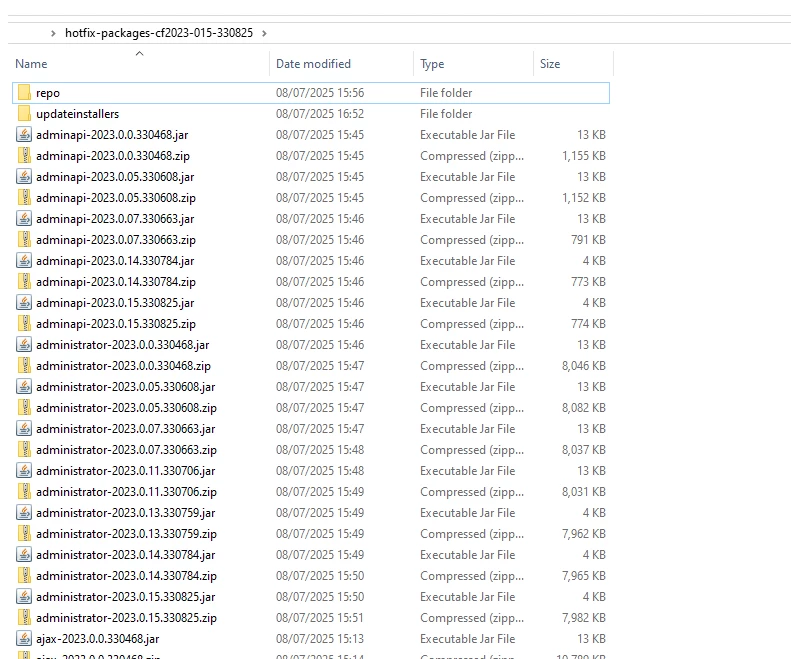
    5.  Extract the zip file you downloaded in Step 1. Its contents look like this:


    6.  Copy all the content from the unpacked directory (for example, using CTRL-A followed by CTRL-C), and paste it in the directory C:\ColdFusion2023\bundles, choosing to replace any files already in the bundles directory.
    7.  Open the directory C:\ColdFusion2023\bundles\updateinstallers and confirm that it contains the Update 15 installer, hotfix-015-330825.jar
    8.  Open the Command Prompt (CMD) as Administrator. Run the DOS command
      C:\ColdFusion2023\jre\bin\java.exe  -jar C:\ColdFusion2023\bundles\updateinstallers\hotfix-015-330825.jar
    9. Restart ColdFusion.

    Yep this is what we've been doing. With the exception of that flag because the java in the installer is not 17.0.8 or higher.

    Actually just found out what is happening but not why.

    Seems that for some reason, the update deletes some .jar files in the bundles\repo folder, and then it fails to update all the packages. Does this for update 14 and 15.

    Our fix because I don't want to find out why at this point, is to just unzip the files again and run a 'cfpm install all'. Or do an install all from CF Admin. 

    1 reply

    Inspiring
    August 1, 2025

    Did a fresh install then tried updating to 14 and get the same error on random packages:

    Downloading the dependent package bcpkix-jdk15on-153.jar

    Illegal character in opaque part at index 2: C:\ColdFusion2023\bundles\repo/bcpkix-jdk15on-153.jar


    So update 14 and 15 seem to have this issue when updating from the bundles folder. 13 was fine.

    Is it complaining about the / when all the others are \ maybe?

    Charlie Arehart
    Community Expert
    Community Expert
    August 1, 2025

    Frustrating, I know. But something about your restricted environment is the issue. There WILL be a way to your updates done. Just depends on the problem. Questions:


    1. What is the current value for the update url and packages url?  FWIW, the default value for the "update site" url for CF2023 are https://www.adobe.com/go/coldfusion-updates--which redirects to https://www.adobe.com/go/coldfusion-updates, which does have CF2023 (and cf2025) updates listed within its json result. The default "packages site" url is https://www.adobe.com/go/cf2023_packages--which redirects to https://cfmodules.adobe.com/cf2023/bundlesdependency.json, and which has only cf2023 package updates in it.

    2. Whatever your values are is, can you browse to either of THOSE values successfully from a browser on that dev machine where you're trying to update? If not, what's the error.

    3. Even if you can, the real question is whether cf can. Create a simple test page to do a cfhttp to each of your urls, dumping the output. Do they succeed or fail? What if you try the default URLs I offered above?

    4. Finally, regarding the "proxy settings" your trying (at the bottom of that package mgt page), you would be naming something on your end (not Adobe's). If that can't be reached, reconsider what value you're specifying.


    Let us know how the above goes.

    /Charlie (troubleshooter, carehart. org)
    Inspiring
    August 1, 2025

    1. The defaults, https://www.adobe.com/go/coldfusion-updates and https://www.adobe.com/go/cf2023_packages

    2. I can reach them fine in a browser

    3. Just trying to get me to google using cfhttp gives some auth required error from the company

    4. I managed to get a '407 proxy authentication required' after trying everything possible. Could be anything with our network that I don't know how to fix.


    Even if we don't do the proxy, any idea what that illegal character error is? We've successfully done update 13 in the same way we're trying 14 and 15 now. I tried scouring the config files to see where that path is being created with 2 different slashes but can't find anything.