
Participating Frequently
March 3, 2026
Question

Log4J Files Removal in JRE

  • March 3, 2026
  • 2 replies
  • 66 views

Hello CF Community,


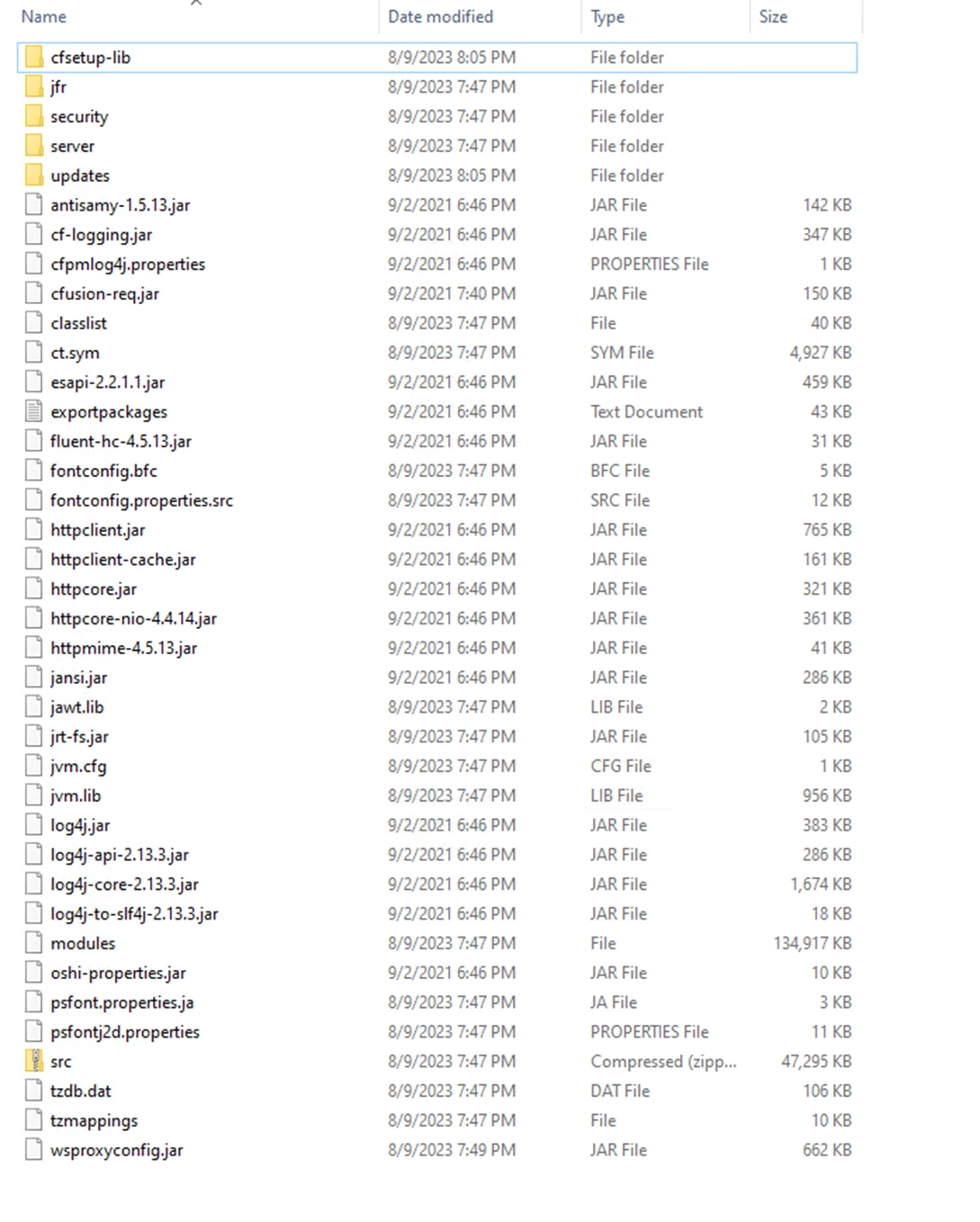
We have a bit of an unusual situation, On one of the servers we have the log4j files which i do not see on the other servers. We have a security issue and the core-2.13.3 needs to be removed. We are running the CF2021 Updated to update 18 on all nodes. Only one of the nodes is showing the extra files in the CF/jre/lib folder. 

How can i go about safely removing the core2.13.3 file for log4j. Can i simply remove and if so what should i be on the look out for in terms of failures?


    2 replies

    BKBK
    Community Expert
    Community Expert
    March 4, 2026

    I think you can remove core-2.13.3.jar without affecting ColdFusion. However, removing it might disrupt an application that needs it. After all, it was there for a reason. More on this in a moment.


    First, your files draw attention immediately. If the contents you’ve shown are those of the directory CF2021/jre/lib, then something has seriously gone wrong with your ColdFusion 2021 installation. The folder appears to mix Java libraries from CF2021/jre/lib together with ColdFusion libraries from CF2021/cfusion/lib. I cannot imagine why. But it looks bad, really bad.


    The jre directory belongs to Java. Java serves ColdFusion, as it does millions of other applications. You cannot expect any of those applications to store their files within jre.


    I have attached the contents of my ColdFusion2021/jre/lib and ColdFusion2021/cfusion/lib directories. They are more or less the ColdFusion default. Have a look, and compare them with yours. You will see that your content deviate. 

    To return to core-2.13.3.jar, do you have a ColdFusion application that uses CFJasperReport? I ask because I once came across core-2.3.0.jar when looking into a thread about CFJasperReport.


    In any case, I consider your ColdFusion 2021 installation to have been corrupted. So, my advice at this point is:

    • if you have to or wish to continue with ColdFusion 2021, then you should delete and re-install it.


    Charlie Arehart
    Community Expert
    Community Expert
    March 3, 2026

    Harship, here are a few considerations:

    1. If you’re asking if others running CF2021 update 18 would or should find those log4j files in the cf jre/lib folder, the answer is no, in that I do NOT find them there. (For those reading along, we are referring here to the jre folder in the root of the cf folder, put there by Adobe at the initial installation of any CF instance.)
    2. I also don’t find those specific ones in the cfusion/lib folder (they are very different folders, of course, serving very different purposes.)

    I find your list of files there to be very odd, on several levels. It shows many MANY files that are NOT in my cf jre/lib folder--and not even in my cfusion/lib folder. You somehow have quite a mix of files there.

    • while a cf jre/lib would have the jfr, security, and server folders, it would NOT have the “updates” or “cfsetup-lib”. Those WOULD normally be in the cfusion/lib...but then so should nearly a dozen other folders you don’t show there. So somehow your jre/lib has those folders it should not. I hope you find them in your cfusion/lib.
    • while a cf jre/lib would have most of those files you show, it would NOT have some of them, like the antisamy*.jar, cf-logging.jar, cfpmlog4j.properties, and others. Those should be instead in the cfusion/lib folder. But then also there are many (many) other files in that folder which you do NOT show being in this folder.


    It feels like someone there tried to do some manual approach to “cleaning things up”--perhaps back in the early day of the log4j debacle a few years ago, before Adobe solved it with updates. But they have made a real mess of that folder. And since CF puts that cf jre/lib into the classpath, it DOES mean that cf may well be loading those incorrect files--possibly BEFORE it would find those in the cfusion/lib.


    And it’s only the cfusion/lib that the CF update mechanism would be updating. It never updates the CF jre/lib folder. Indeed, many people implement newer java versions (in your case of CF2021, newer versions of Java 11, I mean), and then point CF at that. In that case, CF itself is no longer even USING that cf jre/lib folder.


    But you can’t just “delete it”, because if you run the CF add-on service, that is configured to use that cf jre folder by default. See the jetty.lax file in the cfusion/jetty folder, and its lax.nl.current.vm property. (But if you installed the add-on service manually, that would have its own directory outside of CF by default and would use the JRE folder in that directory by default.)


    As for how you can rectify things, that’s going to be a challenge. Again, you seem to have quite a mess there. I’d think reinstalling might be the best solution, but I suspect you/your folks would not want to do that. If you could implement CF2021 on another machine and update that, you could then compare the two. That may seem a lot of work, but with the right tools it’s actually quite trivial. I could assist you in doing that on a consulting basis, likely in as little as an hour.


    But finally, if your security folks are worried about log4j, they should be far more worried about the point I raised above--that the jars in that cf jre/lib folder are NOT the ones that CF updates are updating...so you are loading potentially old, vulnerable jars. They may or may not detect that from scanning.


    And then they should be even MORE worried about the fact that you're still running on CF2021--which Adobe no longer supports (since Nov 2025) and no longer offers updates for (including security updates) since the last one in December 2025 (when they threw us a bone with that one more update, which they’d been working on already in Nov.) And BTW, that was update 23. You are in fact 5 updates behind in your CF2021 (and I appreciate that doing those could cause incompatibilities. Again, I could help with that often in less than an hour.


    Still more concerning should be that because CF2023 and 2025 got the next update, in Jan 2026, now anyone running CF2021 is exposed to the vulnerability which was identified and fixed in that Jan 2026 update--and there is NOTHING you can do to get Adobe to provide an update for that, nor is there any known workaround (for the problem, which has to do with a vulnerability in the Tika library. Even for CF2023, they had to do more than just “update to the latest tika jar”. Again, they will NOT do that ‘other work’ for those on CF2021.)


    So I’m saying that really your BEST solution to this problem is to move up to CF2025 (you can no longer buy CF2023 from Adobe). I realize that upgrading to a new version can seem to be a lot of work.


    Again, I can help make that go more easily (as can other consultants, which I list at my cf411.com site and its categories of different kinds of CF consultants. If you want someone to “do it all”, it will be expensive. If you want someone to be a guiding hand while you do most of the work, that’s what I do and may entail only a few hours of my assistance.).


    Or you can wait to see if someone else may come along to say something quite different than I have said. I am 100% confident in all I’ve said above, but there are others here who may well assert something otherwise, not even having read what I’ve written. I hope you’ll be careful in considering all that is offered. We’re all here just trying to help, each in our own way. (I can wish there would be more cooperative efforts, but I can’t push a rope.)

    /Charlie (troubleshooter, carehart. org)