
Participant
May 23, 2025
Question

[Macromedia][Oracle JDBC Driver][Oracle]ORA-01003: no statement parsed

  • May 23, 2025
  • 2 replies
  • 1215 views

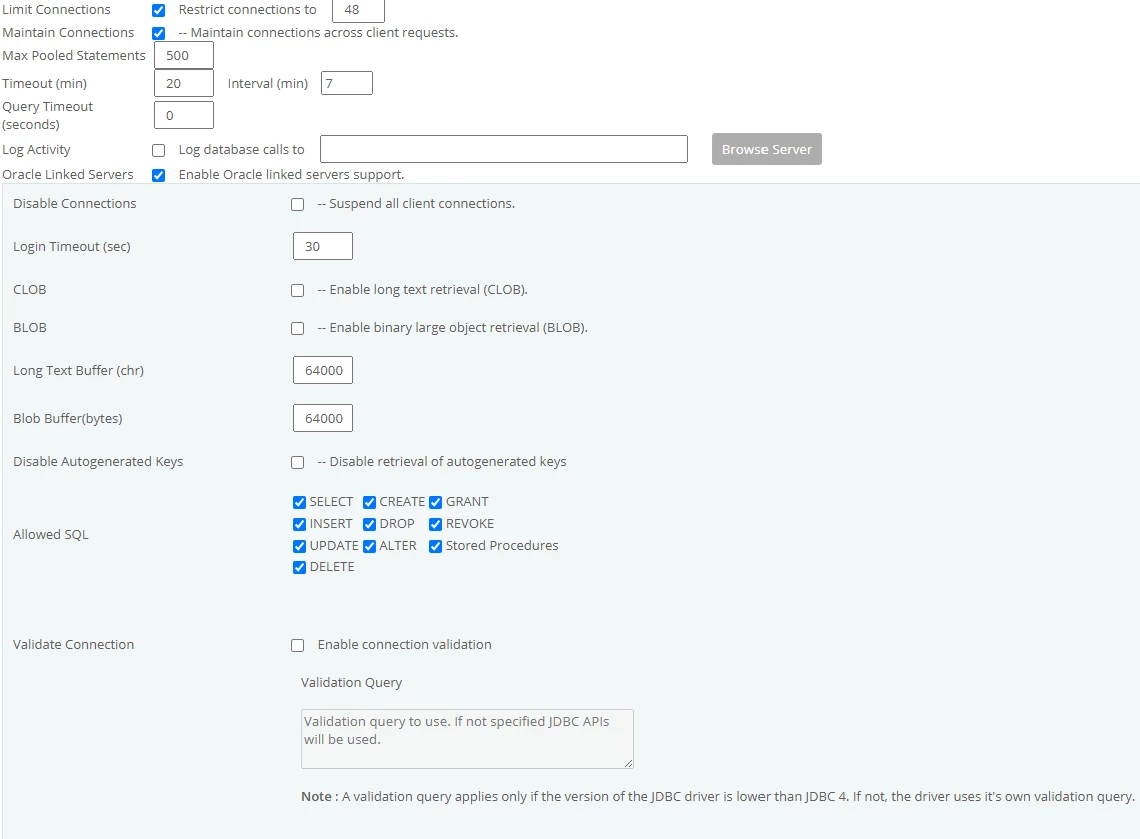
I have some coldfusion servers that are connected to an oracle database and have been having some issues sending queries to the DB from the CF servers. I must also state that both the server and db are quite busy. The issue I am having is that the same query will get processed and shortly after I would receive the aforementioned error. I've done some troubleshooting with the DBA an confirmed the issue is not coming from the DB. Further research into issue led me to make some changes on the CF servers but I am still experiencing this issue. Two actions I normally execute provides a temporary solution to the problem:
1. disable all the db connections and then re-enable them.
2. Restart the nodes with the datasource connections.
The server settings I change are as follows:
1. Increase the "Max Pooled Statements" from 100 to 500. 
2. Enable "Limit Connections"
3. "Restrict connections to" 48 (Simultaneous Requests 16 * 4 nodes) not sure if this is the right approach.
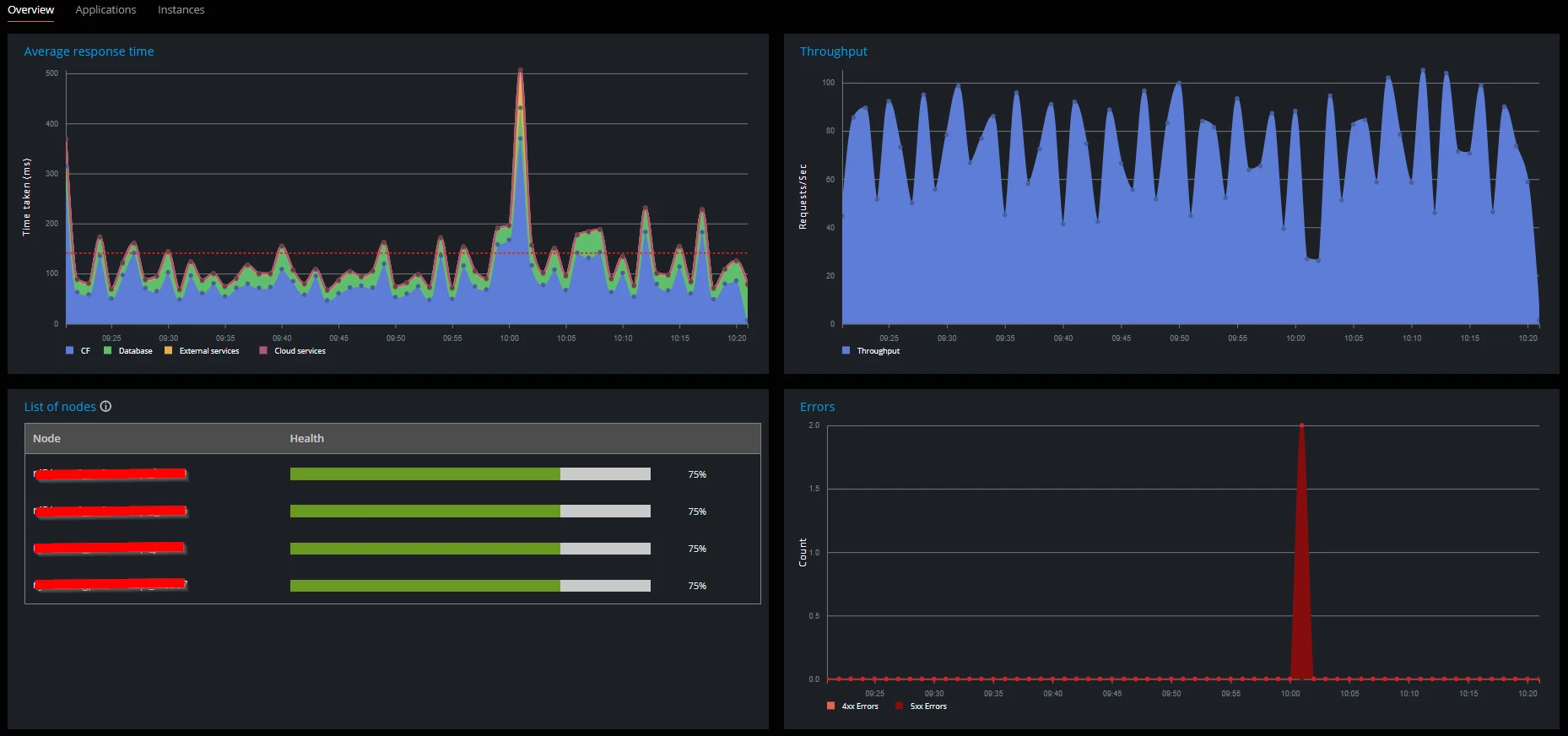
I am not sure what else to do at this moment. I have attached some to photos of the CF server node stats and db connection settings. The settings are mirrored on the other servers.
    2 replies

    BKBK
    Community Expert
    Community Expert
    May 24, 2025

    First of all, what is the ColdFusion version and update level? What is the Oracle driver version?


    When I see "ORA-01003:No statement parsed", my immediate idea is that this is an Oracle database problem. Hence not a ColdFusion problem. So you should probably be looking for a solution in Oracle, not in ColdFusion. At least, to start with. I would therefore suggest the following.


    At the ColdFusion end:

    1.  uncheck the "Limit Connections" checkbox and delete the 48 from "Restrict connections to";
    2.  instead of using the arbitrary value 500 for "Max Pooled Statements", do the following to obtain a more accurate value to use:
      count or estimate the (number of unique cfquery tags that use cfqueryparam + number of unique cfstoredproc tags). In any case the default value (where the field "Max Pooled Statements" is empty), which is 300, is usually sufficient. 


    At the Oracle end:

    1.  Examine the stacktrace (of the ColdFusion error) and identify the query that is causing the problem. It will help greatly if you share the query code as well as the entire stacktrace with the forum.
    2.  Identify the version of the Oracle driver that your ColdFusion application is using. Chances are, it is outdated. Verify on the web whether there is a newer version of the driver. If there is, then update the Oracle driver in your application.


    Remember to restart ColdFusion for any changes to take effect. 

    teno_chinAuthor
    Participant
    May 28, 2025

    Thanks for reaching BKBK and my apologies for the delayed response!

    Here's the info you requested:

    ColdFusion version and update level? Current Update Level is 18


    What is the Oracle driver version?
    I'm thinking this is the version? |Oracle|6.0.0.1408


    CF Ora Package:


    number of unique cfquery tags that use cfqueryparam: 318

    SQL QUERY:

    select to_char(evtime, 'mm/dd/yyyy hh24:mi') AS evtime, SUM(count_) AS tcnt

    from traffic_stats

    WHERE evtime >= (param 1)

    and evtime >= (param 2)

    and evtime >= (param 3)

    and node = (param 4)

    and type = (param 5)

    group by evtime

    order by evtime

    params for the query:
    (param 1) = [type='IN', class='java.sql.Timestamp', value='2025-05-12 05:16:00.0', sqltype='cf_sql_timestamp'] ,
    (param 2) = [type='IN', class='java.sql.Timestamp', value='2025-04-08 03:21:52.0', sqltype='cf_sql_timestamp'] ,
    (param 3) = [type='IN', class='java.sql.Timestamp', value='2025-05-28 12:21:56.189', sqltype='cf_sql_timestamp'] ,
    (param 4) = [type='IN', class='java.lang.String', value='908086', sqltype='cf_sql_varchar'] ,
    (param 5) = [type='IN', class='java.lang.String', value='LTE', sqltype='cf_sql_varchar']


    STACKTRACE:

    coldfusion.tagext.sql.QueryTag$DatabaseQueryException: Error Executing Database Query.
    at coldfusion.tagext.sql.QueryTag.startQueryExecution(QueryTag.java:929)
    at coldfusion.tagext.sql.QueryTag.doEndTag(QueryTag.java:821)
    at cfact_oct_etl2ecfc1174054824$funcGET_TRAFFIC_STATUS._factor7(C:\websites\oct_core\act_oct_etl.cfc:332)
    at cfact_oct_etl2ecfc1174054824$funcGET_TRAFFIC_STATUS.runFunction(C:\websites\oct_core\act_oct_etl.cfc:308)
    at coldfusion.runtime.UDFMethod.invoke(UDFMethod.java:623)
    at coldfusion.filter.SilentFilter.invoke(SilentFilter.java:47)
    at coldfusion.runtime.UDFMethod$ReturnTypeFilter.invoke(UDFMethod.java:553)
    at coldfusion.runtime.UDFMethod$ArgumentCollectionFilter.invoke(UDFMethod.java:516)
    at coldfusion.filter.FunctionAccessFilter.invoke(FunctionAccessFilter.java:95)
    at coldfusion.runtime.UDFMethod.runFilterChain(UDFMethod.java:463)
    at coldfusion.runtime.UDFMethod.runFilterChain(UDFMethod.java:438)
    at coldfusion.runtime.UDFMethod.invoke(UDFMethod.java:681)
    at coldfusion.runtime.TemplateProxy.invoke(TemplateProxy.java:980)
    at coldfusion.runtime.TemplateProxy.invoke(TemplateProxy.java:762)
    at coldfusion.filter.ComponentFilter.invoke(ComponentFilter.java:261)
    at coldfusion.filter.ApplicationFilter.invoke(ApplicationFilter.java:613)
    at coldfusion.filter.RequestMonitorFilter.invoke(RequestMonitorFilter.java:43)
    at coldfusion.filter.MonitoringFilter.invoke(MonitoringFilter.java:40)
    at coldfusion.filter.PathFilter.invoke(PathFilter.java:162)
    at coldfusion.filter.ExceptionFilter.invoke(ExceptionFilter.java:97)
    at coldfusion.filter.ClientScopePersistenceFilter.invoke(ClientScopePersistenceFilter.java:28)
    at coldfusion.filter.BrowserFilter.invoke(BrowserFilter.java:38)
    at coldfusion.filter.NoCacheFilter.invoke(NoCacheFilter.java:60)
    at coldfusion.filter.GlobalsFilter.invoke(GlobalsFilter.java:38)
    at coldfusion.filter.DatasourceFilter.invoke(DatasourceFilter.java:22)
    at coldfusion.xml.rpc.CFCServlet.invoke(CFCServlet.java:167)
    at coldfusion.xml.rpc.CFCServlet.doPost(CFCServlet.java:384)
    at javax.servlet.http.HttpServlet.service(HttpServlet.java:555)
    at javax.servlet.http.HttpServlet.service(HttpServlet.java:623)
    at coldfusion.bootstrap.BootstrapServlet.service(BootstrapServlet.java:311)
    at org.apache.catalina.core.ApplicationFilterChain.internalDoFilter(ApplicationFilterChain.java:199)
    at org.apache.catalina.core.ApplicationFilterChain.doFilter(ApplicationFilterChain.java:144)
    at coldfusion.monitor.event.MonitoringServletFilter.doFilter(MonitoringServletFilter.java:46)
    at coldfusion.bootstrap.BootstrapFilter.doFilter(BootstrapFilter.java:47)
    at org.apache.catalina.core.ApplicationFilterChain.internalDoFilter(ApplicationFilterChain.java:168)
    at org.apache.catalina.core.ApplicationFilterChain.doFilter(ApplicationFilterChain.java:144)
    at org.apache.catalina.core.StandardWrapperValve.invoke(StandardWrapperValve.java:168)
    at org.apache.catalina.core.StandardContextValve.invoke(StandardContextValve.java:90)
    at org.apache.catalina.authenticator.AuthenticatorBase.invoke(AuthenticatorBase.java:482)
    at org.apache.catalina.core.StandardHostValve.invoke(StandardHostValve.java:130)
    at org.apache.catalina.valves.ErrorReportValve.invoke(ErrorReportValve.java:93)
    at org.apache.catalina.core.StandardEngineValve.invoke(StandardEngineValve.java:74)
    at org.apache.catalina.connector.CoyoteAdapter.service(CoyoteAdapter.java:357)
    at org.apache.coyote.ajp.AjpProcessor.service(AjpProcessor.java:448)
    at org.apache.coyote.AbstractProcessorLight.process(AbstractProcessorLight.java:63)
    at org.apache.coyote.AbstractProtocol$ConnectionHandler.process(AbstractProtocol.java:936)
    at org.apache.tomcat.util.net.NioEndpoint$SocketProcessor.doRun(NioEndpoint.java:1791)
    at org.apache.tomcat.util.net.SocketProcessorBase.run(SocketProcessorBase.java:52)
    at org.apache.tomcat.util.threads.ThreadPoolExecutor.runWorker(ThreadPoolExecutor.java:1190)
    at org.apache.tomcat.util.threads.ThreadPoolExecutor$Worker.run(ThreadPoolExecutor.java:659)
    at org.apache.tomcat.util.threads.TaskThread$WrappingRunnable.run(TaskThread.java:63)
    at java.base/java.lang.Thread.run(Thread.java:834)
    Caused by: java.sql.SQLException: [Macromedia][Oracle JDBC Driver][Oracle]ORA-01003: no statement parsed
     
    at macromedia.jdbc.oracle.base.BaseExceptions.b(|Oracle|6.0.0.1408|:1099)
    at macromedia.jdbc.oracle.base.BaseExceptions.a(|Oracle|6.0.0.1408|:976)
    at macromedia.jdbc.oracle.base.BaseExceptions.a(|Oracle|6.0.0.1408|:1120)
    at macromedia.jdbc.oracle.base.BaseExceptions.a(|Oracle|6.0.0.1408|:455)
    at macromedia.jdbc.oracle.OracleImplResultset.a(|Oracle|6.0.0.1408|:941)
    at macromedia.jdbc.oracle.OracleImplResultset.a(|Oracle|6.0.0.1408|:484)
    at macromedia.jdbc.oracle.OracleImplStatement.cu(|Oracle|6.0.0.1408|:3430)
    at macromedia.jdbc.oracle.base.gs.od(|Oracle|6.0.0.1408|:2505)
    at macromedia.jdbc.oracle.base.gs.nW(|Oracle|6.0.0.1408|:1358)
    at macromedia.jdbc.oracle.base.BasePreparedStatement.execute(|Oracle|6.0.0.1408|:2703)
    at macromedia.jdbc.oracle.base.fh.execute(|Oracle|6.0.0.1408|:525)
    at coldfusion.server.j2ee.sql.JRunPreparedStatement.execute(JRunPreparedStatement.java:101)
    at coldfusion.sql.Executive.executeQuery(Executive.java:1629)
    at coldfusion.sql.Executive.executeQuery(Executive.java:1355)
    at coldfusion.sql.Executive.executeQuery(Executive.java:1285)
    at coldfusion.sql.SqlImpl.execute(SqlImpl.java:425)
    at coldfusion.tagext.sql.QueryTag.executeQuery(QueryTag.java:1247)
    at coldfusion.tagext.sql.QueryTag.startQueryExecution(QueryTag.java:876)
    ... 51 more

    I'm about to uncheck the "Limit Connections" checkbox and delete the 48 from "Restrict connections to"; Then restart the nodes. 


    BKBK
    Community Expert
    Community Expert
    May 28, 2025

    Thanks for the information. This new information means that I have to revise all my previous suggestions.


    Here are new suggestions, based on the new information:


    1.  As you're using the Oracle driver that ships with ColdFusion, let ColdFusion decide which version to use.

    I initially thought you were using a custom Oracle JDBC driver., hence my previous suggestion to update. But it turns out you're using the Oracle driver that ships with ColdFusion. In that case, you should let ColdFusion decide which driver to use. The driver version is indeed 6.0.0.1408. However, to be sure, perform the Felix-cache fix discussed below.


    2.  Update the value of the setting "Max Pooled Statements" not to 318, but to 50!

    There is something odd about this setting. You said you had set it to 500. Yet your printscreen shows that the value in effect is 300, the default. Might it be that ColdFusion is failing to pick up the updated setting? If so, could this have something to do with the Felix-cache issue discussed below?


    Anyway, let's march on. You say that the number of unique cfquery tags that use cfqueryparam is 318. (I am assuming there are no stored-procedure tags using cfqueryparam). Each such query corresponds to a prepared statement in the pool. On this basis, ColdFusion's documentation suggests that you use the value 318 for Max Pooled Statements.


    However, we should look at this differently. Especially because of the database issues you are experiencing.

    A pool of 318 statements means that ColdFusion could possibly feel free to allocate 318 cached prepared statements per database connection. That is a lot of statements for a single connection. It is unlikely that your application will ever need all 318 queries at the same time. The end result will likely be unnecessary congestion, besides it being extremely inefficient.


    Hence my suggestion that the statements-pool consist of a maximum of one-sixth the number of queries. That is, one-sixth of 318, which is around 50!


    With Max Pooled Statements = 50, what could the number of pooled connections then be?

    That comes next. 


    3.  Tick the checkboxes "Limit Connections" and "Maintain Connections", and enter the value 64 for "Restrict connections to"

    These settings ensure that ColdFusion will create a database connection pool with a maximum size of 64 connections. ColdFusion will in effect:

    - Open new connections as needed, up to 64;

    - Reuse connections if available;

    - Queue requests beyond that until a connection is free.


    You can confirm that 64 is a good rule-of-thumb value. Firstly, it exceeds 50, the Max Pooled Statements, with extra pooled connections in reserve. Secondly, there is a curiosity in ColdFusion. If you leave blank the settings  "Limit Connections" and "Restrict connections to", ColdFusion will use the following as the default value for the number of connections: the "Maximum number of simultaneous Template requests". This value is 25 by default, which has same order of magnitude as 64.


    4.  Check the checkbox "Enable connection validation" and enter a suitable "Validation Query", for example

    SELECT 1 FROM dual


    5.  Make the query more efficient by replacing the repetitive 'evtime >='.

    That is, replace

    select to_char(evtime, 'mm/dd/yyyy hh24:mi') AS evtime, SUM(count_) AS tcnt
    from traffic_stats
    WHERE evtime >= (param 1)
    and evtime >= (param 2)
    and evtime >= (param 3)
    and node = (param 4)
    and type = (param 5)
    group by evtime
    order by evtime

    with something like

    SELECT TO_CHAR(evtime, 'mm/dd/yyyy hh24:mi') AS evtime, SUM(count_) AS tcnt 
    FROM traffic_stats
    WHERE evtime >= GREATEST(<CFQUERYPARAM VALUE="#param1#"  CFSQLType="CF_SQL_TIMESTAMP">, <CFQUERYPARAM VALUE="#param2#"  CFSQLType="CF_SQL_TIMESTAMP">, <CFQUERYPARAM VALUE="#param3#"  CFSQLType="CF_SQL_TIMESTAMP">)
    AND node = <CFQUERYPARAM VALUE="#param4#"  CFSQLType="CF_SQL_TIMESTAMP">
    AND type = <CFQUERYPARAM VALUE="#param5#"  CFSQLType="CF_SQL_TIMESTAMP">
    GROUP BY evtime
    ORDER BY evtime


    6.  Update ColdFusion 2021

    Your update level is 18. Change from Update 18 to Update 20 (the latest). Though this may not be directly related to the issue, it helps to have the latest ColdFusion 2021 software in place.


    7.  Delete everything from the folder {CF_INSTANCE_HOME}/bin/felix-cache, then restart ColdFusion

    After you inplement an update, delete everything from the folder {CF_INSTANCE_HOME}/bin/felix-cache, then restart ColdFusion.


    In fact, even if you do not yet update, I would urge you to empty the felix-cache folder and then restart. Doing so has been known to fix diverse issues with no apparent link between them. There is an even stronger reason. As the release notes for Update 17 show, clearing the Felix cache has some relation to the Oracle data source. 

    teno_chinAuthor
    Participant
    May 23, 2025

    My restrict connection settings was 64 but I dropped it to 48. not sure I was using the right calculations at the time.