
Inspiring
July 5, 2024
Answered

MySQL str_to_date dates wrong in cf queries but correct in mysql?

  • July 5, 2024
  • 1 reply
  • 536 views

After upgrading MySQL to 8 we noticed some odd date behaviors.

Example:
2024-06-28T02:11:51.000 stored in a varchar type field named tstamp

When we execute this statement in mysql workbench directly:

STR_TO_DATE(tstamp,'%Y-%m-%dT%H:%i') as listedon

The result is correct: 2024-06-28 02:11:00

The same exact query when done using a coldfusion query on the same field and database returns:

2024-06-27 22:11:00.0

The coldfusion SELECT is subtracting 4 hours from the date stored in a varchar field when we use str_to_date to format it?


Needless to say this is causing issues. Does anyone know of a possible cause or fix for this maybe changing db drivers so that I don't have to recoded all queries on our sites using str_to_date?


Thanks

Forrest


    This topic has been closed for replies.
    Correct answer BKBK

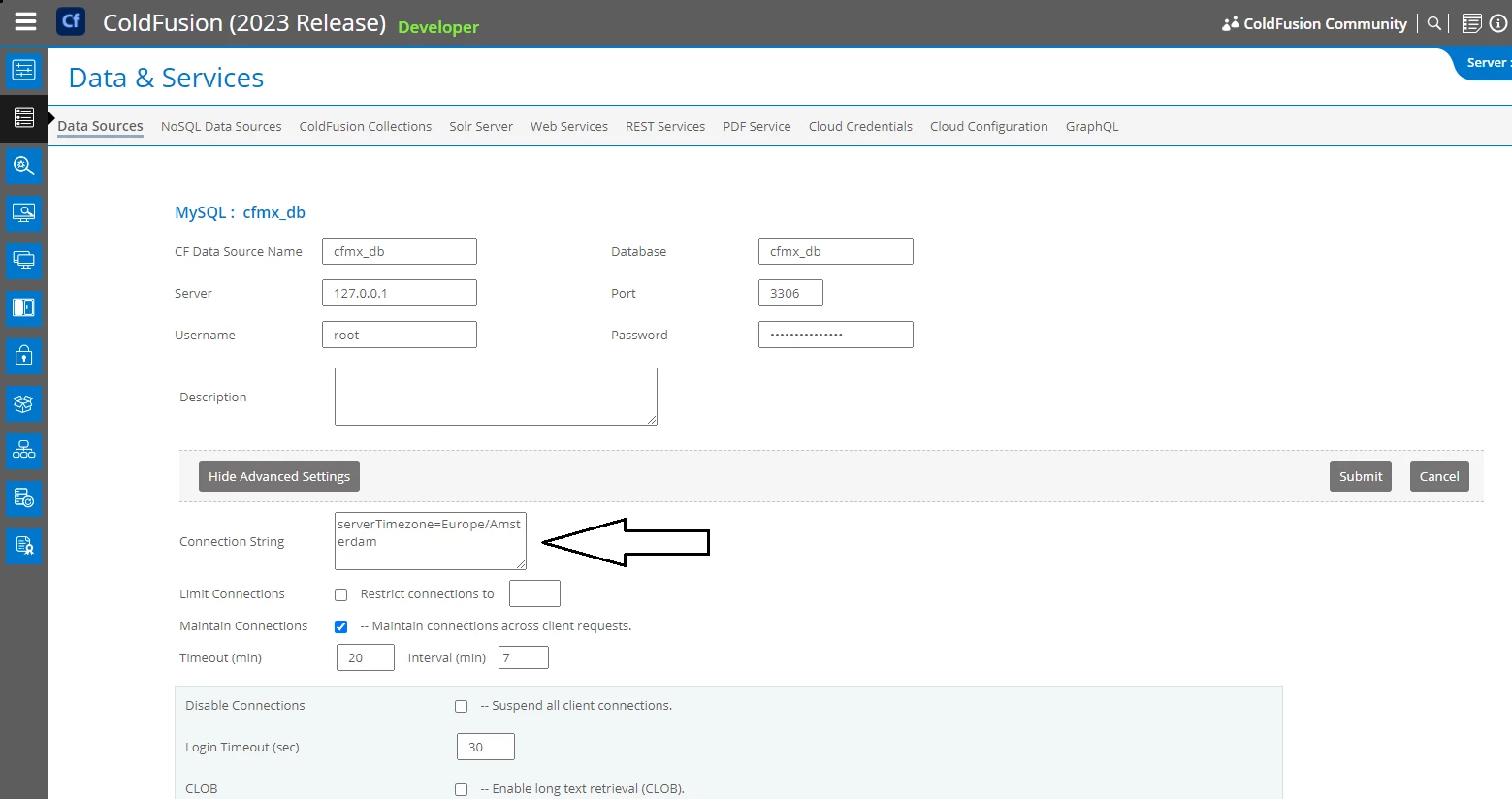
    Likely to be caused by the difference in time-zone netween MySQL and ColdFusion. If so, then you can solve the problem by changing the setting for MySQL time-zone, ColdFusion time-zone or both.

    I shall use my settings to illustrate. 


    Steps to change the MySQL time-zone setting:

    • Go to the Data Sources page in the ColdFusion Administrator;
    • (For the relevant MySQL datasource) Click on the button to edit the datasource settings, then on "Show Advanced Settings";
    • Enter the time-zone in the field "Connection String", using the MySQL driver attribute serverTimezone. In the example, I have entered my time-zone, which is Europe/Amsterdam; (If you want UTC time-zone, for example, use serverTimezone=UTC);
    • Press the Submit button to register the change.


    Steps to change the ColdFusion time-zone setting:

    • Open ColdFusion's system file /bin/jvm.config in a text editor. 
    • Add or, if it already exists, modify the -Duser.timezone flag in java.args. That is the time-zone that ColdFusion uses.
      For example, I want ColdFusion to use the same time-zone as MySQL. So, in my jvm.config file, java.args includes the flag -Duser.timezone=Europe/Amsterdam ; (If you want UTC time-zone, for example, use -Duser.timezone=GMT);
    • ColdFusion is then restarted for the change to take effect.

    1 reply

    BKBK
    Community Expert
    BKBKCommunity ExpertCorrect answer
    Community Expert
    July 6, 2024

    Likely to be caused by the difference in time-zone netween MySQL and ColdFusion. If so, then you can solve the problem by changing the setting for MySQL time-zone, ColdFusion time-zone or both.

    I shall use my settings to illustrate. 


    Steps to change the MySQL time-zone setting:

    • Go to the Data Sources page in the ColdFusion Administrator;
    • (For the relevant MySQL datasource) Click on the button to edit the datasource settings, then on "Show Advanced Settings";
    • Enter the time-zone in the field "Connection String", using the MySQL driver attribute serverTimezone. In the example, I have entered my time-zone, which is Europe/Amsterdam; (If you want UTC time-zone, for example, use serverTimezone=UTC);
    • Press the Submit button to register the change.


    Steps to change the ColdFusion time-zone setting:

    • Open ColdFusion's system file /bin/jvm.config in a text editor. 
    • Add or, if it already exists, modify the -Duser.timezone flag in java.args. That is the time-zone that ColdFusion uses.
      For example, I want ColdFusion to use the same time-zone as MySQL. So, in my jvm.config file, java.args includes the flag -Duser.timezone=Europe/Amsterdam ; (If you want UTC time-zone, for example, use -Duser.timezone=GMT);
    • ColdFusion is then restarted for the change to take effect.

    BKBK
    Community Expert
    Community Expert
    July 6, 2024

    I ran the following test on ColdFusion 2023 Update 8, using the MySQL 8.3.0 Jar:

    <cfscript>
    tstamp="2024-06-28T02:11:51.000";
    
    dt=queryExecute("select STR_TO_DATE('#tstamp#','%Y-%m-%dT%H:%i')  as listedon from testTable limit 1", [], {datasource="myTestDS"});
    
    writeoutput(dt["listedon"][1]);
    	
    </cfscript>

    The result was: 2024-06-28 02:11:00