Inspiring
June 20, 2024
Answered

Mysterious Installations into Bundles Directory

  • June 20, 2024
  • 3 replies
  • 1320 views

Hi All.

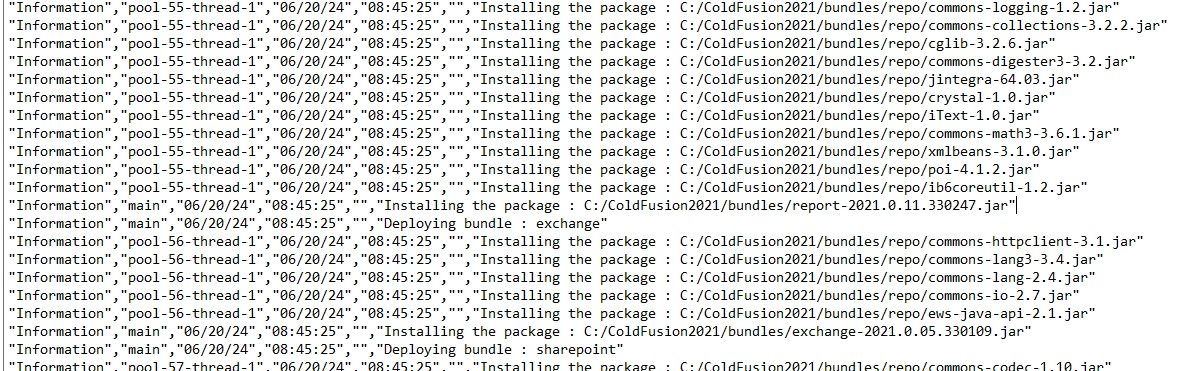
I am seeing many of these installation messages in the cfpm-audit.log from this morning on our production server, and there are many others from June 18th.


We are not installing anything! Can someone shed some light on what these entries are referring to? We absolutely don't want anything being installed without our testing first!


We do have the "Automatically Check for Updates" checkbox checked in the cf administrator, but everythign on the web indicates that this will only send notifications of updates, and will not automatically install them.
Thank you.

    This topic has been closed for replies.
    Correct answer Charlie Arehart

    Hey, guys. I have new info.


    TL;DR Those repeated "Installing the package" messages you see in that cfpm-audit.log are nothing at all to be concerned about. They do occur on EVERY CF restart.


    Details:

    First, I missed that you were referring to the cfpm-audit.log. I thought you were talking about the coldfusion-out.log. As you all may know, that log also tracks information about package processing. And as I mentioned above, I've been helping people to understand that when a CF update entails package updated, those package updates (uninstalling the old/installing the new) happen during the next start AFTER the cf update, and that's tracked in the coldfusion-out.log. 


    That's why I had said that if you saw that happening again and again on CF restarts, it would suggest that the package updates were failing for some reason. I've definitely seen that below (and in fact with the latest updates last week to CF2021 and 2023--but that's not the issue Dordrecht is raising here.)


    I did some more digging into things this weekend (especially because of that other issue), and separate from that I can confirm that indeed the lines dordrecht reported above do appear in that cfpm-audit.log on EACH CF start ("Installing the package", "Deploying bundle", as well as "ServiceRegistration for package"). I'd never really noticed that before. There are several such lines per package, and by default there about 50 packages, so there are literally a few hundred lines of this sort on each restart--and I have confirmed it's been like this since the very first install of CF2021 which again introduced the whole package management feature. (I found it in the cfpm-audit logs I still have from the very first day CF2021 was release in Nov 2020.)


    So Dordrecht, I understand how it was odd-looking to find those lines in that file, but again it's perfectly normal. As for why it says over and over like that (on each restart) that it's "installing" the jar files related to the package, I can only surmise that it's just got something to do with how the OSGI-based package management mechanism works. (This is perhaps what BKBK had in mind when he regarded the process as "private" and "information-hiding". I can understand his contention now.  Again, when I disagreed I was referring to when I thought you were referring to log lines in the coldfusion-out.log instead. If one saw uninstalling of packages there, that WOULD be a problem--and again when I was writing that I had started to observe the problem that started with the latest updates of last week.)


    Finally, I have confirmed also that there's NO change to the files referred to in those log lines. Further, I've confirmed that there's not even a change in the cfusion/bin/felix-cache folder where the packages really are "deployed to". Those files only change when there IS an actual update to the packages. Again, I've dug into all this this weekend on multiple machines. 


    But perhaps Adobe or someone else may have more to share about all this. But in the meantime it may help not only you all but anyone who may come looking for info on this issue, these messages, etc.

    3 replies

    Charlie Arehart
    Community Expert
    Charlie ArehartCommunity ExpertCorrect answer
    Community Expert
    June 24, 2024

    Hey, guys. I have new info.


    TL;DR Those repeated "Installing the package" messages you see in that cfpm-audit.log are nothing at all to be concerned about. They do occur on EVERY CF restart.


    Details:

    First, I missed that you were referring to the cfpm-audit.log. I thought you were talking about the coldfusion-out.log. As you all may know, that log also tracks information about package processing. And as I mentioned above, I've been helping people to understand that when a CF update entails package updated, those package updates (uninstalling the old/installing the new) happen during the next start AFTER the cf update, and that's tracked in the coldfusion-out.log. 


    That's why I had said that if you saw that happening again and again on CF restarts, it would suggest that the package updates were failing for some reason. I've definitely seen that below (and in fact with the latest updates last week to CF2021 and 2023--but that's not the issue Dordrecht is raising here.)


    I did some more digging into things this weekend (especially because of that other issue), and separate from that I can confirm that indeed the lines dordrecht reported above do appear in that cfpm-audit.log on EACH CF start ("Installing the package", "Deploying bundle", as well as "ServiceRegistration for package"). I'd never really noticed that before. There are several such lines per package, and by default there about 50 packages, so there are literally a few hundred lines of this sort on each restart--and I have confirmed it's been like this since the very first install of CF2021 which again introduced the whole package management feature. (I found it in the cfpm-audit logs I still have from the very first day CF2021 was release in Nov 2020.)


    So Dordrecht, I understand how it was odd-looking to find those lines in that file, but again it's perfectly normal. As for why it says over and over like that (on each restart) that it's "installing" the jar files related to the package, I can only surmise that it's just got something to do with how the OSGI-based package management mechanism works. (This is perhaps what BKBK had in mind when he regarded the process as "private" and "information-hiding". I can understand his contention now.  Again, when I disagreed I was referring to when I thought you were referring to log lines in the coldfusion-out.log instead. If one saw uninstalling of packages there, that WOULD be a problem--and again when I was writing that I had started to observe the problem that started with the latest updates of last week.)


    Finally, I have confirmed also that there's NO change to the files referred to in those log lines. Further, I've confirmed that there's not even a change in the cfusion/bin/felix-cache folder where the packages really are "deployed to". Those files only change when there IS an actual update to the packages. Again, I've dug into all this this weekend on multiple machines. 


    But perhaps Adobe or someone else may have more to share about all this. But in the meantime it may help not only you all but anyone who may come looking for info on this issue, these messages, etc.

    /Charlie (troubleshooter, carehart. org)
    Charlie Arehart
    Community Expert
    Community Expert
    June 27, 2024

    @Dordrecht7177366 , can you please let us know what you think of what's been shared by us in this thread, especially this finaly post I made a couple of days ago? It seems to present a clear explanation for your issue (as well as for my initial misinterpretation of things).


    Any reply at all would be appreciated. Or if you find this to be a satisfactory answer, you can just click the "correct answer" button without any need of further response. As always, just trying to help.

    /Charlie (troubleshooter, carehart. org)
    Inspiring
    July 8, 2024

    My thanks to Charlie and BKBK. I'm sorry for not responding back sooner. We just got over the deluge of more pressing issues that accompanied the huge modernization implementation we recently did.


    Charlie, thank you for the final answer. You came and visited a small CF shop where I worked in Annandale, NJ way back in the early 2000's, and have been helpful ever since!


    The install lines do indeed occur whenever I restart CF, and I noticed today that they appear on both of the live CF servers that support our site. It is a relief to know that they do not equate to a time bomb.

    BKBK
    Community Expert
    Community Expert
    June 22, 2024

    [deleted]

    BKBK
    Community Expert
    Community Expert
    June 30, 2024

    All that remains for me is to suggest a tip. There is a way to verify and confirm the "Installing the package" dates and times. 


    It goes as follows (on Windows):

    1.  Open cfpm-audit.log and make a list of the various dates on which the "Installing the package" event occurs;
    2.  Open Control Panel;
    3.  Open Administrative Tools, then Event Viewer;
    4.  Click to expand Windows Logs;
    5.   Click on Application, making application events to appear in the central pane;
    6.  Right-click on Application and select Filter Current Log.  That opens the "Filter Current Log" interface. 
    7.  Click on the button in the Event Sources field, scroll through and select the option ColdFusion 2021 Application Server. Then press OK. As a result, only ColdFusion 2021 server events now appear in the central pane.
    8.  In the right-hand-side pane, click on Save Filtered Log file As ... , choose CSV as "Save As Type", and give it an appropriate name, say, CF2021EventLog;
    9.  Open the file CF2021EventLog.csv in a text editor. Fish out the different dates and times when the ColdFusion 2021 Application Server was started, and make a list; 
    10.  Compare this list with the one you made in step 1. If the two lists match, then there is your confirmation, if only for peace of mind.


    Charlie Arehart
    Community Expert
    Community Expert
    June 21, 2024

    First, no, the "check for updates" feature does indeed do only that--it never causes any auto installation. 


    Second, these log lines you see would indeed seem to be package updates, related to the new package management feature of cf2021 and above (as you may know, where all cf features relate to some one of about 50 packages--aka modules--which can be optionally installed.) And some cf updates entail automatically updating one or more of those packages.


    What's this got to do with what you see? Well, it's important to note that the package updates don't occur right when cf is updated, but rather on the next restart of CF And while you've not indicated it I suspect you'll find those log lines are part of the startup of cf. And perhaps you'll see this is even happening each time cf is started. Can you confirm?


    Of course, such package updates should have happened only on the first start of cf after the last update. (You can find the day and time of that last cf update as the date modified for the install log/s in the hf-updates folder for whatever last update you applied, as reflected in a folder under /coldfusion2021/cfusion/hf-updates, which will have a folder for each update attempted.) 


    Back to your issue, I wonder if some problem is preventing those package updates from succeeding on that restart, so that it's trying on each cf restart. One possibility is if someone did some manual tweaking of permissions for different files/folders within the cf folder. Clearly the logs folder can be written to: but maybe that bundles folder (or some subfolder) or that for some related tracking file has been made read-only. Just a guess. I've never seen or heard of this issue before. 


    Someone may have better ideas, but until then do let us know whatever you may find about what I've proposed.

    /Charlie (troubleshooter, carehart. org)
    BKBK
    Community Expert
    Community Expert
    June 21, 2024

    @Dordrecht7177366 , Charlie has explained completely what is going on. I only wish to add a remark, for additional context.


    You shouldn.t worry about the "Installing the package" lines in cfpm-audit.log  What you've discovered is an example of the well-known software paradigm, encapsulation. Otherwise known as information-hiding or, colloquially, "What happens in Vegas stays in Vegas". 


    ColdFusion's internal update of itself is exactly that: a private matter. ColdFusion wants to hide it from the rest of the world, which is why you were unaware of it.


    Charlie Arehart
    Community Expert
    Community Expert
    June 21, 2024

    Well, if it's happening on each restart, it is indeed something to "worry about".


    Looking forward to their reply to the things I shared and asked.

    /Charlie (troubleshooter, carehart. org)