Inspiring
February 4, 2025
Answered

Nashorn Scripting Engine Replacement/Implementation?

  • February 4, 2025
  • 3 replies
  • 6062 views

Hi all.


ColdFusion 2021 uses Java 11 and ColdFusion 2023 uses Java 17. Java 11 contained the Nashorn Scripting Engine, which is used in my CF 2021 code to run JavaScript on the back end, but Nashorn was removed from Java 17, so I'm looking for the best way to replace what it did in ColdFusion 2023. Has anyone else successfully done this?


Apparently Nashorn is now available as a standalone package but I'm not a Java guy, so I don't know how to get it into a form that ColdFusion can use (maybe a jar file). Would anyone else know how to go about this?


Another alternative is the GraalJS scripting engine, which I understand can duplicate what Nashorn did, but again, how can this be put into a ColdFusion-usable library or installation?


Any help would be greatly appreciated!

    Correct answer BKBK

    Thank you, @BKBK! I really appreciate your assistance.


    To make the coding needs clearer using some altered examples, the Nashorn interaction with the javascript engine in my code is not extensive. Once the engine is made available for CF to use, there is a block of hard-coded JavaScript brought in (mostly Javacript functions):

    <cfset local.engine.eval(local.scriptBody)>

    Next, some dynamically derived JSON data is made available to the engine. (JSON below is defined in scriptBody):

    <cfsavecontent variable="local.jsData">
    <cfoutput>
    var myFirstData = JSON.parse('#JSStringFormat(SerializeJSON(local.firstData))#');
    var mySecondData = JSON.parse('#JSStringFormat(SerializeJSON(local.secondData))#');
    </cfoutput>
    </cfsavecontent>
    <cfset local.engine.eval(local.jsData) />

    Next, more JavaScript is eval'd. (myFunction is defined in scriptBody): 

    <cfsavecontent variable="local.jsRunStuff">
    var myResults;
    myResults = myFunction(myFirstData, mySecondData);
    </cfsavecontent>
    <cfset local.engine.eval(local.jsRunStuff) />

    And last, an invocation is executed with a value returned to CF:

    <cfset local.myResults = DeSerializeJSON(local.engine.invokeFunction('getmyResultsAsJSON', [])) />


    So, I think the only thing I'd need Graal to do is equivalents of eval and invokeFunction methods. (I'm not quite sure at thie time what each of those methods do.) Hopefully everything else would just be handled by Graal. 


    It has been a long search. But I can now provide an update. I have been able to create a proof-of-concept of GraalJS in ColdFusion.


    The proof-of-concept consists of CFML code that uses GraalJS to evaluate Javascript source code, and produce a result.


    Proof-of-Concept

    The steps I followed in creating the proof-of-concept


    1. Create a Maven project
      I created a project in Maven. However, I didn't need to install Maven, as ColdFusion 2023 comes with Maven already installed. It is located at C:\ColdFusion2023\cfusion\maven\apache-maven-3.8.6.
      To create a Maven project, simply create a new directory under the Maven root.
      For example, the directory C:\ColdFusion2023\cfusion\maven\apache-maven-3.8.6\myMvnProject

    2. Attach POM file to project
      Copy the attached pom.xml file to the directory myMvnProject. Examine pom.xml in a text editor. You will see that it contains the 3 dependencies org.graalvm.sdk:graal-sdk, org.graalvm.polyglot:polyglot and org.graalvm.polyglot:js. These are the resources needed to download all the JAR files that GraalJS depends on.

    3. Add Maven to the Operating System's Environment Variables
      I added the following:
      Variable Name: MAVEN_HOME
      Variable Value: C:\ColdFusion2023\cfusion\maven\apache-maven-3.8.6​

      I then added

      %MAVEN_HOME%\bin​
      to the PATH environment variable.

    4. Obtain the JARs required for implementing GraalJS in ColdFusion 2023
      The steps I followed:
        - Open the Command Prompt (CMD) as Administrator.;
        - Use the cd command to navigate to the directory of the Maven project, C:\ColdFusion2023\cfusion\maven\apache-maven-3.8.6\myMvnProject;
        - Type the command mvn dependency:copy-dependencies and press <ENTER> to run it.
           If all goes well, the command will use the POM file to download the required JAR files.
           In addition, the command will automatically create the subfolder /target/dependency within the project directory, and store the JARs there.
           For example, my C:\ColdFusion2023\cfusion\maven\apache-maven-3.8.6\myMvnProject\target\dependency folder looks like this:
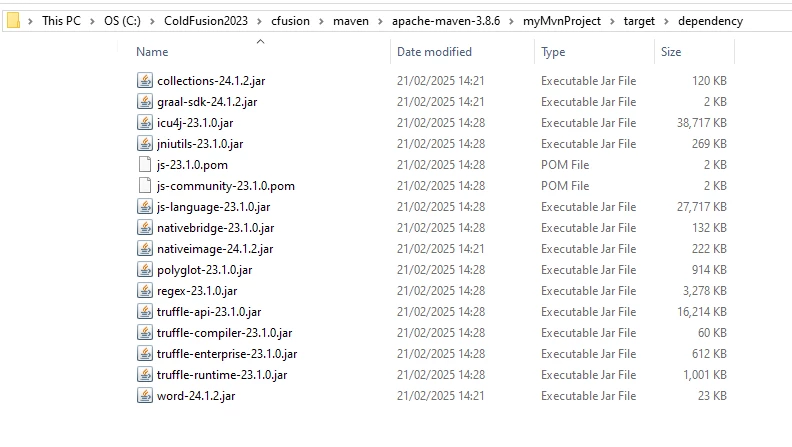

    5.  Create GraalJS_library folder and copy the GraalJS JARs into it
      I created the folder C:\ColdFusion2023\cfusion\GraalJS_library.
      Then I copied all the contents from C:\ColdFusion2023\cfusion\maven\apache-maven-3.8.6\myMvnProject\target\dependency to the GraalJS_library folder.

    6. Configure ColdFusion's JVM for Graal
      I did this by modifying the java.args setting in ColdFusion's jvm.config file as follows:

      Replace
      -Dcoldfusion.classPath={application.home}/lib/updates,{application.home}/lib,{application.home}/gateway/lib,{application.home}/wwwroot/WEB-INF/cfform/jars,{application.home}/bin/cf-osgicli.jar​

      with
      -Dcoldfusion.classPath={application.home}/lib/updates,{application.home}/lib,{application.home}/gateway/lib,{application.home}/wwwroot/WEB-INF/cfform/jars,{application.home}/bin/cf-osgicli.jar,{application.home}/graalJS_library -Dpolyglot.log.file={application.home}/logs/polyglot.log -Dpolyglotimpl.DisableClassPathIsolation=true -Dpolyglot.engine.WarnInterpreterOnly=false​


      You will find an explanation of the additional Graal flags in the Reference Notes below.
      Restart ColdFusion for the changes to take effect.

    7.  Run the proof-of-concept code
      <!--- Create GraalJS context, giving it the necessary permissions --->
      <cfset context=createObject("java", "org.graalvm.polyglot.Context").newBuilder(["js"]).allowAllAccess(true).allowIO(true).build()>
      
      <!--- Javascript for calculating the square root of a given positive integer --->
      <cfset jsCode = 'calculateRoot(param); function calculateRoot(param) { return "The square root of ".concat(param).concat(" is ").concat(Math.sqrt(param)); }'>
      
      <!--- The input: a positive integer --->
      <cfset arg = 10>
      
      <!--- Pass the argument from CFML to GraalJS --->
      <cfset context.eval("js", "var param=#arg#;")>
      
      <!--- Run GraalJS using the argument --->
      <cfset value = context.eval("js", jsCode)>
      
      <cfoutput>#value#</cfoutput>​
      The result: The square root of 10 is 3.1622776601683795

    3 replies

    BKBK
    Community Expert
    Community Expert
    February 9, 2025

    Hi @Dordrecht7177366 ,

    I have found a way to solve the problem on Java 17.  It involves using the OpenJDK Nashorn version, as suggested in this Stackoverflow post: https://stackoverflow.com/questions/68108169/does-nashorn-org-openjdk-nashorn-have-any-support-for-java-17 .  The version I have successfully tested is Nashorn-core 15.6.


    You can see from the Nashorn-core 15.6 documentation that its dependencies are

    • asm
    • asm-commons
    • asm-tree
    • asm-util


    Each dependency corresponds to a Jar file. So, to implement Nashorn on ColdFusion 2023 and Java 17, you need to download the following Jar files, and place then in {CF2023_HOME}/lib:


    Remember to restart ColdFusion 2023.

    The test code I used is:


    <cfset scriptManager = createObject("java", "javax.script.ScriptEngineManager").init()>
    
    <cfset engine = scriptManager.getEngineByName("Nashorn")>
    <!--- Alternative lines to define engine --->
    <!---<cfset engine = scriptManager.getEngineByName("javascript")>--->
    <!---<cfset engine = scriptManager.getEngineByName("js")>--->
    
    <cfset someJavascript = "function addNums() {  return 2 + 3; }">
    <cfset engine.eval(someJavaScript) >
    <cfset someResults = engine.invokeFunction('addNums',[])>
    
    Test result: <cfoutput>#someResults#</cfoutput>


    The output was: Test result: 5


    Inspiring
    February 11, 2025

    @BKBK Thank you for the response.  I'm just finishing the setup of my CF2023 environmet for implementing and testing this, and hope to strat trying to apply your suggestion shortly.

    BKBK
    Community Expert
    Community Expert
    February 12, 2025

    @Dordrecht7177366 , No worries. I am curious to know how it pans out. 


    My intention was to give an answer to your question about implementing standalone-Nashorn in Java. A quick solution, I thought, would remove any obstacles in your migration to ColdFusion 2023. Nevertheless, I would suggest we continue to look for a solution that uses GraallVM.


    GraalVM has advantages over Nashorn, among which:

    • performance;
    • full ECMAScript support (Nashorn is somewhat limited here);
    • versatility: With GraalVM, JavaScript won't be the only language being integrated into your Java application. The ability to use multiple languages together (polyglot programming) represents a more flexible, modern approach than Nashorn, which was solely focused on JavaScript.
    Legend
    February 4, 2025

    If you can obtain a jar file, then it should be fairly simple to load it into CF for use.  I'm a bit hazy on creating a JAR out of Maven repository, though.

    Community Expert
    February 4, 2025

    That sounds interesting! I don't know anything about that. Can you post an example of using this from CFML?


    Dave Watts, Eidolon LLC
    Inspiring
    February 5, 2025

    This is a very rudimentary example, @Dave Watts. I didn't code the original in our codebase but I got this to work yesterday when I was experimenting with it in CF2021.


    <cfset local.scriptManager = createObject("java", "javax.script.ScriptEngineManager").init() />
    <cfset local.engine = local.scriptManager.getEngineByName("javascript") />
    <cfsavecontent variable="local.someJavaScript">
    function addNums() {  return 2 + 3; }
    </cfsavecontent>
    <cfset local.engine.eval(local.someJavaScript) />
    <cfset local.myResults = local.engine.invokeFunction('addNums',[]) />
    <cfoutput>#local.myResults#</cfoutput>


    Community Expert
    February 5, 2025

    First, thank you for posting that example! It's interesting, and saves me the trouble of looking it up. But I think that's using built-in functionality in Java 17. If the rest of your code is using ScriptEngineManager you can skip the rest of my response.


    Based on that example, I don't see any reason you can't just load an extra JAR file into CF to run this. It would have to be within the same JVM as CF though. All that said, I read that Nashorn has been deprecated in favor of GraalJS for reasons (based on your links). So, if you don't care about future compatibility, you could continue using Nashorn, or use GraalJS in compatibility mode. But I don't know how you can create a JAR file from these. I did find a sort of generic "how to create a JAR from a Maven project" page but it has a lot of options:


    https://www.baeldung.com/executable-jar-with-maven


    But it looks like you might have to run CF as a web application within the standard version of Tomcat to make this all work. That's probably more trouble than it's worth - and I could very well be wrong about all this - but here's a link about setting up Tomcat with GraalVM:


    https://tomcat.apache.org/tomcat-9.0-doc/graal.html


    Good luck, and keep us posted!


    Dave Watts, Eidolon LLC


