
Yodeler
Inspiring
November 27, 2024
Answered

Oracle jdbc connect error and patch version

  • November 27, 2024
  • 2 replies
  • 996 views

I was forced to upgrade from Coldfusion 2018 to Coldfusion 2021, update 16.  For our database connection we are using the Oracle wallet to use ssl authentication.  This was working fine in 2018.  Now with the upgrade it stopped working.  The error is this:
java.sql.SQLNonTransientConnectionException: [DataDirect][Oracle JDBC Driver]Error during renegotiation of SSL socket.


I found this article on the same error that occurred with a version of the datadirect drivers:

https://community.progress.com/s/article/Unable-to-get-JDBC-connection-to-SSL-enabled-multitenant-Oracle-database-with-HostNameInCertificate-option


My question is, I know the version shipped with coldfusion 2021 is 6.0, but what is the patch/build version?  I want to compare it against what is in the progress datadirect article to see if that is the problem.  I already tried updating to CF update 17 for 2021, and that mucked up our other database connection as well, so I uninstalled it and went back to update 16.  


Thank You.
    This topic has been closed for replies.
    Correct answer BKBK

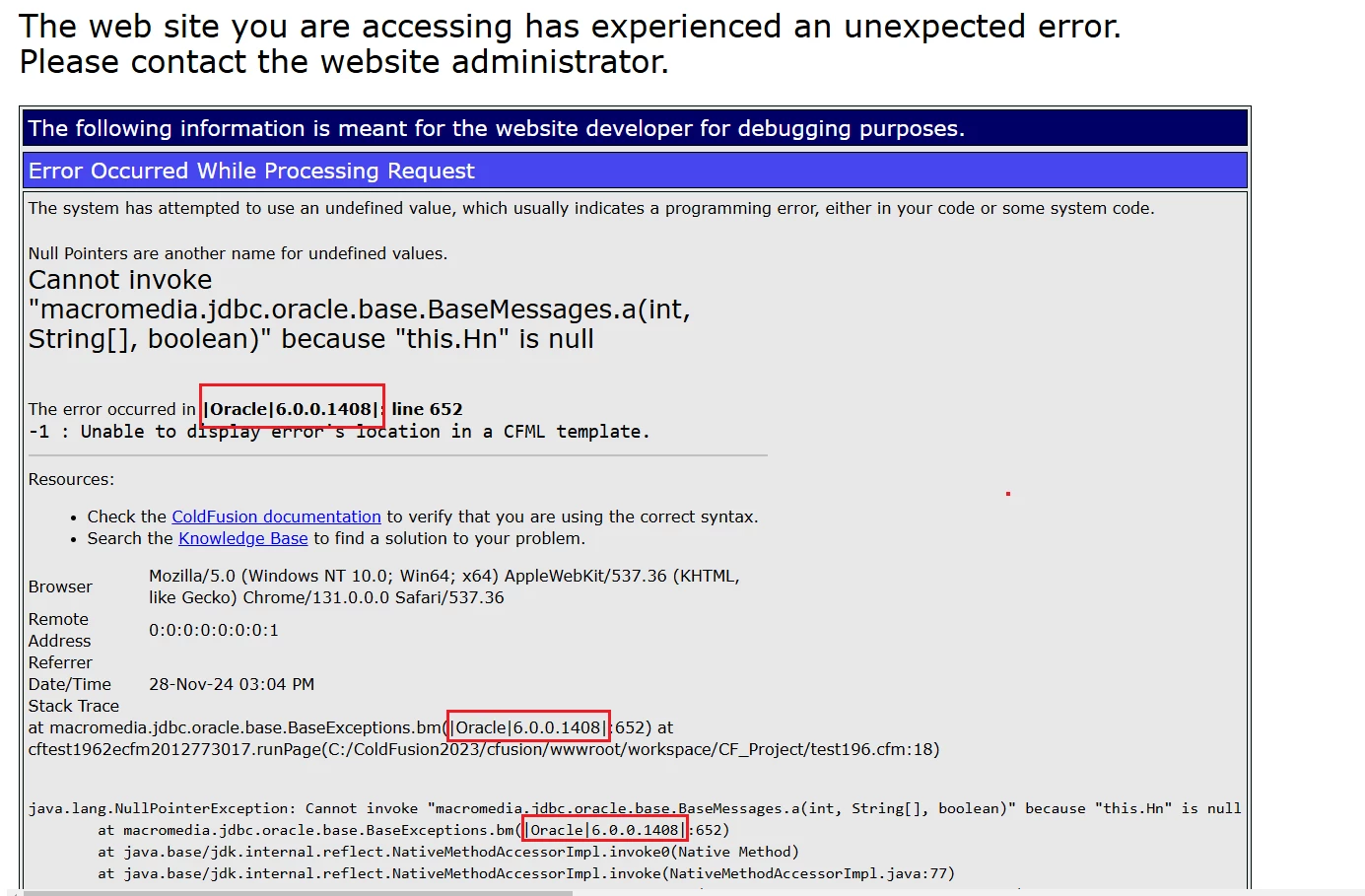
    I have found a way to trick ColdFusion into revealing the full version of the Datadirect Oracle driver. 

    <cfset baseExceptionsObject=createobject("java","macromedia.jdbc.oracle.base.BaseExceptions")>
    <!---<cfdump var="#baseExceptionsObject#" label="macromedia.jdbc.oracle.base.BaseExceptions object"><br>--->
    
    <!--- Deliberate fake call, causing an error. The error message should, we hope, reveal the version --->
    <cfoutput>#baseExceptionsObject.bm(-1)#</cfoutput>


    The result on ColdFusion 2023 Update 11:


    2 replies

    BKBK
    Community Expert
    Community Expert
    November 28, 2024

    Hi @Yodeler ,

    Someone once asked a related question: on how to fix an ArrayCopy Out Of Bounds Error. The question contains a clue.  You will see that the error message in that post contains lines such as

    ...
    at macromedia.jdbc.oracle.base.BaseExceptions.b(|Oracle|6.0.0.1051|:1102)
    at macromedia.jdbc.oracle.base.BaseExceptions.a(|Oracle|6.0.0.1051|:976)
    at macromedia.jdbc.oracle.base.BaseExceptions.b(|Oracle|6.0.0.1051|:1128)
    at macromedia.jdbc.oracle.base.BaseExceptions.b(|Oracle|6.0.0.1051|:796)
    at macromedia.jdbc.oracle.OracleImplConnection.open(|Oracle|6.0.0.1051|:2602)
    ...


    I'm guessing that 6.0.0.1051 refers to the version. So, take a look at your own error messages. Do you see a similar string?

    BKBK
    Community Expert
    Community Expert
    November 28, 2024

    Oh, and please share your findings with the forum. 🙂

    BKBK
    Community Expert
    BKBKCommunity ExpertCorrect answer
    Community Expert
    November 28, 2024

    I have found a way to trick ColdFusion into revealing the full version of the Datadirect Oracle driver. 

    <cfset baseExceptionsObject=createobject("java","macromedia.jdbc.oracle.base.BaseExceptions")>
    <!---<cfdump var="#baseExceptionsObject#" label="macromedia.jdbc.oracle.base.BaseExceptions object"><br>--->
    
    <!--- Deliberate fake call, causing an error. The error message should, we hope, reveal the version --->
    <cfoutput>#baseExceptionsObject.bm(-1)#</cfoutput>


    The result on ColdFusion 2023 Update 11:


    Community Expert
    November 27, 2024

    Ugh. The file you're interested in is something like C:\ColdFusion2021\cfusion\lib\adobe_drivers.jar. (Actually, of course, it's somewhere within that jar, like macromedia/jdbc/oracle.properties or macromedia/jdbc/OracleDriver.class.) Unfortunately, this is a DataDirect driver as you know, and it doesn't contain the relevant version info in a MANIFEST.mf file - I think that's where it would have to go. I'm not entirely sure whether you can just download something from Progress to fix it. You could try in a test environment, but you'd still have to guess at the version you're using.


    I recommend that you open a ticket at https://tracker.adobe.com/ asking (a) can Adobe fix this problem and if so when, (b) what version of the driver you're actually using, and (c) can you download something from Progress that will fix this problem. I'm pretty sure that the Adobe version is one or two versions behind the latest Progress version. I'm sorry I can't give you a more definitive answer. Maybe one of the other contributors can. Adobe might be able to provide a personal bugfix for you and maybe anyone else with the same problem.


    Alternatively, you could try Oracle's own JDBC driver instead. I think it's free, but it'll come with its own problems I'm sure.


    Dave Watts, Eidolon LLC