

Pie chart using CFCHART with any 0 data values failing
This is a problem that was first observed with CF8 using the cfchart tag. We have since upgraded to CF2016 and it still exists. Perhaps this is a programming error on our part but here is the issue:
Trying to create a pie chart. In this case I has 4 data items. Two of them have 0 values and the other two each have a value of 50 (representing percentages).
This is in response to a title to this posing as a question... How do you feel today?
<cfchartseries type="pie">
<cfchartdata item="Terrific!" value="0">
<cfchartdata item="OK" value="50">
<cfchartdata item="Not so good" value="50">
<cfchartdata item="Terrible!" value="0">
</cfchartseries>
</cfchart>
</cfsavecontent>
I don't know if the cfsavecontent has any bearing on this but I left it in because we use it to place the chart on a template page.
This is what I get for the results:
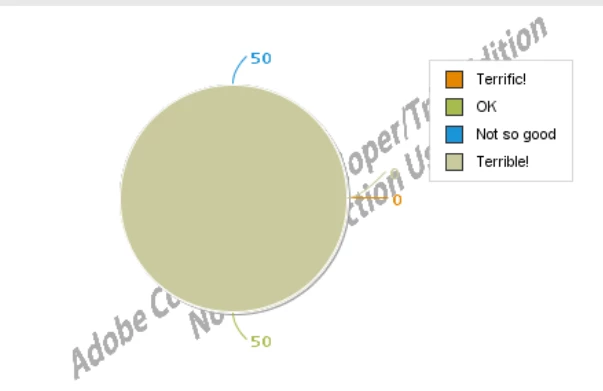
This is completely wrong!
- The color mapping shows one color not two.
- The color choice is wrong for either of the 50% values, suggesting 100% have a value of "Terrible!"
Is this a bug?
We have observed this with other quantity of answer options.
We have seen it wrong with one of the 4 having a non-0 value but the rest are 0 values.
The only work around we have found is to always place non-0 values last in the list.
So changing the data order around...
<cfsavecontent variable="chartContent">
<cfchart format="png" pieslicestyle="solid" width="400" height="280">
<cfchartseries type="pie">
<cfchartdata item="Terrible!" value="0">
<cfchartdata item="Terrific!" value="0">
<cfchartdata item="OK" value="50">
<cfchartdata item="Not so good" value="50">
</cfchartseries>
</cfchart>
</cfsavecontent>
Then you get this pie chart:
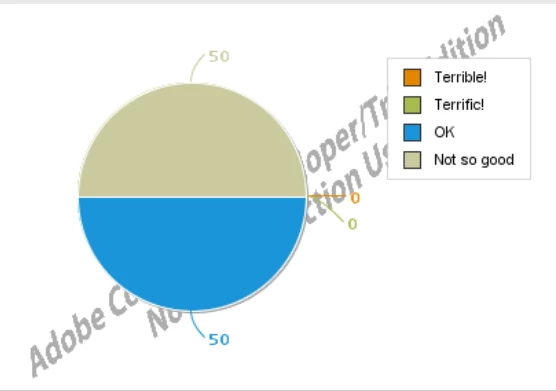
At least the color mapping is correct but the answer options have to be rearranged so that all 0 value data items are at the top of the list.
If it was the opposite where only items at the top of the list were colored it would be better but having to rearrange the order to put non-0 data as the last in the list of cfchartdata is a terrible hack!
Having incorrect color mapping as in the desired implementation shown first above is just unusable!!
I'm hoping there is a simple fix to making this work but if this is a bug... Adobe, please fix ASAP!
I'm also surprised no one else has found this or reported this that I can find so it gives me hope that there is a simple fix to what we are doing.


 AdChoices