
December 9, 2010
Question

Pre-populating forms with radio button values

  • December 9, 2010
  • 2 replies
  • 1412 views

I have been pulling my hair out trying to figure out why my action page is not being pre-populate with the value that is passed from the radio button selection. Can get my hands around what I am actually doing wrong. I have changed my code several times and can not keep up with any more. So below, I have included the main page and the action page that needs to be pre-populated with the data from the database. Thank you in advance for you help and time.
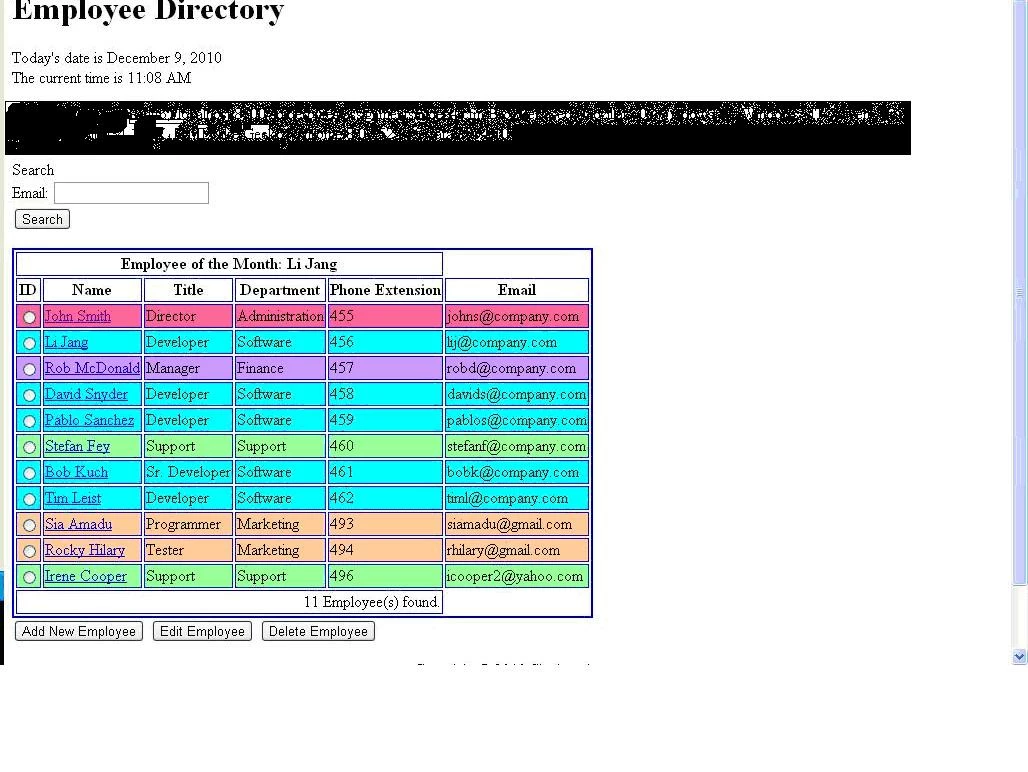
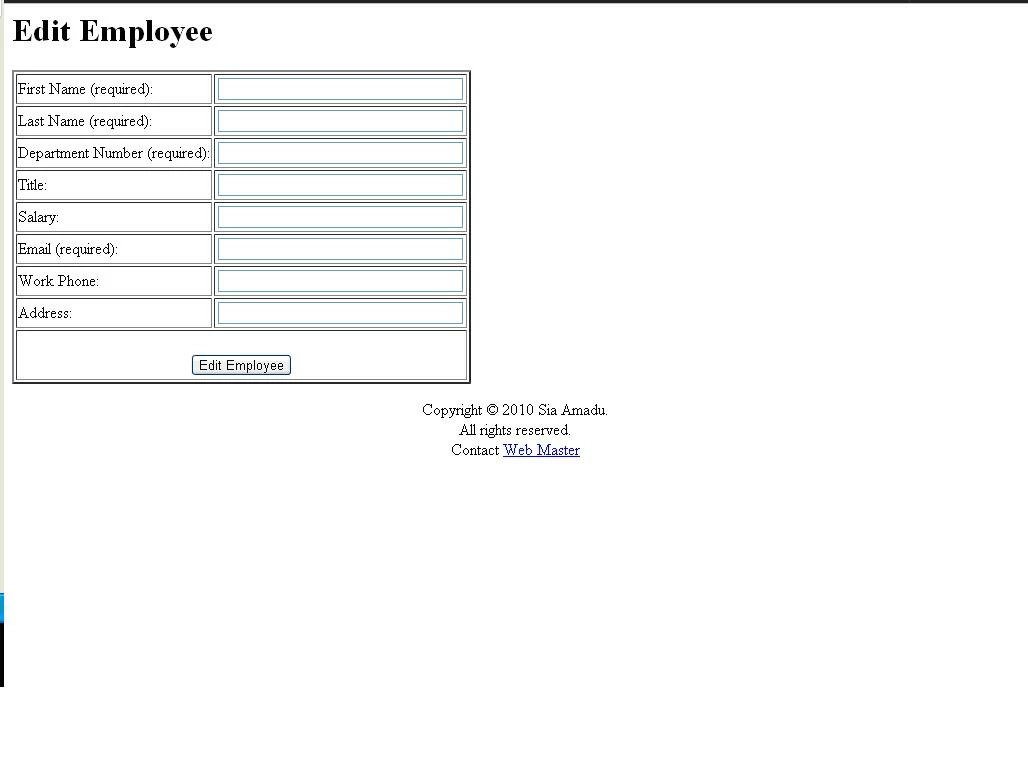
MAIN.cfm

<!DOCTYPE HTML PUBLIC "-//W3C//DTD HTML 4.01 Transitional//EN">

<!--- Declare and initialize the variables

--->

<cfset today = DateFormat(Now(),"mmmm d, yyyy")>

<cfset current_time = TimeFormat(Now(),"h:mm tt")>

<cfset application_name = "Corporate Intranet Directory">

         <cfset current_url ='http://'& #CGI.SERVER_NAME# & ':'& #CGI.SERVER_PORT# & #CGI.SCRIPT_NAME#>

<cfset current_browser = #CGI.HTTP_USER_AGENT#>

<html>

<head>

<title>Employee Directory</title>

</head>

<!--- Included heading for the page--->   

<h1>Employee Directory</h1>

<body>

<!--- Display the today date and the current time--->


<cfoutput>Today's date is #today#</cfoutput><br>

<cfoutput>The current time is #current_time#</cfoutput><p>

<!---Display the URL and Browser used for the template --->

<p><cfoutput>URL of this template: #current_url#</cfoutput>

<cfoutput>Browser used: #current_browser#</cfoutput></p>

<!---Insert a field to have the user search by email address --->

<tr bgcolor = "yellow">

<td>Search</td>

</tr><br>

Email: <input type="text" name="EmailAddress"

size="20" maxlength="100"><br>

<input type="Submit" value="Search"><p>

<!--- Query the Employees table to find the employee who's ManOfTheYear is set to "YES"--->  

<cfquery name="employeeOfTheMonth" datasource="Directory">

    select

            e.FirstName,

                e.LastName

            from

            Employees e

            where

            e.ManOfTheMonth = 'Yes'

        </cfquery>             

<!--- Query the Employees and Departments tables to find employee's First Name, Last Name, Title, Phone Extension, Email Address, and Department Name--->      

<cfquery name="employees" datasource="Directory">

select

e.EmployeeID,

e.FirstName,

e.LastName,

e.Title,

                e.PhoneExtension,

                e.EmailAddress,

                d.DepartmentName,

d.DepartmentID

from

Employees e,

                Departments d

            where

            e.DepartmentID = d.DepartmentID

</cfquery>

<table border="2" bordercolor="blue">

<!--- Display the Employee of the Month--->   

          <cfoutput query="employeeOfTheMonth">

<tr>

            <th align="center" colspan="5">Employee of the Month: #employeeOfTheMonth.FirstName# #employeeOfTheMonth.LastName# </th>

            </tr>

            </cfoutput>

            <tr>

<th>ID</th>

<th>Name</th>

<th>Title</th>

<th>Department</th>

<th>Phone Extension</th>

                <th>Email</th>

</tr>

<!--- Display the First Name, Last Name, Title, Department Name, Phone Extension, and Email Address--->   

<form action="admin3.cfm?EmployeeID=#EmployeeID#" method="post">

<cfoutput query="employees">

<cfswitch expression="#DepartmentID#">

    <cfcase value="1">

       <cfset backgroundcolor="00FFFF">

   </cfcase>

<cfcase value="2">

       <cfset backgroundcolor="ff6699">

   </cfcase>

<cfcase value="3">

       <cfset backgroundcolor="99ff99">

   </cfcase>

<cfcase value="4">

       <cfset backgroundcolor="ffcc99">

   </cfcase>

<cfcase value="5">

       <cfset backgroundcolor="cc99ff">

   </cfcase>

    <cfdefaultcase>

        <cfset backgroundcolor="red">

    </cfdefaultcase>

</cfswitch>

<tr bgcolor=#backgroundcolor#>

<td><input type ="radio" name="EmployeeID" value="#employees.EmployeeID#"</td>

<td><a href="http://localhost:8500/spiderbytes/assignments/employee_details.cfm?EmployeeID=#EmployeeID#"> #employees.FirstName# #employees.LastName#</td>

<td>#employees.Title#</td>

                <td>#employees.DepartmentName#</td>

<td>#employees.PhoneExtension#</td>

                    <td>#employees.EmailAddress#</td>

</tr>

</cfoutput>

<tr>

<!--- Display the number of employee's in the directory--->

<td align="right" colspan="5"><cfoutput>#employees.recordCount# Employee(s) found.</cfoutput></td>

</tr>

</table>

<input type="Submit" name="Action" value="Add New Employee">

<input type="Submit" name="Action" value="Edit Employee">

<input type="Submit" name="Action" value="Delete Employee"><p>

</form>

<!--- Include a footer --->

<CFINCLUDE template="footer.cfm">

</body>

</html>

ADMIN.cfm
<!DOCTYPE HTML PUBLIC "-//W3C//DTD HTML 4.01 Transitional//EN">
<html>
<head>
<title>Add New Employee</title>
</head>
<body>
<CFIF ISDEFINED("Action")>
<!--- Use the "Action" variable to display the same name as a heading --->
<h1><CFOUTPUT>#Action#</CFOUTPUT></h1>
<!--- Determine if the user select Edit Employee or Delete Employee --->
<CFIF Action IS "Edit Employee" OR Action IS "Delete Employee">
<!--- Query the database to get the data for current employee the user
selected--->
<cfquery name="DisplayEmployeeRecord" datasource="Directory">
SELECT *
FROM Employees
Where EmployeeID = #EmployeeID#
</cfquery>
<cfoutput query="DisplayEmployeeRecord">
<cfset variable.EmployeeID = "#EmployeeID#">
<cfset variable.FirstName = "#FirstName#">
<cfset variable.LastName = "#LastName#">
<cfset variable.DepartmentID = "#DepartmentID#">
<cfset variable.Title = "#Title#">
<cfset variable.Salary = "#Salary#">
<cfset variable.PhoneExtension = "#PhoneExtension#">
<cfset variable.HomeAddress = "#HomeAddress#">
</cfoutput>
</CFIF>
<form action="query.cfm" method="post">
<table border="2">
<!--- Server-Side Validation - First Name, Last Name, Department, and and Email Address are required
fields --->
<input type="hidden" name="EmployeeID_required" value="First Name is
a required field">
<input type="hidden" name="FirstName_required" value="First Name is
a required field">
<input type="hidden" name="LastName_required" value="Last Name is
a required field">
<input type="hidden" name="DepartmentID_required" value=" Department ID is
a required field - Please fill in the coorsponding Department ID for the employee">
<input type="hidden" name="EmailAddress_required" value="Email Address is
a required field">
<!--- Create a table for the names of the fields and the textbox --->
<tr>
<td>
First Name (required): </td>
<td><input type="Text"
name="FirstName" size="35" maxlength="35"><br></td>
</tr>
<tr>
<td>
Last Name (required): </td>
<td><input type="Text" name="LastName"
size="35" maxlength="35"><br></td>
</tr>
<tr>
<td>
Department Number (required): </td>
<td><input type="Text"
name="DepartmentID" size="35" maxlength="4"><br></td>
</tr>
<tr>
<td>
Title: </td>
<td><input type="Text"
name="Title" size="35" maxlength="35"><br></td>
</tr>
<tr>
<td>
Salary: </td>
<td><input type="Text" name="Salary"
size="35" maxlength="10"><br></td>
</tr>
<tr>
<td>
Email (required): </td>
<td><input type="Text" name="EmailAddress"
size="35" maxlength="35"><br></td>
</tr>
<tr>
<td>
Work Phone: </td>
<td><input type="Text" name="PhoneExtension"
size="35" maxlength="10"><br></td>
</tr>
<tr>
<td>
Address: </td>
<td><input type="Text" name="HomeAddress"
size="35" maxlength="50"><br></td>
</tr>
<!--- Adds the new employee to the Directory database---> 
<tr>
<th align "center" colspan ="2">
<br><input type="Submit" name="Action" value="<cfoutput>#Action#</cfoutput>">
</th>
</tr>
</table>
</form>
<!--- Include a footer --->
<CFINCLUDE template="footer.cfm">
</body>
</html>
</CFIF>
    This topic has been closed for replies.

    2 replies

    ilssac
    Inspiring
    December 9, 2010
    <!--- Query the database to get the data for current employee the user
    selected--->
    <cfquery name="DisplayEmployeeRecord" datasource="Directory">
    SELECT *
    FROM Employees
    Where EmployeeID = #EmployeeID#
    </cfquery>

    That would be mucth better writtin as:

    <!--- Query the database to get the data for current employee the user
    selected--->
    <cfquery name="DisplayEmployeeRecord" datasource="Directory">
    SELECT *
    FROM Employees
    Where EmployeeID = <cfqueryparam value="#form.EmployeeID#" cfsqltype="cf_sql_integer">
    </cfquery>


    Just using #EmployeeID# means that the value could be coming from at least a half-a-dozen places.

    December 9, 2010

    Thanks for the great suggestion. I am new to coding with Coldfusion. I am a java programmer learning Coldfusion for the first time. There are many things that are similar, but definately there are difference I am still trying to get my hands around.  Will this fix my problem with pre-populating the fields with the data?

    ilssac
    Inspiring
    December 9, 2010

    garjuyen1107 wrote:

    Will this fix my problem with pre-populating the fields with the data?

    Maybe, maybe not.  But it demonstrates a couple of best pratices.

    First using <cfqueryparam...>, especially on ANY data that comes from an untrusted source, such as a form.  <cfqueryparam...> will paramatize the input values that can allows databases to better optimize query execution plans.  This has the added and VERY IMPORTANT benifit of preventing SQL injection attacks because databases will NEVER execute SQL code in a query parameter.

    Secondly scoping your variables "#form.employeeID#.  This one might solve your problem.  If you do not scope your variables, i.e. #employeeID#, ColdFusion will search an extensive list of scopes for that variable: variables, form, url, session, ect.  It will then use the first one it finds.  If you had created a version of the employeeID variable in another scope and that one was being used, instead of the form scope one, you would be getting undesirable and VERY HARD to debug problems.

    Inspiring
    December 9, 2010

    There was so much code that I only glanced at it.

    Radio buttons are part of a form.  The only place I noticed any appeared to be in association with an anchor tag.  The only way to get that combination to work would be to write some javascript that edits the anchor tag when you do something to the radio button.

    Of course, it could be something else altogether.

    December 9, 2010

    Thanks for your reply.  The radio button was placed inside the anchor so that when the user selects that employee, it will pre-populate the from base upon the "Action" selected (i.e. Edit Employee and Delete Employee).  I quite sure this can be done with out using javascript.  I know that I accomplish this by using a drop-down list, but I would like to use the radio buttons instead because I would have to change my code.

    Here is the  code with the radio button:

    <tr bgcolor=#backgroundcolor#>

    <td><input type ="radio" name="EmployeeID" value="#employees.EmployeeID#"</td>

    <td><a href="http://localhost:8500/spiderbytes/assignments/employee_details.cfm?EmployeeID=#EmployeeID#"> #employees.FirstName# #employees.LastName#</td>

    <td>#employees.Title#</td>

                    <td>#employees.DepartmentName#</td>

    <td>#employees.PhoneExtension#</td>

                        <td>#employees.EmailAddress#</td>

    </tr>

    Here is are some ways that I coded my form action is coded:

    <form action="admin3.cfm" method="post">  OR

    <form action="admin3.cfm?EmployeeID =# EmployeeID#" method="post">

    ilssac
    Inspiring
    December 9, 2010

    It is important to output variables when you want to see them in the display!

    This would be an example of where putting TOO MUCH code into a post makes it hard to see what might be missing or wrong.