
Inspiring
May 4, 2018
Answered

problem adding font in administrator

  • May 4, 2018
  • 1 reply
  • 1507 views

I am trying to add a barcode font (free 3 of 9) using the administrator's Font Management page. What I end up with is this:
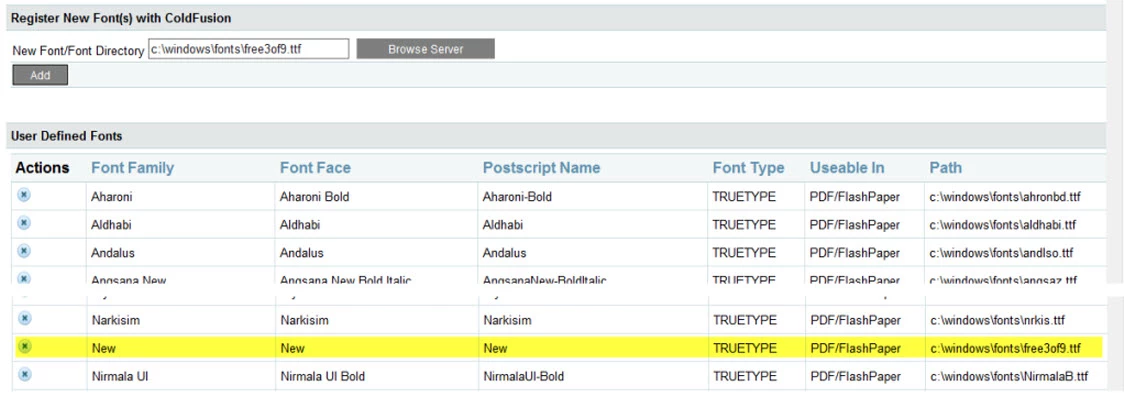
Notice that the Font Family, Font Face  etc are all called 'New'. The problem is that the font can't be displayed in a PDF document (works fine in a normal page). There doesn't appear to be a way to edit Font Family etc.

I'm trying this with ColdFusion 2016  update 6 on Windows 2012 R2. We do not have this problem with our ColdFusion 9/Windows 2003 system. On that system the font shows up like this in the Font Management Page (not sure why there are two of them):

and the font displays fine in PDFs:

Any suggestions as to what might be wrong or how to fix it?

Thanks

Bob

This topic has been closed for replies.
Correct answer bobk1

Fixed the problem by rebooting the server. Now there is a new section at the end of the Font Management page called Current System Fonts and it has these entries, same as on our CF 9 server:

Bob

1 reply

bobk1AuthorCorrect answer
Inspiring
May 4, 2018

Fixed the problem by rebooting the server. Now there is a new section at the end of the Font Management page called Current System Fonts and it has these entries, same as on our CF 9 server:

Bob

James Moberg
Inspiring
May 4, 2018

Did it require rebooting the server or could it have been fixed by restarting the ColdFusion service?  (I'm not sure how the fonts are enumerated.)


Our workaround: We've had issues with some fonts not working well or not being able to be embedded and checked out WKHTMLTOPDF (commandline). As a result, we've gained the ability to use webfonts (as well as much better CSS3/HTML5/SVG support).  We've had great success using any font we want (sometimes requiring a TTF-to-webfont conversion) without having to install any fonts to Windows and then restart/reboot.  We recently converted the free USPS Intelligent Mail(R) Barcode (IMB) fonts to webfont so we could use them on webpages as well as our generated PDF documents.

bobk1Author
Inspiring
May 11, 2018

I found a couple of articles that suggested you must reboot the server to get the new fonts recognized by CF. Never thought to try just restarting CF.

Thanks for the tip on WKHTMLTOPDF

Bob