July 8, 2011
Question

RDS Dataview menu option missing

  • July 8, 2011
  • 1 reply
  • 769 views

In Coldfusion Builder 2, under the menu Window->Show View, the option for RDS Dataview is missing.    The knock on effect is that I can't run any extensions for generating code from database tables becauase I can't browse the datasources.  This option was available a couple of days ago.     It is also missing from the Other... dialog.

Screenshot
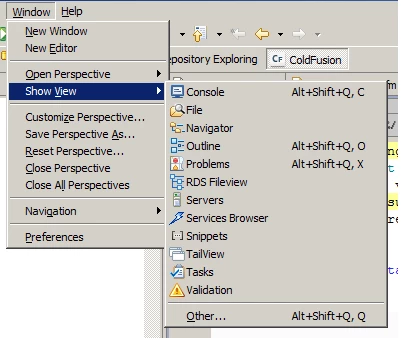
Has anybody else encountered this problem?  Does anyone know of a solution?   Thanks in advance  (PS how come, when using the rich text editor to enter this question, whenever I press return, a new line is added above the current paragraph?)

This topic has been closed for replies.

1 reply

July 8, 2011

I have found the solution...

Under Window->Customize perspective...

Select the Menu Visibility tab

Expand the Window node

Expand the Show View node

and there, towards the bottom, is the RDS Dataview menu option, which just needs to be checked.

Of course, this doesn't explain why it went missing in the first place

Hope this helps someone else

Known Participant
July 8, 2011

The RDS Dataview not appearing in the sub menu maybe how CFBuilder was installed (plugin vs standalone) or even which perspective you are in. You may want to read up on Eclipse. Their help is great and undestand it's basic concepts like workspace, perspective, plugins, etc....

If you go to windows - show views - ColdFusion all the ColdFusion views will be available.