I finally created the sub-report. I am getting the correct output but it is not printing the data across the band. I created calculated fields to only show if the appchk_cod matched the column heading.
How can I save the dates for the different appchk_cod and print them in the same band? I want the report to look like:
Disposition Filing FAFSA Award Award Jump Start Housing Housing
FAFSA Date Letter Sent Letter Rec'd Date Contract Rec'd Deposit Rec'd
Student Name Accepted 05/15/2014 3/14/2014 06/14/2014 06/14/2014 06/14/2014
It looks like this:
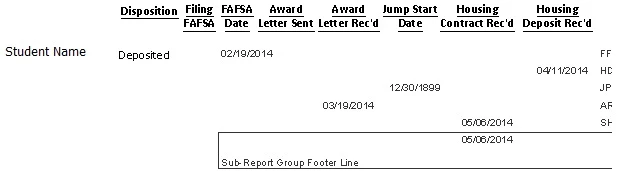
I think I now have a better idea of what you are trying to accomplish.
You don't need a sub-report to get each person's dates on the same line. It is best to do that in your query, for example:
select table_name.UserName, dtFafsa.FafsaDate, dtLetterSent.LetterSentDate, dtLetterReceived.LetterReceivedDate
from table_name left outer join
(select userID, FafsaDate from table_name as table_name_fafsa where appchk_cod = 'FF') as dtFafsa on table_name.userID = dtFafsa.userID
left outer join
(select userID, LetterSentDate from table_name as table_name_LetterSent where appchk_cod = 'AS') as dtLetterSent on table_name.userID = dtLetterSent.userID
left outer join
(select userID, LetterReceivedDate from table_name as table_name_LetterReceived where appchk_cod = 'AR') as dtLetterReceived on table_name.userID = dtLetterReceived.userID
This is obviously not syntax checked, but it illustrates the concept.
Each derived table returns the date of each code. You will need a derived table for every code you want to report on.



 AdChoices