
Participant
March 23, 2010
Question

Strange formatting with cfgrid

  • March 23, 2010
  • 3 replies
  • 1103 views

Hey folks,

Haven't played with CF in a long time.  Thought I'd mess with CF9 to build a new app to see what the new features are.  I'm trying to use cfgrid for the first time and it just looks flat-out wrong.

Anybody run into cfgrids that look like this?  Any idea why it's formatting like this? 
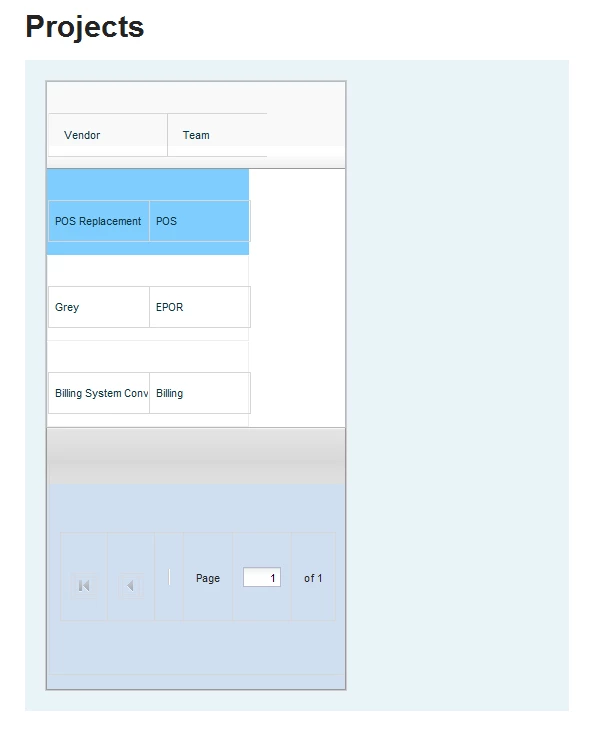
Code:

<cfoutput>
<cfform name="projectForm" action="index.cfm" format="html">
<cfgrid
    format="html"
    name="projectGrid"
    bind="cfc:Test.components.Project.getProjects({cfgridpage},{cfgridpagesize},{cfgridsortcolumn},{cfgridsortdirection})">
    <cfgridcolumn name="ID" display="false" />
    <cfgridcolumn name="PROJECTNAME" header="Vendor" />
    <cfgridcolumn name="TEAMNAME" header="Team">
</cfgrid>
</cfform>
</cfoutput>

    This topic has been closed for replies.

    3 replies

    Known Participant
    August 25, 2010

    Hi Jonathan,

    All my grids used to work fine until we updated the servers with the latest  CF9 patch. Now all of our grids look like yours! I suspect that it has something to do with CSS but do not want to try to troubleshoot there CSS!

    Also now my grids do not submit data their data to the next page

    I am going to post this as a separate issue on this site but I thought I would let you know.

    BKBK
    Community Expert
    Community Expert
    March 29, 2010

    Drop the cfoutput tag for a start.


    Inspiring
    March 23, 2010

    Have you used Firebug or something to check the underlying CSS to check whether any of your own CSS is conflicting with CF's?

    Any other mark-up being sent to the browser which could be interfering?

    --

    Adam

    ilssac
    Inspiring
    August 19, 2010

    Another aspect of Adam's answer.

    Make sure your client has the required access to the CFIDE/scripts folder where ColdFusion stores all the JavaScript, CSS, swf and other client files it uses for features such as the <cfgrid...>

    My favorite test is:

    http://yourSubdomain.yourDomain.yourRootdomain/CFIDE/scripts/wddx.js


    I.E

    http://www.cdpr.ca.gov/CFIDE/scripts/wddx.js

    If a URL like that returns a JavaScript file this is not your problem.  If it does not, you need to fix the configuration of your webserver so that clients can access content from that location.

    ilssac
    Inspiring
    August 19, 2010

    Ok, I just noticed that I responded to posts from MARCH!

    Why the hell did this turn up in my e-mail today? #)$()$*)*