
Participant
May 10, 2026
Question

Syntax Highlighting Bug with Adobe ColdFusion Builder Extension for VS Code

  • May 10, 2026
  • 1 reply
  • 11 views

The syntax highlighting is one of the most important features for IDEs because they tell coders if there are problems with the code. I'm currently using version 1.0.701 and noticed an annoying problem whenever the “#” is found on the script. CF Builder assumes that every time it encounters a #, it is part of a variable evaluation, which is commonly used in CF tag attributes or between <cfoutput> tags. But in html, the # is used such as in css settings for colour. As a result, we get problems like these:
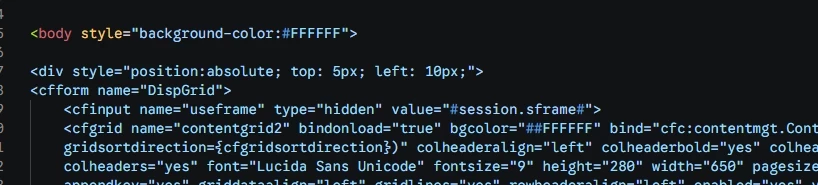


In this example above, the # is used properly, and is part of standard html that is not parsed by the CF server. Adding a second # tricks CF Builder into thinking that the # has been escaped:
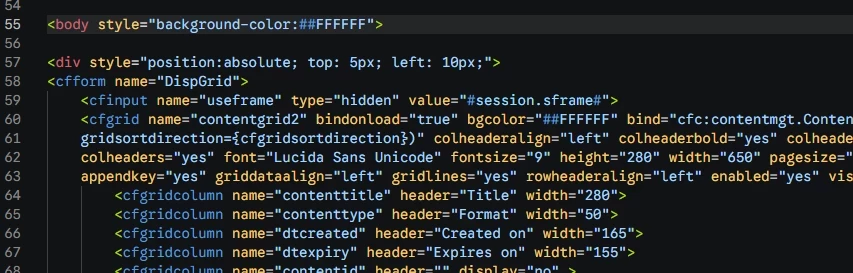


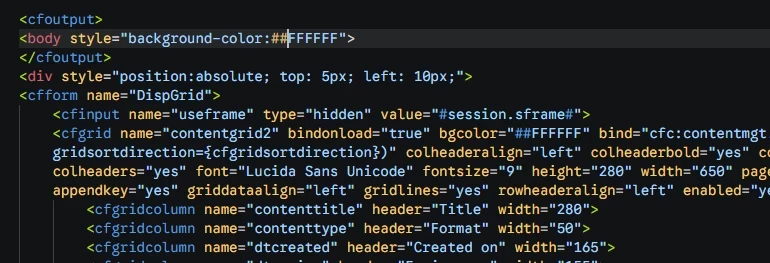
But this is wrong and will cause problems because the final html code that is sent to the end user's browser will contain two #s. The only way to fix the problem is additional CF code:
​​​​

But this is an inefficient way of handling things. We shouldn't need to nest html tags within <cfoutput> when it isn't necessary.


I hope you can fix this. CF builder is being a bit overaggressive with the detection of #s.

    1 reply

    Radwan Almsora
    Participating Frequently
    May 10, 2026

    Hi there!

    ​This is a very insightful catch. You are absolutely right—the ColdFusion Builder extension for VS Code appears to be prioritizing the CFML expression parser even when the # symbol is contained within standard HTML attributes or CSS color values (like #FFFFFF). This 'over-aggressive' detection treats the first # it encounters as the start of a CF variable evaluation, and then waits for a second # to close it, causing the broken syntax highlighting you're seeing.

    ​While this is something that needs to be addressed in the extension's Grammar/Lexer files by the Adobe engineering team, here are a few things you can try or consider:

    1. Escaping the Hash: As you’ve noted, double-hashing (##) is the standard CF way to escape the symbol so it’s rendered as a single # in the final HTML. While inefficient for plain CSS/HTML, it is currently the most reliable way to 'correct' the highlighting within <cfoutput> blocks.
    2. Separate CSS Files: If possible, moving your styles to an external .css file (or a <style> block outside of <cfoutput>) will bypass the CFML parser entirely, as the extension only looks for # variables within CF-specific tags.
    3. Check VS Code Color Themes: Sometimes, certain VS Code themes handle 'Grammar Toggles' differently. Try switching to a 'Default Dark+' theme to see if the highlighting discrepancy is less jarring.
    4. Reporting via GitHub/UserVoice: Since this is a bug in the extension’s logic, I highly recommend reporting this specific example on the Adobe ColdFusion UserVoice or the official Adobe forums under 'Bug Reports'. Providing these exact screenshots of the #session.sframen# conflict will be very helpful for the developers.