Inspiring
November 6, 2013
Answered

Timesheet entry form that auto-fills the Date ranges?

  • November 6, 2013
  • 1 reply
  • 2289 views

I currently have a ColdFusion form & need to add a "Week Selector" drop-down above my table so that:

- when the week is chosen from the drop-down, (how do I generate these weeks drop-down values?)

- the correct dates are added to the date fields in the form.. (how do I populate the text boxes?)

- Once the user chooses the week, the Sun-Sat dates update, he then enters his time for each day..

--Choose Week-->Nov 3 thru Nov 9<-- (drop-down)

Sun---Mon---Tue---Wed---Thu---Fri---Sat (static labels)

---------------------------------------

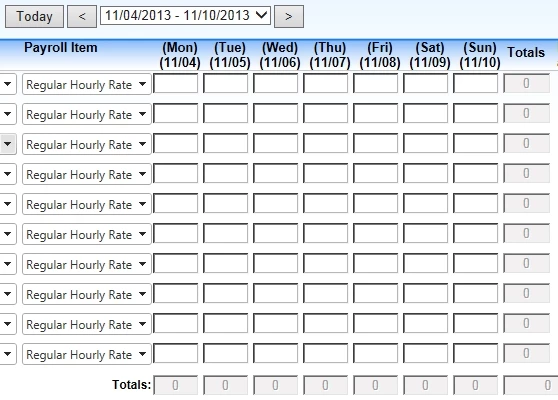
11/03 11/04 11/05 11/06 11/07 11/08 11/09 (text boxes for dynamic dates)

0 8 8 8 8 8 (text boxes for hours entry)


Here is a sample picture of what I'm trying to roughly duplicate:

------------------------------------------------------------------------------

Note: This UDF post by Ben Nadel looks promising: http://www.bennadel.com/blog/719-Ask-Ben-Getting-The-Date-Based-On-The-Year-And-Week-In-ColdFusion.htm

This topic has been closed for replies.
Correct answer jlig

Ok, here is my current page so far:

- Using this jq weekly calendar: http://jsfiddle.net/manishma/AVZJh/light/ I'm able to select the week and have it update my "Start thru End" dates text boxes.

- But how do I update the javascript (code below) to also "populate" the weekday column headings (highlighted in yellow) with the mm/dd?

- Lastly, I'm not sure how to do the SQL INSERT across three rows of data (highlighted in yellow)?
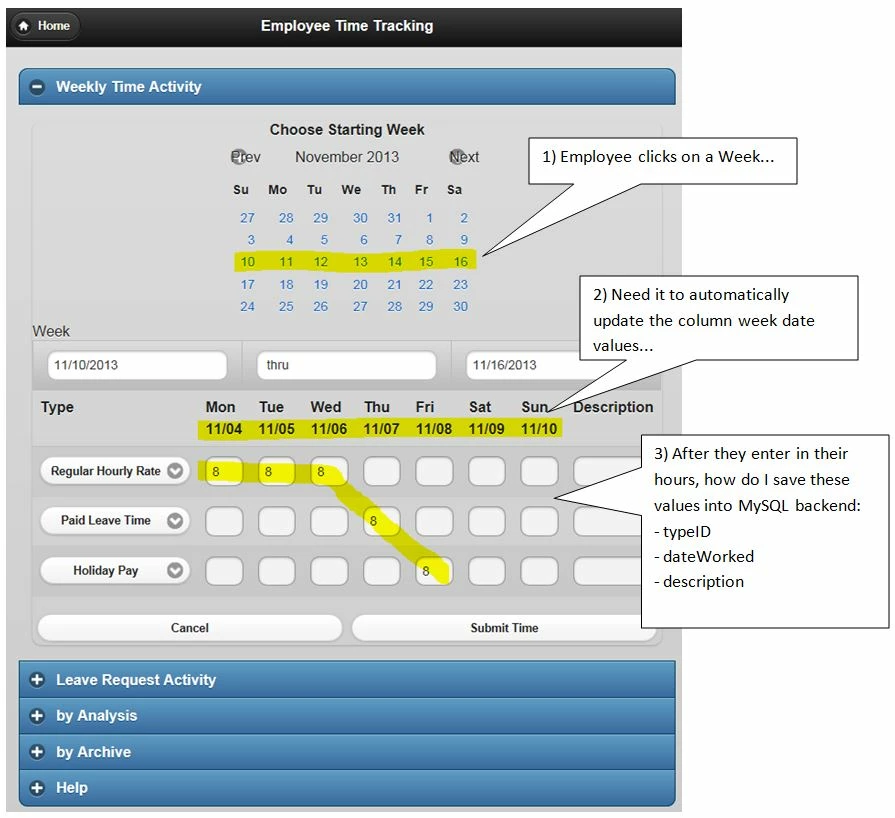
Here is my updated code to fill in the labels with the dates:
------------------------------------------------------------------------

<script type="text/javascript">
$
(function() {
var startDate;
var endDate;
var monDate;
var tueDate;
var wedDate;
var thuDate;
var friDate;
var satDate;
var sunDate;
var selectCurrentWeek = function() {
    window
.setTimeout(function () {
        $
('.week-picker').find('.ui-datepicker-current-day a').addClass('ui-state-active')
   
}, 1);
}

$
('.week-picker').datepicker( {
    showOtherMonths
: true,
    selectOtherMonths
: true,
    dateFormat
: "mm/dd",
    firstDay
: 1, // Start with Monday
    onSelect
: function(dateText, inst) {
       
var date = $(this).datepicker('getDate');
        startDate
= new Date(date.getFullYear(), date.getMonth(), date.getDate() - date.getDay() + 1);
        endDate
= new Date(date.getFullYear(), date.getMonth(), date.getDate() - date.getDay() + 7);
        monDate
= new Date(date.getFullYear(), date.getMonth(), date.getDate() - date.getDay() + 1);
        tueDate
= new Date(date.getFullYear(), date.getMonth(), date.getDate() - date.getDay() + 2);
        wedDate
= new Date(date.getFullYear(), date.getMonth(), date.getDate() - date.getDay() + 3);
        thuDate
= new Date(date.getFullYear(), date.getMonth(), date.getDate() - date.getDay() + 4);
        friDate
= new Date(date.getFullYear(), date.getMonth(), date.getDate() - date.getDay() + 5);
        satDate
= new Date(date.getFullYear(), date.getMonth(), date.getDate() - date.getDay() + 6);
        sunDate
= new Date(date.getFullYear(), date.getMonth(), date.getDate() - date.getDay() + 7);
       
var dateFormat = inst.settings.dateFormat || $.datepicker._defaults.dateFormat;
        $
('#startDate').val($.datepicker.formatDate( dateFormat, startDate, inst.settings ));
        $
('#endDate').val($.datepicker.formatDate( dateFormat, endDate, inst.settings ));
        $
('#monDate').val($.datepicker.formatDate( dateFormat, monDate, inst.settings ));
        $
('#tueDate').val($.datepicker.formatDate( dateFormat, tueDate, inst.settings ));
        $
('#wedDate').val($.datepicker.formatDate( dateFormat, wedDate, inst.settings ));
        $
('#thuDate').val($.datepicker.formatDate( dateFormat, thuDate, inst.settings ));
        $
('#friDate').val($.datepicker.formatDate( dateFormat, friDate, inst.settings ));
        $
('#satDate').val($.datepicker.formatDate( dateFormat, satDate, inst.settings ));
        $
('#sunDate').val($.datepicker.formatDate( dateFormat, sunDate, inst.settings ));
        selectCurrentWeek
();
   
},
    beforeShowDay
: function(date) {
       
var cssClass = '';
       
if(date >= startDate && date <= endDate)
            cssClass
= 'ui-datepicker-current-day';
       
return [true, cssClass];
   
},
    onChangeMonthYear
: function(year, month, inst) {
        selectCurrentWeek
();
   
}
});

$
('.week-picker .ui-datepicker-calendar tr').live('mousemove', function() { $(this).find('td a').addClass('ui-state-hover'); });
$
('.week-picker .ui-datepicker-calendar tr').live('mouseleave', function() { $(this).find('td a').removeClass('ui-state-hover'); });
});
</script>

And then in my HTML page I used:

-------------------------------------------

<thead>
<tr>
 
<th>Type</th>
 
<th>Mon<br>
   
<input disabled id="monDate" size="5" data-mini="true"></th>
 
<th>Tue<br>
   
<input disabled id="tueDate" size="5" data-mini="true"></th>
 
<th>Wed<br>
   
<input disabled id="wedDate" size="5" data-mini="true"></th>
 
<th>Thu<br>
   
<input disabled id="thuDate" size="5" data-mini="true"></th>
 
<th>Fri<br>
   
<input disabled id="friDate" size="5" data-mini="true"></th>
 
<th>Sat<br>
   
<input disabled id="satDate" size="5" data-mini="true"></th>
 
<th>Sun<br>
   
<input disabled id="sunDate" size="5" data-mini="true"></th>
 
<th>Totals</th>
 
<th>Description</th>
</tr>

Message was edited by: jlig

1 reply

jligAuthor
Inspiring
November 11, 2013

On another note: How would I write the INSERT query that inserts the following values into the database?

- Would prefer to insert all rows with a single INSERT operation

- The INSERT should include the EmployeeID, PayrollItemCategoryID, as well as the dates/hours

- This is for CF9 w/MySQL 5.5 backend..

jligAuthorCorrect answer
Inspiring
November 13, 2013

Ok, here is my current page so far:

- Using this jq weekly calendar: http://jsfiddle.net/manishma/AVZJh/light/ I'm able to select the week and have it update my "Start thru End" dates text boxes.

- But how do I update the javascript (code below) to also "populate" the weekday column headings (highlighted in yellow) with the mm/dd?

- Lastly, I'm not sure how to do the SQL INSERT across three rows of data (highlighted in yellow)?

Here is my updated code to fill in the labels with the dates:
------------------------------------------------------------------------

<script type="text/javascript">
$
(function() {
var startDate;
var endDate;
var monDate;
var tueDate;
var wedDate;
var thuDate;
var friDate;
var satDate;
var sunDate;
var selectCurrentWeek = function() {
    window
.setTimeout(function () {
        $
('.week-picker').find('.ui-datepicker-current-day a').addClass('ui-state-active')
   
}, 1);
}

$
('.week-picker').datepicker( {
    showOtherMonths
: true,
    selectOtherMonths
: true,
    dateFormat
: "mm/dd",
    firstDay
: 1, // Start with Monday
    onSelect
: function(dateText, inst) {
       
var date = $(this).datepicker('getDate');
        startDate
= new Date(date.getFullYear(), date.getMonth(), date.getDate() - date.getDay() + 1);
        endDate
= new Date(date.getFullYear(), date.getMonth(), date.getDate() - date.getDay() + 7);
        monDate
= new Date(date.getFullYear(), date.getMonth(), date.getDate() - date.getDay() + 1);
        tueDate
= new Date(date.getFullYear(), date.getMonth(), date.getDate() - date.getDay() + 2);
        wedDate
= new Date(date.getFullYear(), date.getMonth(), date.getDate() - date.getDay() + 3);
        thuDate
= new Date(date.getFullYear(), date.getMonth(), date.getDate() - date.getDay() + 4);
        friDate
= new Date(date.getFullYear(), date.getMonth(), date.getDate() - date.getDay() + 5);
        satDate
= new Date(date.getFullYear(), date.getMonth(), date.getDate() - date.getDay() + 6);
        sunDate
= new Date(date.getFullYear(), date.getMonth(), date.getDate() - date.getDay() + 7);
       
var dateFormat = inst.settings.dateFormat || $.datepicker._defaults.dateFormat;
        $
('#startDate').val($.datepicker.formatDate( dateFormat, startDate, inst.settings ));
        $
('#endDate').val($.datepicker.formatDate( dateFormat, endDate, inst.settings ));
        $
('#monDate').val($.datepicker.formatDate( dateFormat, monDate, inst.settings ));
        $
('#tueDate').val($.datepicker.formatDate( dateFormat, tueDate, inst.settings ));
        $
('#wedDate').val($.datepicker.formatDate( dateFormat, wedDate, inst.settings ));
        $
('#thuDate').val($.datepicker.formatDate( dateFormat, thuDate, inst.settings ));
        $
('#friDate').val($.datepicker.formatDate( dateFormat, friDate, inst.settings ));
        $
('#satDate').val($.datepicker.formatDate( dateFormat, satDate, inst.settings ));
        $
('#sunDate').val($.datepicker.formatDate( dateFormat, sunDate, inst.settings ));
        selectCurrentWeek
();
   
},
    beforeShowDay
: function(date) {
       
var cssClass = '';
       
if(date >= startDate && date <= endDate)
            cssClass
= 'ui-datepicker-current-day';
       
return [true, cssClass];
   
},
    onChangeMonthYear
: function(year, month, inst) {
        selectCurrentWeek
();
   
}
});

$
('.week-picker .ui-datepicker-calendar tr').live('mousemove', function() { $(this).find('td a').addClass('ui-state-hover'); });
$
('.week-picker .ui-datepicker-calendar tr').live('mouseleave', function() { $(this).find('td a').removeClass('ui-state-hover'); });
});
</script>

And then in my HTML page I used:

-------------------------------------------

<thead>
<tr>
 
<th>Type</th>
 
<th>Mon<br>
   
<input disabled id="monDate" size="5" data-mini="true"></th>
 
<th>Tue<br>
   
<input disabled id="tueDate" size="5" data-mini="true"></th>
 
<th>Wed<br>
   
<input disabled id="wedDate" size="5" data-mini="true"></th>
 
<th>Thu<br>
   
<input disabled id="thuDate" size="5" data-mini="true"></th>
 
<th>Fri<br>
   
<input disabled id="friDate" size="5" data-mini="true"></th>
 
<th>Sat<br>
   
<input disabled id="satDate" size="5" data-mini="true"></th>
 
<th>Sun<br>
   
<input disabled id="sunDate" size="5" data-mini="true"></th>
 
<th>Totals</th>
 
<th>Description</th>
</tr>

Message was edited by: jlig

jligAuthor
Inspiring
November 15, 2013

Here is the solution to populate the week-day labels:

------------------------------------------------------------------

<!--- Populate the Week Days with Dates after employee picks the week from calendar --->

<script type="text/javascript">

$(function() {

    var startDate;

    var endDate;

    var monDate;

          var tueDate;

          var wedDate;

          var thuDate;

          var friDate;

          var satDate;

          var sunDate;

    var selectCurrentWeek = function() {

        window.setTimeout(function () {

            $('.week-picker').find('.ui-datepicker-current-day a').addClass('ui-state-active')

        }, 1);

    }


    $('.week-picker').datepicker( {

        showOtherMonths: true,

        selectOtherMonths: true,

                    dateFormat: "mm/dd",

                    firstDay: 1, // Start with Monday

        onSelect: function(dateText, inst) {

            var date = $(this).datepicker('getDate');

            startDate = new Date(date.getFullYear(), date.getMonth(), date.getDate() - date.getDay() + 1);

            endDate = new Date(date.getFullYear(), date.getMonth(), date.getDate() - date.getDay() + 7);

                              monDate = new Date(date.getFullYear(), date.getMonth(), date.getDate() - date.getDay() + 1);

                              tueDate = new Date(date.getFullYear(), date.getMonth(), date.getDate() - date.getDay() + 2);

                              wedDate = new Date(date.getFullYear(), date.getMonth(), date.getDate() - date.getDay() + 3);

                              thuDate = new Date(date.getFullYear(), date.getMonth(), date.getDate() - date.getDay() + 4);

                              friDate = new Date(date.getFullYear(), date.getMonth(), date.getDate() - date.getDay() + 5);

                              satDate = new Date(date.getFullYear(), date.getMonth(), date.getDate() - date.getDay() + 6);

                              sunDate = new Date(date.getFullYear(), date.getMonth(), date.getDate() - date.getDay() + 7);

            var dateFormat = inst.settings.dateFormat || $.datepicker._defaults.dateFormat;

            $('#startDate').val($.datepicker.formatDate( dateFormat, startDate, inst.settings ));

            $('#endDate').val($.datepicker.formatDate( dateFormat, endDate, inst.settings ));

            $('#monDate').val($.datepicker.formatDate( dateFormat, monDate, inst.settings ));

                              $('#tueDate').val($.datepicker.formatDate( dateFormat, tueDate, inst.settings ));

                              $('#wedDate').val($.datepicker.formatDate( dateFormat, wedDate, inst.settings ));

                              $('#thuDate').val($.datepicker.formatDate( dateFormat, thuDate, inst.settings ));

                              $('#friDate').val($.datepicker.formatDate( dateFormat, friDate, inst.settings ));

                              $('#satDate').val($.datepicker.formatDate( dateFormat, satDate, inst.settings ));

                              $('#sunDate').val($.datepicker.formatDate( dateFormat, sunDate, inst.settings ));

            selectCurrentWeek();

        },

        beforeShowDay: function(date) {

            var cssClass = '';

            if(date >= startDate && date <= endDate)

                cssClass = 'ui-datepicker-current-day';

            return [true, cssClass];

        },

        onChangeMonthYear: function(year, month, inst) {

            selectCurrentWeek();

        }

    });


    $('.week-picker .ui-datepicker-calendar tr').live('mousemove', function() { $(this).find('td a').addClass('ui-state-hover'); });

    $('.week-picker .ui-datepicker-calendar tr').live('mouseleave', function() { $(this).find('td a').removeClass('ui-state-hover'); });

});

</script>

------------------------------------------------------------