
Inspiring
March 22, 2025
Answered

Two coldfusion 2011 servers, same configurations, same source code, but different error

  • March 22, 2025
  • 2 replies
  • 617 views

Hi,

Our users do not want to see the debugging info.

Error on server 1:
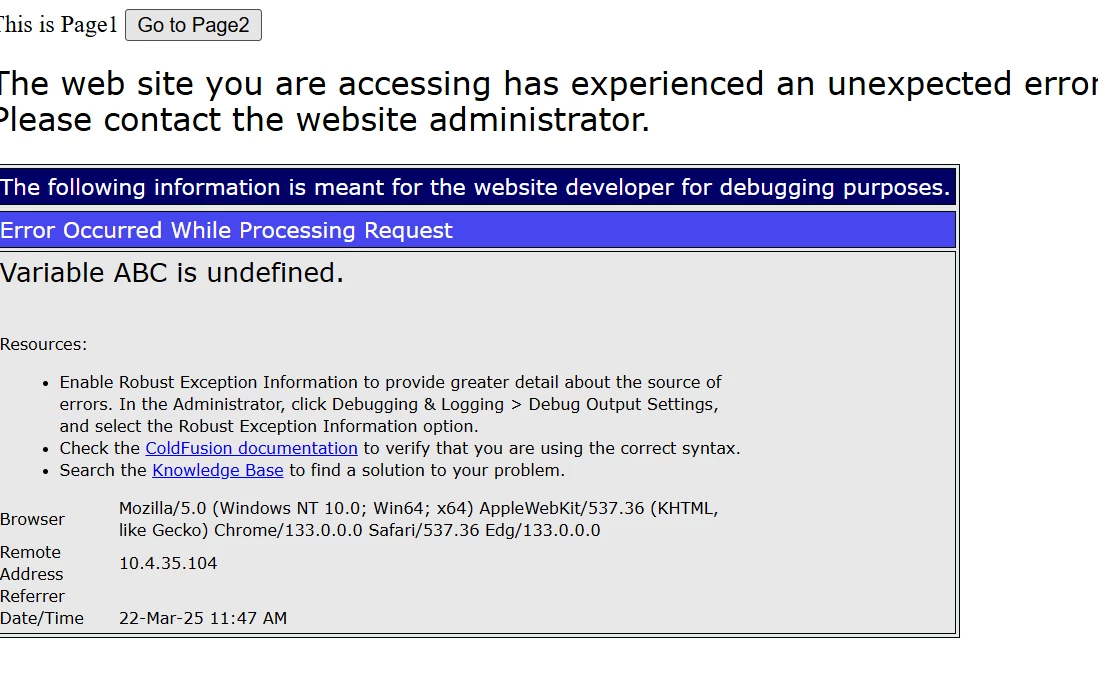
 

Error on server 2:

User wants to see the error as on Server 2 for security reason.

I have compared all the config, and have tried to check/uncheck some debug settings, but no luck.

Can anyone help on this?

Thanks in advance. James
    Correct answer Enchanted_vibrancy5464

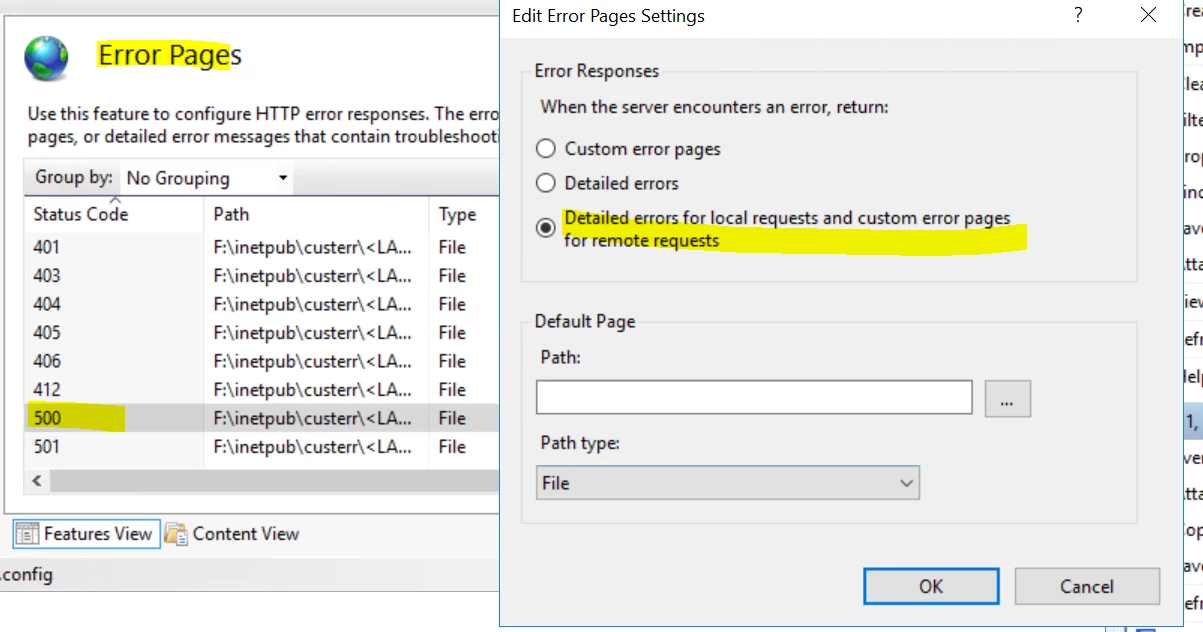
    Thank you Dave Wattes for pointing to the right direction. Yes, the difference is on IIS: I solved this by:

    IIS->Default Web site->Error Pages-> Right click and select "Open Feature" ->500->Right click, and select "Edit Feature Settings" -> click  "Detailed errors for local requests, and custom error page for remote request":

    Thanks again!

    2 replies

    BKBK
    Community Expert
    Community Expert
    March 22, 2025

    Dave's explanation of the cause is very likely. I in fact think it is the best. 


    Unchecking the "Debug Output Settings" in the ColdFusion Administrator is not enough. From what you've said, my suggestion would be that you should let ColdFusion handle errors, for example, by implementing a site-wide error handler


    You can do so in either of the following two ways. Each requires that you create a custom error page, say, errorpage.cfm,  to be displayed to the user. 

    1.  by means of the onError event-handler in Application.cfc
      <!--- Event-handler within Application.cfc --->
      <cffunction name="onError">
      	<cfargument name="Exception" required=true/>
      	<cfargument name = "EventName" type="string" required=true/>
      	   
      	<!--- Dump the exception as readable HTML in ColdFusion's log directory (for convenience of developer)  ---> 
      	<cfdump var="#arguments.exception#" format="html" output="#server.coldfusion.rootDir#\logs\exception_struct_in_onError.html">
      	
      	<!--- Custom error page to display to user --->
      	<cfinclude template="/workspace/cf_project/errorPage.cfm" >
      	<cfabort>
      </cffunction>​
    2.  via the Side-wide Error Handler setting on the page Server Settings > Settings in the ColdFusion Administrator.

      In my examples, the location of the error page relative to the web root is /workspace/cf_project/errorpage.cf,m
      <html>
      	<!--- Add any custom styling or page design  --->
          <head>
              <title>Error</title>
          </head>
      
          <body>
              <p> Sorry, an error has occurred.</p>
      		We have been made aware of it and are working to fix it.
          </body>
      </html>​
    Inspiring
    March 24, 2025

    Thanks BKBK! Yes, Dave's answer is the solution. Your suggestion is excellent.  At this moment, our user just wants to see the 500 error because it is the error msg in PROD.

    Thanks,

    James

    BKBK
    Community Expert
    Community Expert
    March 24, 2025

    Hi James,

    Thanks for your update.

    Community Expert
    March 22, 2025

    The error on server 2 is being presented by IIS, not CF. So, my guess is that you're using a different web server configuration on server 1.


    Dave Watts, Eidolon LLC
    Enchanted_vibrancy5464AuthorCorrect answer
    Inspiring
    March 24, 2025

    Thank you Dave Wattes for pointing to the right direction. Yes, the difference is on IIS: I solved this by:

    IIS->Default Web site->Error Pages-> Right click and select "Open Feature" ->500->Right click, and select "Edit Feature Settings" -> click  "Detailed errors for local requests, and custom error page for remote request":

    Thanks again!

    Community Expert
    March 24, 2025

    I'm glad you got this resolved! You might want to mark your own answer as correct also. I made a suggestion, you found and documented the solution. So, your  answer is more helpful than mine.


    Dave Watts, Eidolon LLC