



collaboranaut
Known Participant
September 14, 2026
Question

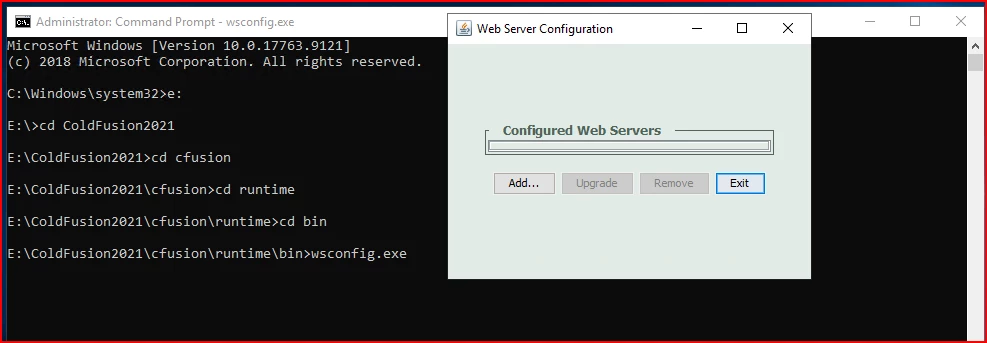
Upgrading CF2021 to CF2023 and WSCONFIG is blank/unselectable

  • September 14, 2026
  • 11 replies
  • 64 views

Server Product    ColdFusion 2021
Version    2021,0,23,330486
Operating System    Windows Server 2019; IIS

We are looking at upgrading from CF 2021 to CF 2023 and one of the first steps O have is to remove the IIS connectors via the wsconfig (ben a while since the last upgrade form CF 2016 o CF 2021, so fuzzy). We have two separate systems, a dev and a production, This is all on dev. but i get the same behavior on both instances. I made sure that Visual C++ Redistributable for Visual Studio was installed (it was, but I updated/repaired just in case). I run wsconfig As Administrator (via Explorer or CMD. I just do not get anything to pull down to remove. These instances have been moved since the CF 2016 > CF2021 upgrade, when we migrated rom Windows 2012 to Windows 2019. I am presuming the issue lies there, but not sure how to go about correcting, and do not want o just take too many guesses as we will have to repeat for production.


11 replies

Inspiring
September 16, 2026

@collaboranaut Please check if the required features are installed in IIS per the first screenshot in this article: https://coldfusion.adobe.com/2022/09/coldfusion-in-distributed-environment-windows/

In case you still face issue, please reach out to us at cfsup@adobe.com


Thanks,

Abhishek

collaboranaut
Known Participant
September 16, 2026

Thank you Abhishek. I still get the same issue:


BKBK
Community Expert
Community Expert
September 16, 2026

Hi ​@collaboranaut , 

Given the facts you've shared, the IIS connector itself is apparently present and functioning, while WSConfig has lost (or can no longer recognize) its record of the connector.  That suggests to me that WSConfig's bookkeeping is inconsistent with the actual connector installation.

Therefore, my next suggestion is that you inspect WSConfig's log file. It's default location is C:\ColdFusion2021\config\wsconfig\wsconfig.log.

That file may contain the history of connector creation and of subsequent connector operations. Search, in particular, for terms such as:

  • configure
  • unconfigure
  • remove
  • upgrade
  • IIS
  • site
  • error

The timestamps of such operations could be revealing.

BKBK
Community Expert
Community Expert
September 14, 2026

The blank drop-down in the Web Server Configuration Tool (wsconfig) does not necessarily mean IIS has no ColdFusion connectors. What it means is that this particular wsconfig.exe instance is unable to find any connector configurations that it recognizes as its own.

Before looking further into this, it will be helpful to be aware of the various options available to you when you use wsconfig.exe on the command-line (CMD) . That is, options such as -list, -remove, -uninstall, and so on. See https://helpx.adobe.com/la/coldfusion/configuring-administering/web-server-management.html 

For example, the first thing I would do is list the configured web servers. The CMD command is

C:\ColdFusion2021\cfusion\runtime\bin>wsconfig.exe -list

The second thing I would do is inspect the directory C:\ColdFusion2021\config\wsconfig\.

If CF2021 connectors exist, you will normally expect that there would be numbered subdirectories such as:

  • C:\ColdFusion2021\config\wsconfig\1\
  • C:\ColdFusion2021\config\wsconfig\2\

and so on.

Each of these numbered directories would contain files such as:

  • isapi_redirect.dll
  • isapi_redirect.properties
  • workers.properties
  • uriworkermap.properties

So, what do these two checks reveal?


collaboranaut
Known Participant
September 16, 2026

Thanks BKBK, i am going to try the command line remove, since everything is fine with the current ColdFusion installation, I just could not see the sites from the GUI. Will be trying shortly so will update the thread later today.

Charlie Arehart
Community Expert
Community Expert
September 14, 2026

@collaboranaut , it’s not clear. Do you feel you have cf2021 setup on this machine such that your IIS sites DO currently connect to CF2021? And you’re wanting to remove those connectors so that you can instead connect the sites to CF2023?

If so, when you open this cf2021 wsconfig tool then you should certainly see the current connections. If instead this is a new machine, perhaps the issue is that you do NOT have the connectors in place for CF2021. There are ways we could diagnose things, but let’s start with the simple questions above.

If the answer to them is yes, then I’ll ask: is there any chance that perhaps you’d opened the CF2023 wsconfig tool, and on realizing IT was empty you then opened this cf2021 wsconfig tool--without closing the first? If so, that can cause the second one not to work correctly (while the first is still open).

Finally, if that’s not the issue, let’s focus on what the CF2021 wsconfig tool would be reading, to show what WAS configured: look at the coldfusion2021/config/wsconfig folder and its wsconfig.properties file. First, is there one? And if so, are there more than just two comment lines? The rest would be pairs of lines describing each connector in IIS. An example is:

1=IIS,0,true,cfusion,"",bitness64
1.srv=localhost,cfusion

The pair of lines list first a number corresponding to what should be a folder with the same number under that wsconfig folder. Then on that first first line, the number after “IIS,” would either be a number corresponding to an IIS site id, or “0” which means “all sites” (like you would see shown in the UI above when adding a first connector). BTW, the site id numbers can be seen in IIS using the “sites” feature on the top left navigational feature in IIS.

If somehow that wsconfig.properties ONLY has the first two comment lines, then that file thinks you HAVE no connectors setup for that CF version to that IIS instance.

Let us know what you find.

/Charlie (troubleshooter, carehart. org)
collaboranaut
Known Participant
September 16, 2026

Thanks Charlie. I will preface to say, this is all prep for CF2023, ColdFusion on both instances (dev and prod) are running CF2021 just fine. I think the issue is literally related to the GUI itself, why I thought that C++ distro was the issue, but not the case. I do have this in the wsconfig.properties:

1=IIS,1,true,cfusion,"",bitness64
1.srv=localhost,cfusion

I do think the issue is related to when we migrated Windows instances, but I see in the following reply I can just remove the bindings via command line, I just wanted to make sure there not something obvious, plus I wanted to nail to down before going on the the prod instance. 


And also verifying, I do have ColdFusion2021\config\wsconfig\1