

URGENT! Why is Web Server Configuration Tool not working after upgrading CF11 Enterprise?
After installing ColdFusion 11 Enterprise Evaluation then upgrading that installed version to a paid licensed version, we cannot get the Web Server Configuration Tool to work. This is on Windows Server 2012 R2. All updates are installed on everything.
This tool was just fine before we upgraded. It opens but it is empty. We cannot see any sites associated with it so we cannot active new sites.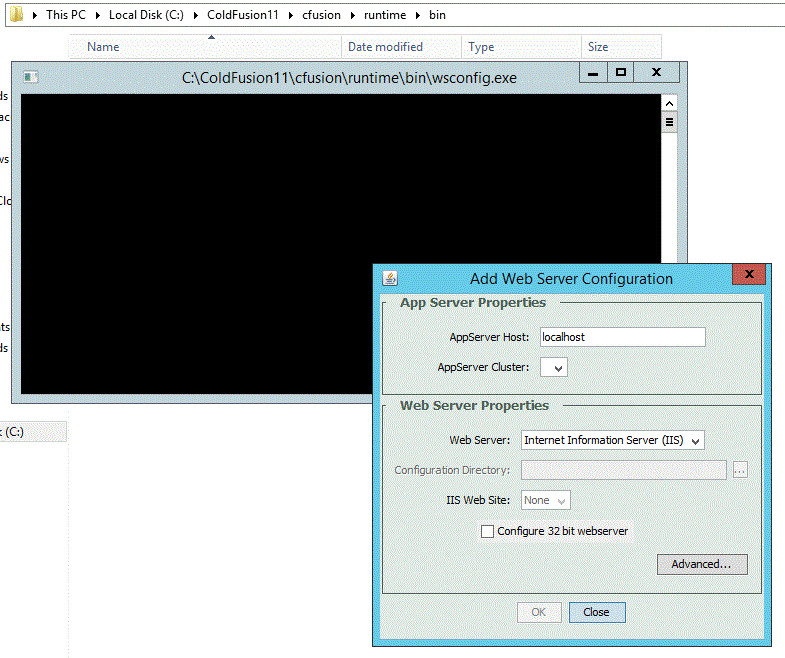
When any .cfm file other than the default document is run on the new site (and the new site not updated with the Web Server Configuration Tool), we received this error:
"HTTP Error 404.2 - Not Found
The page you are requesting cannot be served because of the ISAPI and CGI Restriction list settings on the Web server."
This seems as though it is because we upgraded from the trial version to the licensed version (In CF Administrator, New License).
The 'Instance Manager' in CF Admin has the 'Name" still set to 'cfusion' and it is the only instance. We changed nothing here, in face, nothing has been changed in CF Admin after buying and installing the paid license.
All other ColdFusion enabled sites are working correctly, except for the new site created after the new license I assume because we cannot run the Configuration Tool to enable it for CF.
Any idea or suggestions as to why the tool, (WSCONFIG.EXE) when opened has all "Configured Web Services" now blank when run, even when run as ADMINISTRATOR from command line?
We are running only one instance of ColdFusion 11 and with no clusters. Nothing has changed once we input the new license, except that the configuration tool will not work.


 AdChoices