
October 30, 2012
Question

Using CFSTAT Results to Pin-Point Issues?

  • October 30, 2012
  • 4 replies
  • 1059 views

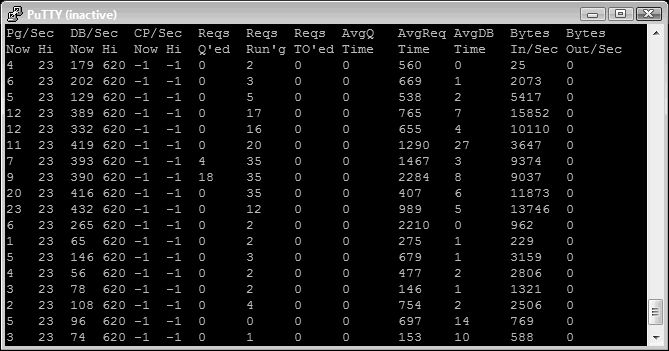
I am wondering if the results from CFSTAT can help me pin-point why my server sometimes bogs down?  What do the below stats tell me (click the image to see it full size)?  Is there a way to find out which page(s) started the backlog?
Thanks,
Michael

    This topic has been closed for replies.

    4 replies

    BKBK
    Community Expert
    Community Expert
    October 31, 2012

    Bugswald III wrote:

    Is there a way to find out which page(s) started the backlog?

    A simple check (recommended for development or test server only): Switch on Request Debugging Output and Report Execution Times in the ColdFusion Administrator. That should tell you how long it takes for pages to process.

    BKBK
    Community Expert
    Community Expert
    October 31, 2012

    First off, it helps to mention at least your ColdFusion build. Newer versions have functionality that may help solve performance problems which previous versions cannot.

    The number of queued requests(Req Q'ed) aand timed out requests(Req TO'ed) are consistently low, mostly 0. So too is the average queue time(AvgQ Time). Whereas the number of database accesses per second(DB/Sec), the average request time(AvgReq Time) and the number of incoming bytes per second(Bytes In/Sec) remain consistently high.

    The low values imply it is likely your pages are running OK. The high values imply your pages are engaged in large, time-consuming processing jobs involving fetching data from the database.

    Charlie Arehart
    Community Expert
    Community Expert
    October 31, 2012

    Michael, it looks to me like you’re just getting a burst of traffic. Notice that the request per second and DB/sec are both higher during the time things are “bogging down”. That suggests there are indeed more requests (and more queries) happening then. Could easily be a spider hitting many pages over a period of a few minutes.

    As for the queuing, notice that happens when you hit 35 requests. That would suggest to me that your CF admin settings on the request tuning page of the CF admin indicate a limit of 35 requests. (There are some other elements that could lead to reaching a limit different than the numbers shown there, but I won’t bother to elaborate here as it may not be your issue.)

    As for things “bogging down”, are you really experiencing a perceived performance problem? And are you sure it’s at this very time? It could be, but it could also be that there would be no real “problem” during the time you are looking at.

    If you are indeed experiencing a problem, there could be still other causes (where this is just showing “when it’s happening” not “why”). A common problem when you DO get a high rate of requests suddenly, such as from a spider or bot (or load testing or other kind of testing tool) is that such high rates of requests lead to high rates of creation of sessions and client repository entries. With spiders and bots (or other automated requestors), every such request created a new session and new client variable repository entry, as opposed to a regular browser which would only create one such session/repo entry for a number of requests in a row. Both can lead to a drag on resources.

    As for CFSTAT helping know more about the requests, sadly, no. That’s it’s limitation: while it does tell you THAT many requests are happening (which is indeed valuable, and good for you for finding it), it cannot tell you anything about WHAT the requests are (or are doing). For that, you either need to be running CF Enterprise and its Server Monitor, or use a commercial third-party tool like FusionReactor or SeeFusion. These can tell you the details of the requests (url, query string, ip address, user agent, and much more). Both tools have free trials, if that may interest you.

    Other than that, you can also look at your web server request logs (IIS, Apache), though that’s harder because those track ALL files requested, not just those requested of CF itself, which is what you see happening in CFSTAT.

    And if these requests WERE running long, you could also use these tools to do “stack traces” to know what exactly the requests were doing, while they we rerunning long. There’s lots more you could benefit knowing, but I don’t want to turn this into a blog entry! You can find out more about all the above, including pointers to many blog entries and other resources from me and others, at a CF troubleshooting wiki I keep, at http://www.cf911.com.

    But if you have more questions, fire away, and I or Carl or others can try to help.

    Hope that’s helpful.

    /charlie

    PS Finally, besides digging in on your own, there are folks (like myself) who can help you on a consulting basis with such analysis and problem resolution (short-term, on-demand, remotely). For a list of such consultants, see a list of them that I keep (yes, my “competitors”, essentially) at a category of my CF411 list of tools and resources, specifically the category: http://www.cf411.com/cfconsult/.

    /Charlie (troubleshooter, carehart. org)
    Legend
    October 31, 2012

    CFSTAT is showing sometimes Requests Queued. I expect the system would be performing badly when the queuing is happening?

    On positive side appears things leave the queue so perhaps generally normal service resumes?

    So Michael if that about describes your situation then likely you want to know why things are Queuing.

    HTH, Carl.