Participating Frequently
January 27, 2024
Answered

Util PKCE not found

  • January 27, 2024
  • 1 reply
  • 372 views

I'm tryinge to the function GeneratePKCE() from the object pkce but getting this :
Could not find the ColdFusion component or interface utils.deps.pkce.pkce.

Is a way to install this tool PKCE to Coldfusion?

It must be used for authentication with openID.

Thanks

    This topic has been closed for replies.
    Correct answer BKBK

    You can install it for ColdFusion as follows:

    1.  Download and install CommandBox.
    2.  Use CommandBox to install the Proof Key for Code Exchange (PKCE) tool, using the command install pkce


    A practical example with:

    • ColdFusion 2021 Update 12 on 64-Bit Windows 10 
    1.  Download CommandBox., choosing the "Windows JRE-64"version. It is a ZIP file. 
    2.  Extract the zip to, for example, C:\temp.
           In this case, the result is the directory C:\temp\commandbox-jre-win64-5.9.1.
    3.  Double-click on box.exe , opening the Command Prompt, and wait till you get the CommandBox prompt.
    4.  At the prompt, type update --system and press [ENTER]. Wait for CommandBox to completely update.
    5.  At the prompt, type install pkce and press [ENTER].  That will install/create the PKCE package.
          In this case, the new directory C:\temp\commandbox-jre-win64-5.9.1\pkce and the new file C:\temp\commandbox-jre-win64-5.9.1\box.json appear. Verify that the new directory contains the component pkce.cfc.
    6.  Copy the pkce directory to a location in your ColdFusion application.
    7.  (In your ColdFusion application) Create the page pkceTest.cfm within the directory pkce and launch it.
      <!--- pkceTest.cfm --->
      <cfscript>
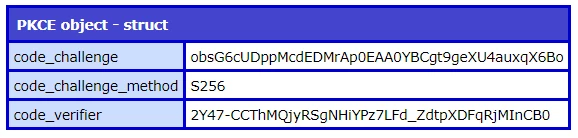
       objPKCE = new PKCE();
       struPKCE = objPKCE.generatePKCE();
       writedump(var="#struPKCE#", label="PKCE object");
      </cfscript>
      ​


    1 reply

    BKBK
    Community Expert
    BKBKCommunity ExpertCorrect answer
    Community Expert
    January 28, 2024

    You can install it for ColdFusion as follows:

    1.  Download and install CommandBox.
    2.  Use CommandBox to install the Proof Key for Code Exchange (PKCE) tool, using the command install pkce


    A practical example with:

    • ColdFusion 2021 Update 12 on 64-Bit Windows 10 
    1.  Download CommandBox., choosing the "Windows JRE-64"version. It is a ZIP file. 
    2.  Extract the zip to, for example, C:\temp.
           In this case, the result is the directory C:\temp\commandbox-jre-win64-5.9.1.
    3.  Double-click on box.exe , opening the Command Prompt, and wait till you get the CommandBox prompt.
    4.  At the prompt, type update --system and press [ENTER]. Wait for CommandBox to completely update.
    5.  At the prompt, type install pkce and press [ENTER].  That will install/create the PKCE package.
          In this case, the new directory C:\temp\commandbox-jre-win64-5.9.1\pkce and the new file C:\temp\commandbox-jre-win64-5.9.1\box.json appear. Verify that the new directory contains the component pkce.cfc.
    6.  Copy the pkce directory to a location in your ColdFusion application.
    7.  (In your ColdFusion application) Create the page pkceTest.cfm within the directory pkce and launch it.
      <!--- pkceTest.cfm --->
      <cfscript>
       objPKCE = new PKCE();
       struPKCE = objPKCE.generatePKCE();
       writedump(var="#struPKCE#", label="PKCE object");
      </cfscript>
      ​


    danlbnAuthor
    Participating Frequently
    January 29, 2024

    It works fine thanks for help.

    BKBK
    Community Expert
    Community Expert
    January 29, 2024

    Glad to have helped.